October 23, 2009
Win 7 -- Readyboost
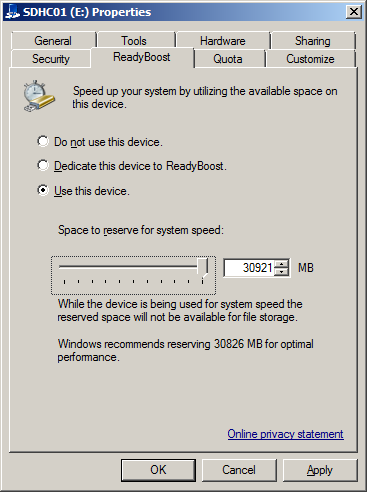
Isn't this interesting? Under Vista, I was limited to no more than 4G of Readyboost memory. Win 7 allows me to use my entire 32G (i.e. 30.2G) SDHC chip. It shows as nearly completely full now in the explorer, just 5 megabytes of free space. I wonder what difference it'll make? Or whether it'll be perceptible?
DAMN Microsoft for "Automatic Update"! I've got it disabled. I've told Windows Home Server to ignore the fact that I have it disabled.
And every time I boot Procyon, both my computers pop error messages saying that Procyon has it disabled, and the popups don't go away automatically. Once I click them both to make them go away, Connector's icon turns green and I don't get told about it again.
But I shouldn't get told about it at all! I've told WHS I don't care about it.
There's an intermediate setting between "Go to Hell" and "Please fuck up my computer any time you feel like it" where it will phone home and say that there are updates available but not install them. Maybe that'll make this thing stop happening. But it's just trading one kind of itch for another, because it means I'll get popups every time Microsoft posts a new update.
UPDATE: Agent, my mail program, is working but every time I run it I have to say, "Yes, I really do want to let this program make changes to my HD" before it'll start. That's because it's running in XP SP3 compatibility mode, which I guess makes it automatically suspect as far as UAC is concerned.
I almost disabled User Access Control this morning, but thought better of it. There really should be a way for me to set the Agent icon to say, "Yeah, I really am sure about this one" and I vaguely recall that in Vista there was one because I never got prompted then. But I can't find anything like that in the properties popup for the icon I'm using. Running as administrator doesn't help. And currently it's set so that everybody in the universe has Full Permission.
I know there was some way of setting up specific UAC exceptions, but I don't remember what it was. And anyway, it might not be the same in Win 7.
Posted by: Steven Den Beste in Computers at
05:17 PM
| Comments (3)
| Add Comment
Post contains 385 words, total size 2 kb.
1
Only way I know of to set up a UAC exception in Vista is to remove the program from the startup sequence completely and instead make it run as a Task Manager task on startup. This will actually work for most applications, but anti-virus agents generally need to run as startup tasks, to ensure they start monitoring the system for suspicious activity before anything else (like an infected program) gets to run,
Posted by: Tatterdemalian at October 23, 2009 09:22 PM (4njWT)
2
Agent runs when I want to check my mail, but I shut it down afterwards. I don't leave it running all the time, because if it is running when the computer goes down, no matter why, there's a slight chance it will toast its data structures.
I used to leave it running all the time, and one time it did louse up that way. So I don't any more.
Posted by: Steven Den Beste at October 23, 2009 10:14 PM (+rSRq)
3
MS has the Standard User Analyzer program which is part of the
Application Compatibility Toolkit 5.5 which allows you to modify programs to avoid UAC issues. See
here for example. You're going to have to google around to learn how to use it, but it does work. I was able to fix some old windows games that would only run with admin privileges and prompted the UAC so that my kids could run the games while being locked down as standard users. Good luck.
Posted by: kderosa at October 24, 2009 08:12 AM (/qyKz)
Hide Comments
| Add Comment
Win 7 -- Agent fixed
Major relief -- I found where Agent used to store its data files, and copied them to where Agent now stores them, and the last two years of email is back again. Whew!
I still haven't figured out how to disable the touchpad, which is a pain. But I've got an idea how to go about it.
As to my issues with drivers, I've pretty much got those all straightened out.
UPDATE: I downloaded and installed Movie Maker, and now I'm installing Microsoft Security Essentials, Microsoft's new antivirus program.
UPDATE: Automatic Update got turned on by the installed. That's turned back off again. (Automatic Update is evil.)
UPDATE: Every time the backup runs, it ends with an error because the D partition is gone. I think the path of least resistance here is to rename the computer.
I considered using "Procyon Zwei". But I decided to go with "Procyon2". However, I'm not sure it'll work. WHS now shows Arcturus and Procyon2 and when I click the latter one it shows all the backups from before the name change. I wonder if it would help if I uninstalled Connect and reinstalled it?
Posted by: Steven Den Beste in Computers at
10:57 AM
| Comments (10)
| Add Comment
Post contains 196 words, total size 1 kb.
1
Hmmm...
WARNING...SHOT IN THE DARK...I've only been playing with this a few hours...
Have you tried right-clicking on "Computer" under the start button (opening the "System" Control Panel Dialog), then opening the device manager, finding the touchpad in the list, opening its properties, and clicking "Disable" on the "Driver" tab?
Posted by: CatCube at October 23, 2009 12:09 PM (4WWhC)
2
Yes, I have tried that. Only problem is that there isn't anything labeled "touchpad" in that list.
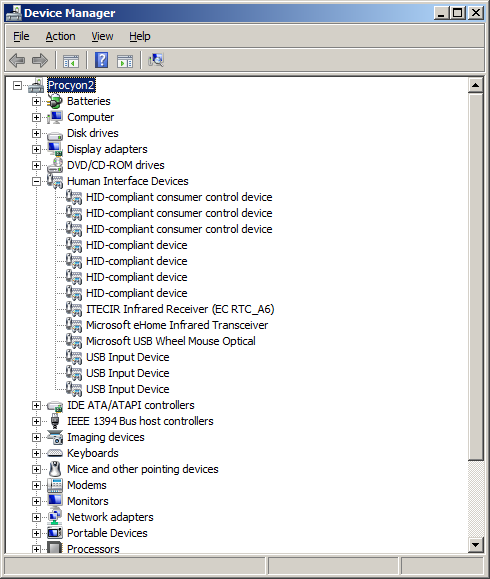
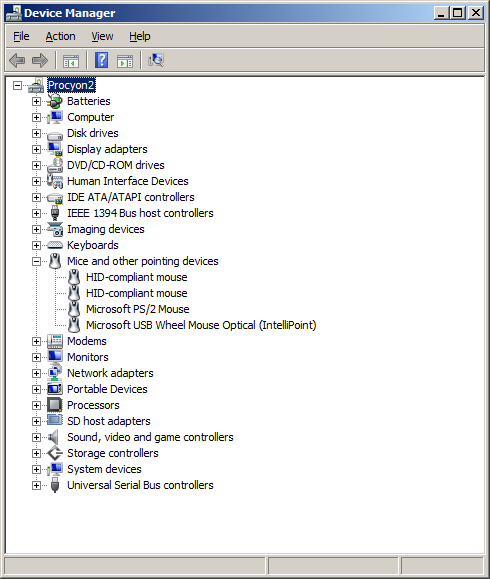
That is the problem.
(And this is yet another demonstration of why I don't want unsolicited suggestions and advice. They're nearly always useless or redundant. Pixy's advice regarding the Quick Launch yesterday was the very rare exception.)
What I'm going to do, when I get to it, is to disconnect my mouse and my graphics tablet, and then deactivate everything that's left, using the touchpad to navigate. When I deactivate something and the touchpad stops working, I'll plug my mouse and tablet back in.
Posted by: Steven Den Beste at October 23, 2009 12:46 PM (+rSRq)
3
But right now I've got more important things to worry about. FlashDigger doesn't work, and that's a program I use a hell of a lot.
Posted by: Steven Den Beste at October 23, 2009 12:48 PM (+rSRq)
4
Crap. Compatibility mode and administrator privilege don't help.
Posted by: Steven Den Beste at October 23, 2009 12:54 PM (+rSRq)
5
For the back-up issue, have you tried going to the console to the computer & backup tab>configuration> and then removing the d: drive from the backups for your computer? That should (have) solved the error problem.
You shouldn't have to rename the computer, WHS will happily give you two entries for a computer having an identical name with different OSes. It will, however, cause some confusion come restore time but that's about it.
Posted by: kderosa at October 23, 2009 01:21 PM (/qyKz)
6
I knew there was a place where I had configured that, but I couldn't find it. Thanks. (Another rare exception.)
Posted by: Steven Den Beste at October 23, 2009 01:38 PM (+rSRq)
7
What is "Human Interface Devices"? Obviously it isn't mice or keyboard... joysticks and gamepads?
Posted by: Wonderduck at October 23, 2009 05:38 PM (4Mcos)
8
The touchpad is most likely the PS/2 mouse. That's what it is on the Dells and IBMs I've used.
Posted by: RickC at October 23, 2009 06:23 PM (zFTOh)
9
The touchpad is most likely the PS/2 mouse. That's what it is on the Dells and IBMs I've used.
That's what I figured, too, but it didn't turn out to be.
Doesn't matter; I have solved the problem a different way.
Posted by: Steven Den Beste at October 23, 2009 06:39 PM (+rSRq)
10
What is "Human Interface Devices"? Obviously it isn't mice or keyboard... joysticks and gamepads?
Damned if I know. The mystery is deepened by the fact that most of them think they're associated with the IR transceiver.
I think maybe a lot of those are PowerDVD's remote control. As to why there are so many of them? Likely because PowerDVD keeps installing it.
Posted by: Steven Den Beste at October 23, 2009 06:41 PM (+rSRq)
Hide Comments
| Add Comment
October 22, 2009
Win 7 -- kirei
I've long thought it interesting that 奇麗 kirei means both "beautiful" and "clean". It betrays an engineer's esthetic, because it seems to refer to the thing we call "elegance".
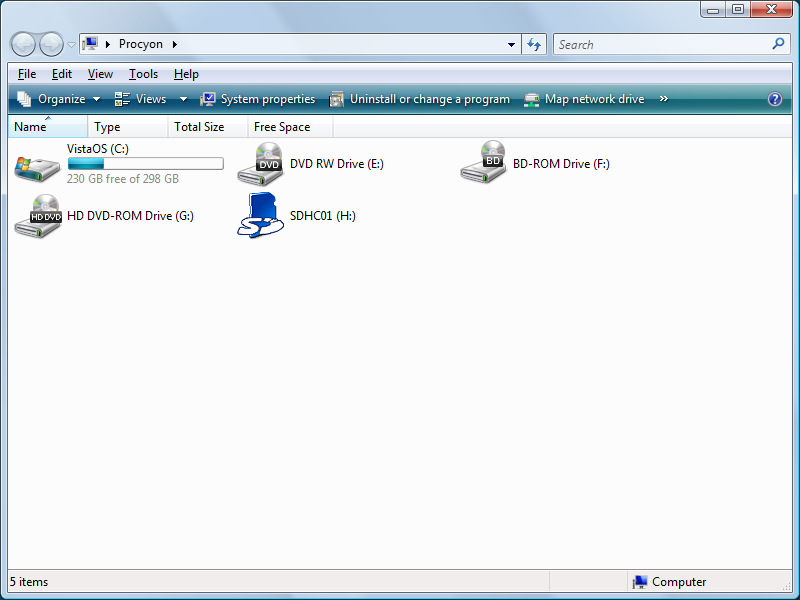
Here's what an explorer window looked like in Vista:
Here's what it looks like now in Win 7:
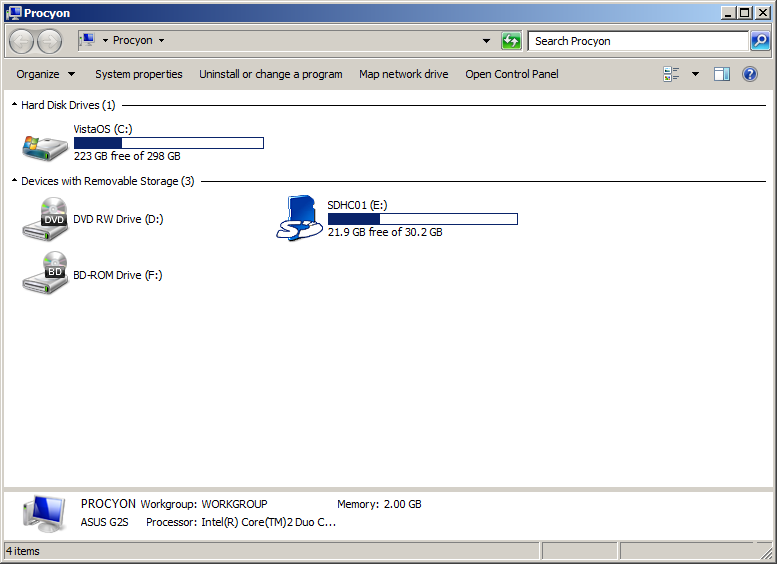
Ah, so much nicer. Look at all the cruft they added back in Vista, in a keep-up-with-the-Jones attempt to look more like a Mac. Look at all the background crap in the line that includes the word "organize", in order to make it look like it's plastic and like it's sticking out of the screen. Look at how each of the menus has both an icon and a text phrase. Ick. It's cluttered. It isn't clean.
The one I've got now may strike some as a throwback, and they'd be right. This is what windows looked like back in XP and Win2K, and ever since Microsoft changed them, I've wished they hadn't tried to fix something that wasn't broken. Anyway, it's back to not being broken.
If I wanted a Mac, I'd buy a Mac. Just because Apple is in love with screen flourish doesn't mean it's a good thing.
Same thing for the fullness indicator on the HD. They made that look like a jellybean, too. Now it's back to being a solid color, like it ought to be.
There's a lot less wasted space in the window header, too. The "name/type/total-size/free-space" line, which changes with context, is gone now and I never wanted it. The top part has a lot less blank space in it, and that's good.
The version I have now is clean, uncluttered. And that's what I want. Clean is beautiful.
Posted by: Steven Den Beste in Computers at
10:19 PM
| Comments (16)
| Add Comment
Post contains 287 words, total size 2 kb.
1
Now you can install that official OS-Tan theme everyone is talking about.
Posted by: Pete Zaitcev at October 22, 2009 10:23 PM (/ppBw)
2
Which OS-tan? eh?
I wish I could deactivate the touchpad hardware, but I can't figure out what Windows thinks it's called in the hardware manager. grump grump grump
Posted by: Steven Den Beste at October 22, 2009 11:07 PM (+rSRq)
3
The official OS-Tan that Microsoft themselves commissioned.
Posted by: Pete Zaitcev at October 22, 2009 11:19 PM (/ppBw)
4
Steven, it looks like that in Win7 because you've got Aero turned off, but maybe you already knew that.
Also, I think you have different views set in the two screenshots, thus the breakdown between hard drives and removable storage.
Turn it back on and the jelly-bean effect will come back.
Posted by: RickC at October 23, 2009 07:23 AM (zFTOh)
5
Yeah, but having it as an option is hardly horrible, the problem is when you can't turn the random eye-candy *off*.
( or turning it off requires a Ph.D in CompSci and a hex editor )
Posted by: metaphysician at October 23, 2009 07:26 AM (vM63Z)
6
Er, I wasn't suggesting you do that. I should've said "If you turn it on, ..."
Posted by: RickC at October 23, 2009 07:28 AM (zFTOh)
7
Aaaaand, now I see that you did know. Sorry. 's what happens sometimes if you read stuff in reverse order. I blame society.
It's interesting that it offered you the old UI at install time. I don't recall seeing the RC do that.
Interestingly, the eye-candy can be controlled pretty easily from one setting in the system control panel. In XP, anyway, it's under the Performance section of the Advanced tab. The bottom-most checkbox, "se visual styles on windows and buttons," controls whether you get the "classic" or candy UI.
Posted by: RickC at October 23, 2009 07:32 AM (zFTOh)
8
Let's see, from the top:
Window controls
Navigation bar
Menu bar
Toolbar
Column controls - when there aren't any columns
The clean version reduces five rows of widgets to three. It's still untidy, but it's certainly improved.
I like the jellybean look, but the layout of the controls in Vista / Windows 7 Explorer is just terrible.
Posted by: Pixy Misa at October 23, 2009 07:37 AM (PiXy!)
9
I like Windows Vista, myself. BUT, it is a massive resource hog and I'll be very interested to hear some real-world accounts of 7's performance. Doubt I'll upgrade before the first service pack, though.
Posted by: Ben at October 23, 2009 09:13 AM (LNHCk)
10
The amusing thing about Microsoft's (and desktop Linux's) chrome-and-tailfins paintjobs is that they're imitating a "Mac look" that doesn't exist any more. Apple occasionally abuses drop shadows and transparency effects, but the bulk of the UI is in flat shades of gray, with occasional subtle gradients.
I like the under-the-hood work that went into Vista, but the Aero look just screams "game console" to me. Fortunately, that's all I ever use it for. 
-j
Posted by: J Greely at October 23, 2009 10:56 AM (9Nz6c)
11
I haven't even tried looking at Aero. I'm not even curious.
Posted by: Steven Den Beste at October 23, 2009 10:58 AM (+rSRq)
12
What I'm mainly seeing that I like is lots of little tweaks that suggest that Microsoft has been listening.
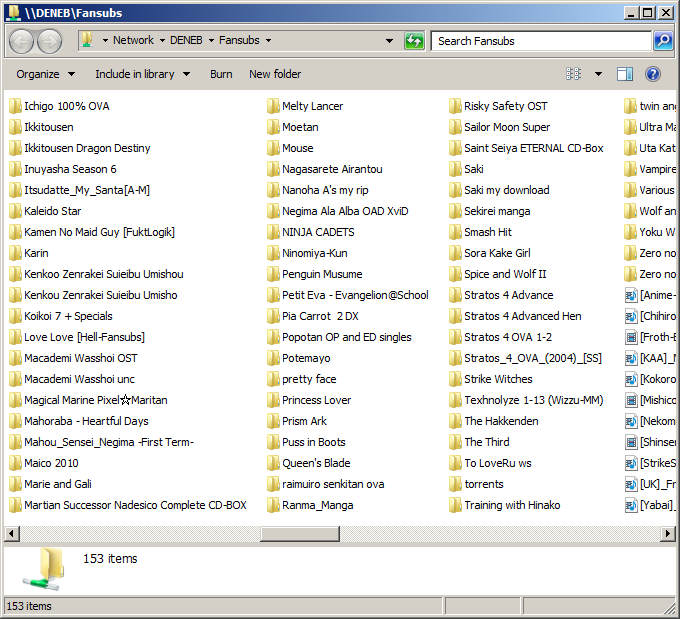
One thing I hated in Vista was that in the "list" directory mode, the columns were really wide even if they didn't need to be. Now, at least the way I've got things set up, each column is exactly as wide as it needs to be in order to fit the longest filename in that column. That's what I want.
Another thing I've noticed is that there are some changes in how IE works. It used to be that when I wanted to upload a picture to here, IE would open "My Pictures". Now it opens the root, and I can get to the place I keep my pictures in three clicks.
Posted by: Steven Den Beste at October 23, 2009 11:06 AM (+rSRq)
13
Aero is normally enabled by default, it certainly was on all three of the machines I've but the beta and RC on. I suspect it was disabled for you because of the generic driver and resulting low video performance test numbers. Most of the aero features I'm sure you won't miss, who really cares if an icon on the taskbar is shaded or not. However the semi-transparent window borders are quite nice, and the "aero peek" feature of having it pop up a view of the app window as you tab over minimized icons on the task bar or in task manager is one of the nicest new features. I don't know if you can enable just that or not, it's a checkbox option in the performance tab, but I suspect it has dependencies.
I know you are sticking with 32 bit for the moment to avoid reinstalling all your applications, but I can't put enough force behind the suggestion to bite the bullet and go with 64 bit. MS isn't making much noise about it, but there are some technologies that are only in the 64 bit version, such as automatic heap defragmentation, that are just huge.
Posted by: David at October 23, 2009 04:43 PM (4NX60)
14
I've entertained the idea that once this thing is stable and I'm sure I won't want to retreat, of putting the old 200G drive back in it and installing the 64 bit version on it just to see how it works.
But not really very seriously. It seems like a hell of a lot of work where the main benefit would be bragging rights. Even if there was some kind of performance increase, I really don't do anything on this machine where I need more performance than I'm already getting.
And I'm just a tadge bit worried about what Microsoft might do to me if they see the same registration number going by twice in short succession. Not sure I really want to risk that.
Posted by: Steven Den Beste at October 23, 2009 05:21 PM (+rSRq)
15
I'm running the 64-bit version of the RC and have been for a while; it works pretty fine except for a few issues like not wanting to install unsigned 32-bit drivers, and a few rare applications. One big advantage is that it lets you have more RAM.
As for the activation, two will be fine, especially on the same computer.
Something useful is that you don't _have_ to put in a key when you install it. You can wait up to 30 days without a key; it'll just nag you every once in a while with a bubble in the tray, so if you only want to play with the 64-bit version, just install it without a key. (You can also--I believe--use the rearm trick to get a couple of extra 30-day cycles out of it.)
Posted by: RickC at October 23, 2009 06:30 PM (zFTOh)
16
One big advantage is that it lets you have more RAM.
Theoretically valuable, but utterly useless for me in practice. This computer is maxed out at 2G, which is fully supported by the 32-bit version.
And there isn't anything I do that needs more than that.
Posted by: Steven Den Beste at October 23, 2009 06:43 PM (+rSRq)
Hide Comments
| Add Comment
Win 7, first impression
It's not a disaster, but it's kind of like getting a new pair of glasses: everything looks strange for a while. I've got some work to do, though.
One huge, huge cool thing: you can choose "Classic Windows" look for the UI, and go back to windows looking the way they did in XP. Which means, not like a Mac. Square corners. No weird ass icons. Man, it's like meeting a long lost friend that I'd thought had died.
One huge, huge bad thing: my shortcut area is gone on the task bar. Which means I'm crippled doing nearly anything.
UPDATE: Turns out it was called "quick launch". You enter that in the help, and the first entry that turns up is "What happened to the Quick Launch?"
The answer? We got rid of it. Use "pin program to task bar" instead. Except that "pin program to task bar" uses full sized icons, and I used to have about 35 programs in my quick launch.
UPDATE: Did Microsoft change the driver model again?
Few if any of the custom drivers came through. I'm currently using a generic display driver -- which nonetheless is able to choose a 1920*1200 mode, that being the native size of this LCD. But performance ain't great, and special features are nil. I tried running the performance analysis which shows up in the Games folder. It gave me scores of about 5.8 for CPU, RAM, and HD, and a flat 1.0 for graphics.
ASUS has a Hooray for Win7 web site, and it has a place to click to go download new drivers. But when I do that for the G2S (this computer model) it asks me for the target OS, and Win7 isn't listed for the G2S.
Fortunately, it is listed for the Xonar sound module, but the only driver is a beta. However, it works. And after I reinstalled the CCCP, I was able to play an MKV file using Zoom Player.
Meanwhile, I'm also using a generic mouse driver and there isn't any way to turn off the touchpad. So when I'm typing, or if I'm mousing, and not paying attention, suddenly the carat will zoom off because I've brushed the touch pad by mistake.
What I think I'm going to hope is that the Vista drivers will work, and I'm going to dig up the driver CD that came with the computer and try it.
UPDATE: Looks like I have to rely on NVidia for drivers. I've found one they say works with Vista and Win7, and works on my hardware (8600M GT) but the package is 115 megabytes so it's taking a while to download.
UPDATE: Actually, my biggest concern right now is Agent, my mail program. It's installed and running, but I've lost 2 years worth of mail, everything dating back to the last time I updated it to a new version. As part of that update they moved all the folders somewhere else and I don't know where so I can't dig them out of the backups.
UPDATE: Flash CS3 remembered my ID number, but didn't remember that I'd already set it up and registered it.
Posted by: Steven Den Beste in Computers at
06:50 PM
| Comments (7)
| Add Comment
Post contains 531 words, total size 3 kb.
1
Since the acceleration features of the video chip aren't used to play video, it's acceptable for me to use it unaccelerated, with one caveat: the full color depth may not be available without a specific driver. This is surprisingly noticeable when anime has whitewashed color key like GA:GADC.
Posted by: Pete Zaitcev at October 22, 2009 08:14 PM (/ppBw)
2
Unfortunately, the driver CD says, "Sorry, I'm only for Vista."
DAMN ASUS for not having updated drivers ready for us!
Posted by: Steven Den Beste at October 22, 2009 08:35 PM (+rSRq)
3
You can add the quick launch toolbar back in with Windows 7 - it's not gone, just hidden. Instructions
here, and a few other notes on the new taskbar
here.
Posted by: Pixy Misa at October 22, 2009 09:30 PM (PiXy!)
4
Oh, THANK you, Pixy! What a relief!
Current top priority problem is figuring out how to disable the touchpad when the mouse is in use. There used to be a checkbox in the control panel mouse applet which made it do that, but I just installed Microsoft's Intellipoint driver and there isn't one now.
I never ever use the touchpad, and I'm considering disabling the device entirely in the hardware manager, like I have a couple of other devices that I never use. (Like the camera on the display bezel.)
Posted by: Steven Den Beste at October 22, 2009 09:47 PM (+rSRq)
5
Other good news: whatever warnings they had about PowerDVD didn't have to do with the low level drivers. I was just able to play a DVD with Zoom Player.
However, it doesn't look as good as it used to because it isn't doing smooth resizing. I have some ideas about that, though.
Posted by: Steven Den Beste at October 22, 2009 09:48 PM (+rSRq)
6
"Unfortunately, the driver CD says, "Sorry, I'm only for Vista.""
I've had good luck with "Run as administrator" and "run in compatibility mode."
Posted by: RickC at October 23, 2009 07:35 AM (zFTOh)
7
I'll second RickC's comment about compatibility mode. I upgraded this morning, and the advisor said that my soundcard wasn't compatible. I've had good luck with the release candidate on my laptop, so I said "what the hell" and went with it.
I downloaded the Windows XP drivers and installed them using compatibility mode, and I'll be damned if it doesn't seem to be working right (using iTunes...haven't run it through it's paces with Half-Life 2 yet)
I mean, I knew that Microsoft was borderline psychotic about backwards-compatibility, but damn...
Posted by: CatCube at October 23, 2009 09:46 AM (4WWhC)
Hide Comments
| Add Comment
Win 7 Upgrade
I'm going to leave the name of this category as "Vista" even though I won't be running Vista any longer.
The upgrade started 1720, and we'll see how long it takes. The very first thing it did was demand the right to phone home and download something, which turned out to only be about a megabyte. That was fast, but I bet that server at Microsoft is going to get hammered this weekend.
They keep telling me that PowerDVD 6 isn't going to work. That could be a probem, because I'm using PowerDVD 6's codecs in Zoom Player to play DVDs.
UPDATE: 1805, first reboot.
UPDATE: 1830, second reboot
UPDATE: 1900, third reboot. I think we may be on the home stretch.
UPDATE: 1915, fourth reboot. "Setting up for first use"
UPDATE: 1920, and the fifth and hopefully last restart. Total time, two hours.
Posted by: Steven Den Beste in Computers at
04:26 PM
| No Comments
| Add Comment
Post contains 147 words, total size 1 kb.
Procyon brain transplant complete
The restore from Windows Home Server took about 20 minutes. The computer rebooted fine, but something got installed that needed a restart, and after that it came up perfectly. This was far more convenient than I expected it to be.
Before:

After:
UPDATE: The upgrade wizard says that if I try to install the 64-bit version of Win 7, I'll have to install all my apps again. Guess I'll stick with the 32-bit version.
Bummer.
UPDATE: In preparation for doing the Win 7 upgrade, I told Connector to do a backup. The backup program is tossing an error because the second partition I used to have isn't there any more.
I can tell it to ignore that error, but it seems as if there really should be a cleaner answer. I hope I don't have to rename the computer, even though I'm sure that would do it.
Posted by: Steven Den Beste in Computers at
03:53 PM
| No Comments
| Add Comment
Post contains 151 words, total size 1 kb.
Procyon's Brain
The 320G HD for Procyon just got delivered, so now to install it.
UPDATE: I took the cover off where the HD is, and could not figure out how to get the HD to come out. I messed with it for a while, and then gave up. So I packed up the computer and walked over to the repair shop, and offered the guy there $10 to show me how it was done.
It wasn't very hard, and I felt silly once he showed me that the drive had to be slid sideways to come out. Sheesh.
Since I was out anyway, I walked over to Fred's, and was lucky enough to find a copy of Win 7 Home Premium. $120. I got it.
I'm back home again and I've got the new drive in. The restore CD has booted, and right now it's formatting the new drive.
The Win7 package says it has both the 32-bit and 64-bit versions of Win 7, which of course makes me curious.
The restore should bring me back to the same version of Vista I had, and if so then there really isn't any risk for me in trying to install the 64-bit version of Win 7 to begin with. There's a program I downloaded from Microsoft which checks the hardware to see if it's compatible, and I ran it to see if it would work with 32-bit and it said it would. Once I've got Vista working again, I'll try running it to see if Procyon would be compatible with the 64-bit version, and if so I think that's what I'll install.
If it doesn't work, I'll restore Vista again, and then run the 32-bit upgrade.
UPDATE: The disk formatting program shows me having the new drive, which is going to be 305GB formatted, and my SDHC chip, which is 32G, and something else which is 3.74G formatted as FAT32. I wonder what that is? The flash memory is only supposed to be 1G, so that can't be it.
Anyway, right now that thinks it's the C drive. The new partition is gonna be G. I don't think that's good, so when the format is complete I'm going to reboot the restore CD. Next time, hopefully, the HD will get assigned C:.
But it's gonna be a while. It's only 13% done.
UPDATE: Microsoft allows this upgrade to be used from both XP and Vista, but they've decided to punish XP users. If you upgrade from XP you have to reinstall all your apps.
UPDATE: Big drives are really nice to have, but formatting takes forever! 89% done. Fortunately you only have to do that once.
UPDATE: Finally done formatting. Rather than reboot, I just reassigned the drive letters so that the new drive is C, and now the restore is running. It's estimating 11 minutes to restore something like 60G.
No, 12. No, 13. Now it's 14. Windows time estimates really suck! (There was an XKCD comic about that.)
Posted by: Steven Den Beste in Computers at
12:54 PM
| Comments (2)
| Add Comment
Post contains 500 words, total size 3 kb.
1
The small partition is probably where Windows keeps recovery data. Chiyo-chan's internal HD is laid out that way, but she's running XP.
Posted by: Wonderduck at October 22, 2009 03:15 PM (4Mcos)
2
Yeah, well, except that this is a new drive which has never been formatted before.
And all the partitions on a given physical device all appear on the same line in the disk control applet, and this was on a separate line which means it has to be a separate physical device.
And I just realized what it is: it's the 4G flash drive I am using to hold the networking device drivers.
Posted by: Steven Den Beste at October 22, 2009 03:42 PM (+rSRq)
Hide Comments
| Add Comment
October 17, 2009
WHS -- DHCP success!
With DHCP installed, I was able to make it all the way into the recovery menus, to enter my server password, and to see a list of backup checkpoints. I didn't go any further than that because I didn't really need to. What it means is that it all works.
So now I can seriously consider getting a 320G drive. AND... consider getting a Windows 7 upgrade. If I put a 320G drive in here, and restore Vista onto it, and archive the old drive in my parts drawer, then installing the Windows 7 upgrade becomes considerably less risky since I have two different ways of retreating. (The preferred retreat would be to restore Vista from Windows Home Server, of course.)
Win7 isn't out yet, but it should be very soon (days). So I'm going to put in an order for a 320G HD today.
UPDATE: Or maybe not quite yet. The drive I currently have is SATA 150. The drive I want to get is SATA 300, and I'm not sure if that's compatible. So I've emailed my brother for advice. And I'm asking y'all.
UPDATE: Order placed!
I was going to preorder Win7, too, but they're not accepting preorders. I could buy a Vista license with a free upgrade certificate, but that would be stupid. I guess I'll just wait and get it from the local Best Buy store. (If Fred Meyers doesn't carry it, and I bet they will.)
Posted by: Steven Den Beste in Computers at
11:30 AM
| Comments (3)
| Add Comment
Post contains 246 words, total size 1 kb.
1
All SATA should be backward compatible. If the controller card can do SATA300 it will mean better transfer rates, but worst case is it will default to SATA150. Kinda like USB1.0 vs USB2.0 (and soon to come USB3.0)...
Posted by: Bear at October 17, 2009 12:31 PM (8Aimx)
2
I thought that was probably the case, but I wanted to make sure. Thanks!
Posted by: Steven Den Beste at October 17, 2009 12:33 PM (+rSRq)
3
Turns out my ATA controller (Intel ICH8M) handles SATA 300.
Posted by: Steven Den Beste at October 17, 2009 01:18 PM (+rSRq)
Hide Comments
| Add Comment
October 14, 2009
Procyon upgrades
I finally got around to doing something today which I've been putting off. I took Procyon to see the computer doctor.
It's been running really hot for a long time, and I've been coping with it by putting it up on spacers to allow it to breath better, and by using the system power control to throttle back the CPU clock rate, and by being careful about using it heavily on hot days. All of which I shouldn't have to be doing.
Today I got off my butt and took it out to the computer place that's on my way to the grocery/variety store where I do most of my shopping. I left Procyon there to be cleaned out, while I went on to Fred's. I wanted to buy a coat (the one I have is 20 years old and getting kind of ragged). So I did that, and then stopped back at the computer store on the way home. Had to wait maybe ten minutes (no big deal) and it cost me $15. And now Procyon is running more than 10 degrees cooler at full clock rate than it used to with the clock rate throttled to 70%.
Reason I was finally willing to do that was because of the backups that Deneb has been making every night. And it occurred to me today that this might make it easy for me to put a larger HD inside Procyon. It's a 200G drive, divided into two partitions. And I'm pretty sure that Deneb's backups are file-oriented, not block-oriented. In fact, I'm certain of it.
Deneb came with a boot CD for purposes of restoring a crashed computer from the backups. The idea is that if your HD is totally dead, you boot off that CD, and it makes contact with Windows Server on your LAN and restores the whole thing. What I'm wondering is how that process would work if the HD was suddenly magically bigger?
In other words, if I replaced my 200G drive with a 320G drive, would the backup CD work? Would the restoration work? Would my apps work afterwards?
I might get a new drive and give it a try. After all, if it fails I can just put the old drive back in. And it sure would be nice to have more space on this thing. Even if I had to make the new space a third partition.
Which might not be necessary. NTFS partitions can be made larger; it's a feature of the file system. If it initially created a 111G C partition and a 66.7G D partition, which is how it is now, and didn't use any of the rest of the space on the larger drive, I could later add all the rest of the drive space to D. That would be fine.
Another possibility is to copy all the stuff that's currently on D onto the server and delete it all, and then delete that partition as well. Then run another backup, just before swapping drives. That way it only restores one partition.
OK, all you Windows Home Server gurus out there. (Quentin?) Think this would work? Or have a reasonable chance of working?
UPDATE: Hitachi has a 7200 RPM 320G SATA drive for just $80. There are other drives which are cheaper, but I like Hitachi as a brand. And $80 is amazingly cheap.
Posted by: Steven Den Beste in Computers at
04:27 PM
| Comments (13)
| Add Comment
Post contains 567 words, total size 3 kb.
1
Fry's had 640GB Hitachi SATA drives available ~1 month ago. <$100 IIRC. I got 2 of them. (/proc/scsi/sci reports the model as "Hitachi HDT72106")
Wow. Even less now. http://www.frys.com/product/5947264?site=sr:SEARCH:MAIN_RSLT_PG
Posted by: Mark A. Flacy at October 14, 2009 07:45 PM (Lbkvv)
2
That's the wrong form factor. It won't fit into a notebook computer like Procyon.
Posted by: Steven Den Beste at October 14, 2009 08:00 PM (+rSRq)
3
So what was it that was causing Procyon's overheating? Was it, as you expected, just dusty?
Posted by: Wonderduck at October 14, 2009 08:41 PM (/O6qY)
4
Yeah. He said that a
lot of dust came out of it.
Posted by: Steven Den Beste at October 14, 2009 08:50 PM (+rSRq)
5
Yes, you can install a bigger HD and restore to the bigger drive. My father dropped his laptop and borked the hd. Luckily I had backed up his system on my WHS. I installed a much larger drive and 45 minutes later the restore had completed without issue. If I recall correctly, I believe the restore cd program gives you a slider indicating how big you want to size the restored partition. You can get a good idea of the process by inserting the restore cd and stepping through the dialogue windows (not surprisingly, the limits are the size of your data and the size of the drive). No data is affected and no changes are made until the last confirmation which has clear warnings.
The backups work at the cluster level (from wikipedia.) This technology uses Volume Shadow Services (VSS) technology on the client computer to take an image based backup of a running computer. Because the backup operates on data at the cluster level, single instancing can be performed to minimize the amount of data that travels over the network and that will ultimately be stored on the home server. This single instancing gives the server the ability to store only one instance of data, no matter if the data originated from another computer, another file, or even data within the same file.
Posted by: kderosa at October 15, 2009 04:50 AM (/qyKz)
6
That's good to know. I think I'll give it a try.
Posted by: Steven Den Beste at October 15, 2009 07:47 AM (+rSRq)
7
I just tried a dry run using the restore CD, and it didn't load network drivers. Looks like I need to buy a USB flash drive to put the drivers onto. (I saw the instructions for how to get the drivers; seems straightforward once you have a USB flash drive.)
I'll buy one next time I go to the store, and then try it again. It's probably a good thing I'm going through this now, in any case, rather than waiting until after a real crash some time.
Posted by: Steven Den Beste at October 15, 2009 11:02 AM (+rSRq)
8
Are you using the restore disk that came with the server or have you burned a cd of the new Restore PC program that came with the first service pack?
goto \\denedb\software\Home PC Restore CD and find the restorecd.iso file. Use that (once you've burned it to a cd) instead of the original disk. It has better driver support.
I had the same network driver issue that you're having with the original disk, but the new program ran without issue.
Posted by: kderosa at October 16, 2009 03:55 AM (/qyKz)
9
The only thing in that directory was a readme. I looked at it and it had a URL at Microsoft to download from.
That gave me a file with extension MSI, which turns out to be a self-unpacking archive which contained the ISO.
The ISO was dated July 2008 and when I booted from it it seemed to be exactly the same as the other one. It didn't know about my networking hardware. (Which is peculiar; I bought this computer November 2007.)
I need to go to the store today anyway and I'll get a USB flash drive.
The restore program is strange. First thing it does is ask you if you have more or less than 512 MB of RAM. Can't it tell? Why doesn't it ask the BIOS?
Posted by: Steven Den Beste at October 16, 2009 11:41 AM (+rSRq)
10
Flash drive purchased, and when I reached that point in the restore process, it read the flash drive and did install the network drivers.
But it couldn't locate the server. I'm sure it's exactly the same problem I had when I restored the server software: the IP is in a different block. I'm currently using the 192.168.*.* black hole and I fear I'm going to have to move everyone over to that other one on a permanent basis. Bleah.
Posted by: Steven Den Beste at October 16, 2009 04:04 PM (+rSRq)
11
The iso in my directory is dated 7/12/2008. And has a link to this download: http://www.microsoft.com/downloads/details.aspx?FamilyID=26881305-91cc-4f37-b1fc-3813c423df2c&displaylang=en
The primary reason for the upgrade was to include native vista x64 client support. I have no idea why the restore program can't auto detect the amount of RAM, but I do know that the >512MB version of the connector is an optimized version.
Sounds like your server shipped with the updated restore program but that your network hardware drivers still weren't included.
Posted by: kderosa at October 16, 2009 04:53 PM (/qyKz)
12
As a minor note, an address on the 169.254.*.* subnet usually indicates that the computer is using a DHCP client, and cannot find a DHCP server to talk to that will give it an IP address on the local subnet. One solution is to run a DHCP server on your network that gives out addresses on the 192.168.1.* subnet.
The usual place to run a DHCP server is on your gateway (most consumer routers have them), but if all you need it for is to assign a local IP when you run the recovery disk, Deneb might have a DHCP server that can be enabled and configured easily.
Posted by: benzeen at October 16, 2009 09:00 PM (SQ64B)
13
Well, surprise of all surprises, I found a freeware DHCP server on a Microsoft WHS forum. It's been there for two years, so presumably if there was something wrong with it a moderator would have removed the post long since. So I downloaded it and installed it, and it looks like it's working.
Tomorrow I'll try the restore CD again, but it's too late tonight.
Posted by: Steven Den Beste at October 16, 2009 09:23 PM (+rSRq)
Hide Comments
| Add Comment
October 13, 2009
Computer Security
Over at BakaBT, one of the mods took a look at the kinds of passwords that people were using and found that a lot of them were incredibly weak. More interesting is that some passwords happened again and again.
It's long been known that the most insecure component in a computer system is the user. But it's still surprising when you see that demonstrated by this kind of list:
1115 123456
407 password
269 qwerty
255 dragon
160 123456789
145 gundam
142 ?????
133 shadow
130 12345678
123 sakura
117 abc123
104 pokemon
100 123123
100 naruto
What that means is that over a thousand people chose "123456" as their passwords. Which is pretty damned appalling.
A loooong time ago I read a book called "Out of the inner circle" which was written by a kid who had been a member of an elite hacking group called "The Inner Circle". He'd been caught by the authorities and convicted of something. After he got out of prison he wrote a book about what it was like for hackers, and some of the exploits they were using.
This was in the days of 300 baud modems, and one of the things he and his fellows did was to try to break into dialup systems by using dictionary attacks against passwords. Using a well-chosen dictionary of maybe 300 entries, they were successful a surprising amount of the time.
He said that at the time by far the two most common passwords they found were "sex" and "secret". Other things in the dictionary would be names of popular rock groups, names of top rock performers, famous movie stars, common boys and girls names, and a few other things like that.
And from BakaBT's experience, it's still the case that people are unimaginative about the choices they make. I guess that's why a lot of systems now actively police password choices when you register and pretty much force you to choose one which would not be easy to guess.
And increasingly you're seeing sites give you your password, and don't permit you to change it.
400 people chose "password"? Yikes! PIBKAC!!!
Posted by: Steven Den Beste in Computers at
04:12 PM
| Comments (12)
| Add Comment
Post contains 358 words, total size 2 kb.
1
400 people chose "password"? Yikes!Two possibilities. Either they think they're being ironic, or they're just stupid.
Most likely? It's an ID-10-T error.
Posted by: Wonderduck at October 13, 2009 05:50 PM (/O6qY)
2
Pffft. Choosing "password" as the password isn't stupid. Having an IT
policy that the e-mail password will be "password" because the enterprise server admins get pissy over password retrieval requests....
that's stupid.
"Well nobody can get to your email without logging in as you at your workstation, so your user password is the security." Um. Guys? The internet portal?
(Further stupidity withheld for the sake of what's left of security.)Government is proof that Darwin doesn't exist, as it defies the concept of 'too stupid to live.'
Posted by: ubu at October 13, 2009 07:13 PM (f8pAz)
3
So what exactly is the downside if someone breaks your password on BakaBT?
I have several external identities for which I frankly do not give a rat's ass if they are compromised. The passwords chosen for those names are
not the passwords that I have for any accounts that are important to me.
Posted by: Mark A. Flacy at October 13, 2009 08:24 PM (Lbkvv)
4
BakaBT claims that you can only join once per lifetime. If your account becomes compromised and you lose it, you never get another one. Or so they say.
The real downside is that someone who gains access to the account could use it in various ways to cause mischief or worse, making things bad for the other members.
Posted by: Steven Den Beste at October 13, 2009 08:46 PM (+rSRq)
5
The fact that the site admins can recover your password so trivially is reason enough not to bother with a good one. Something simple that's guaranteed to be different from your email and banking passwords is good enough for most random web forums. (to be fair, the reason they mentioned it is because they were switching to a less-trivial storage method)
Personally, I don't even know most of my passwords any more; they're all stored encrypted in Yojimbo behind a single strong password, and I just copy-and-paste them into login dialogs as needed. The actual passwords are generated as 8-12 random printable characters, depending on the site's limits.
A good password vault for Windows users is Password Safe, the open-sourced version of security guru Bruce Schneier's system.
-j
Posted by: J Greely at October 13, 2009 09:19 PM (2XtN5)
6
Actually, in that same announcement he said that they were tightening up the way that the passwords were stored.
Posted by: Steven Den Beste at October 13, 2009 09:28 PM (+rSRq)
7
Granted, I've always wondered whether draconian password restriction actually improved security, or just changed which kind of threats could hit you. Sure, totally random number strings that the user can't change are unlikely to be hit by password guessers, but that pretty much means the users will have written copies of them somewhere.
Posted by: metaphysician at October 14, 2009 12:22 PM (M5Kik)
8
"...the users will have written copies of them somewhere."I had a co-worker who claimed that that
was strong security. Write 'em down, keep 'em in your wallet. You protect your wallet pretty well, right?
And what's wrong with the first password? Â That's the same as the combination on my luggage...
(somebody has to field the ground balls, too.)
Posted by: Mikeski at October 14, 2009 02:23 PM (GbSQF)
9
Yup, most quality-of-password rules don't significantly increase the effort required to crack them, they just increase the odds that they'll will be stored on a sticky-note. Ditto for password-expiration rules, which encourage the use of keyboard patterns and easy-to-guess variations.
Still, when your first name is Mike, and the only computer system you ever log into is named Mike, your password should probably not be Mike. I once had a senior research professor complain shrilly to the faculty committee when I politely pointed this out to him in email. I'm sure that in these modern days of strong password requirements, his password is now 2MikeThree, and next month it will be 3MikeTwo
-j
Posted by: J Greely at October 14, 2009 03:06 PM (9Nz6c)
10
Or it's currently "October" and it'll be "November".
Posted by: Steven Den Beste at October 14, 2009 03:24 PM (+rSRq)
11
+1 on the incomprehensable passwords being written down. I did some contract work doing a conversion from Novell Groupwise to Outlook for part of the .mil here in town. The requirements were, IIRC, at least one each of capital, lower case, number, & symbol with a minimum of eight characters, with no re-using of old passwords, and it couldn't contain a name. And the passwords had to be changed every other month. Needless to say, lots of post-its were found under keyboards & mouse pads.
Posted by: Cybrludite at October 15, 2009 08:46 PM (GDpMq)
12
Lesson to be taken from this - if you require strong passwords, DON'T force a change on a regular basis. (I never really understood the point of this, anyway.)
I have at least six different passwords to deal with on a regular basis up here at the office. Nominally they're supposed to change every 90 days, no repeats, rules on how "strong" it has to be, yadda yadda. Most of mine are static (pays to be friend to the guy who has admin access because he's a part-time developer, even months after he's left...)
Posted by: Avatar_exADV at October 15, 2009 10:01 PM (pWQz4)
Hide Comments
| Add Comment
74kb generated in CPU 0.0258, elapsed 0.1667 seconds.
46 queries taking 0.1518 seconds, 143 records returned.
Powered by Minx 1.1.6c-pink.
