October 10, 2009
Acer Easystore -- settling in
I'm finding that it's really surprisingly nice to have the Easystore on my LAN.
I was a bit worried about the backups, because they run daily and there doesn't seem to be any easy way to reschedule them. But they're not really a problem.
I have the backup window set to be 0300-0600. But it turns out that if a computer isn't on during that time, then the backup will run the next time it turns on, which is what happens with Procyon every morning when I get up.
But it isn't really a problem. While the backup is running I don't use anything critical (e.g. my mail program) for fear of getting anachronisms in the archived database files, but browsing is fine. And it doesn't usually take long because it's only doing incremental backups. Sunday is a big day for the backup system; it prunes obsolete backups on Sundays. And I would bet that it does full backups on Sundays, too. I guess I'll find out tomorrow.
It's a lot nicer as a place to store my fansubs than a USB drive. The USB drive keeps spinning down -- which is a feature, not a bug, but which does affect performance. Whereas the drives in Deneb run all the time. And data transfer is faster from Deneb. When I play a video from there, I have never had any skipping or pauses as a result of data not being ready.
I've used about half the storage capacity at this point. I'm running 49% free space. It's currently using 91G for backups, but that will certainly grow. The way things are set up now, it should peak after 3 months and stay pretty steady thereafter. If I start running short of space, I have two empty bays left and can add two more drives.
Now that McAfee Antivirus is gone (yay!) Deneb doesn't hassle me with error reports. It just sits back there in the corner, doing what it's supposed to be doing, and otherwise staying out of my way.
It doesn't get hot on top, either. Haruhi isn't in any danger of melting.
What I'm finding is that a LAN with one of these on it is much nicer than one without. And the price is not at all unreasonable.
Posted by: Steven Den Beste in Computers at
03:45 PM
| Comments (2)
| Add Comment
Post contains 386 words, total size 2 kb.
1
It just sits back there in the corner, doing what it's supposed to be doing, and otherwise staying out of my way.
For a home server, you can't get a much higher recommendation than that.
Posted by: Pixy Misa at October 11, 2009 12:55 AM (PiXy!)
2
Indeed.
Turns out today's backup didn't spike the disk usage, so it seems they keep doing incrementals. And that's fine, as long as they do their record keeping correctly, and I'm sure they are.
Posted by: Steven Den Beste at October 11, 2009 01:06 PM (+rSRq)
Hide Comments
| Add Comment
October 07, 2009
Acer Easystore -- removing McAfee
Using remote desktop to access the server isn't very difficult, it turns out. Performance is actually pretty good when you're talking over a 1000 megabit ethernet.
Every time I log into the server, though, it tries to run IE to display a warning message. It takes forever for it to load. I'm going to have to find the place where that's invoked (likely in one of the startup folders) and get rid of it.
I tried using the "Add and Remove Programs" applet to remove one of the McAfee programs, and it hung half way through. Oh, goodie. I ended up having to forcibly terminate the uninstaller and then reboot the server and I'm about to try to log in again to see what it's like over there.
I decided it might be safer if I terminated all the instances of "Connector" on the clients.
UPDATE: There are two entries, and quite naturally I tried to remove the first one first. That one was labeled "Total Protection", and trying to remove it hung.
It turns out the right thing to do is to remove the second one first, because it removes the first one automatically. I just did that, and the server is rebooting.
UPDATE: That seemed to do it. I just used Connector to access the server, and the McAfee tab is not there any longer, and there isn't any McAfee choice in the setup menu either.
So three cheers for not having McAfee any longer!
UPDATE: I wonder, I wonder... When you use "remote desktop" to access the server, you have to designate the name of the machine you're trying to use, i.e. Deneb in my case.
But when you use "Connector", which is the preferred way to manage the server, you don't get asked. The only thing you enter is the administrator password.
What if you have two of these servers with different names on the same LAN? What does Connector do? Is there a new field that appears that permits you to choose which machine you reach? Or do you have to do all your server management using remote desktop?
Posted by: Steven Den Beste in Computers at
09:18 AM
| Comments (3)
| Add Comment
Post contains 359 words, total size 2 kb.
1
Amen to that. I
hate McAfee.
I'm glad you already did all the hard work, so that when I get one of these things all I have to do is come back here...

Posted by: atomic_fungus at October 07, 2009 12:20 PM (z8tFa)
2
I guess this puts a lie to my pretensions to not being an early adopter, doesn't it?
Posted by: Steven Den Beste at October 07, 2009 01:20 PM (+rSRq)
3
Woo hoo.
With two WHS servers on the same network what happens is that when you run the connector software it gives you a drop down list and you select which server to associate the client computer with. You can only associate with one server at a time, though you can access shared folder on both servers.
You can always change the server name by using the control panel network applet and changing the computer name. That's alsao a way to change the workgroup.
Posted by: kderosa at October 07, 2009 04:39 PM (/qyKz)
Hide Comments
| Add Comment
October 06, 2009
Acer Easystore -- controller frames
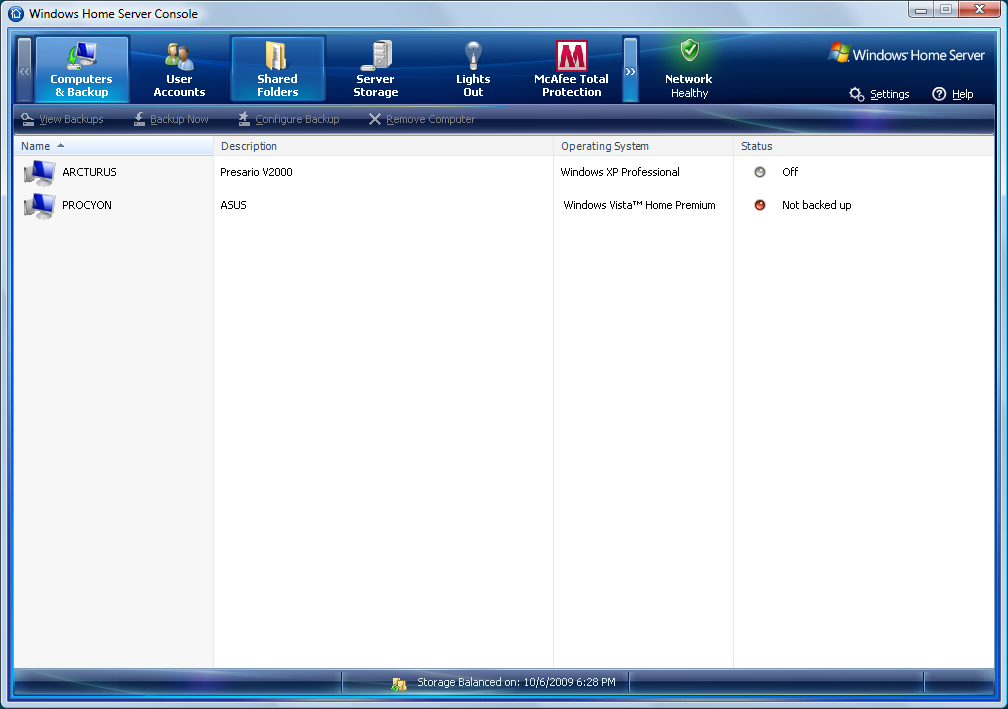
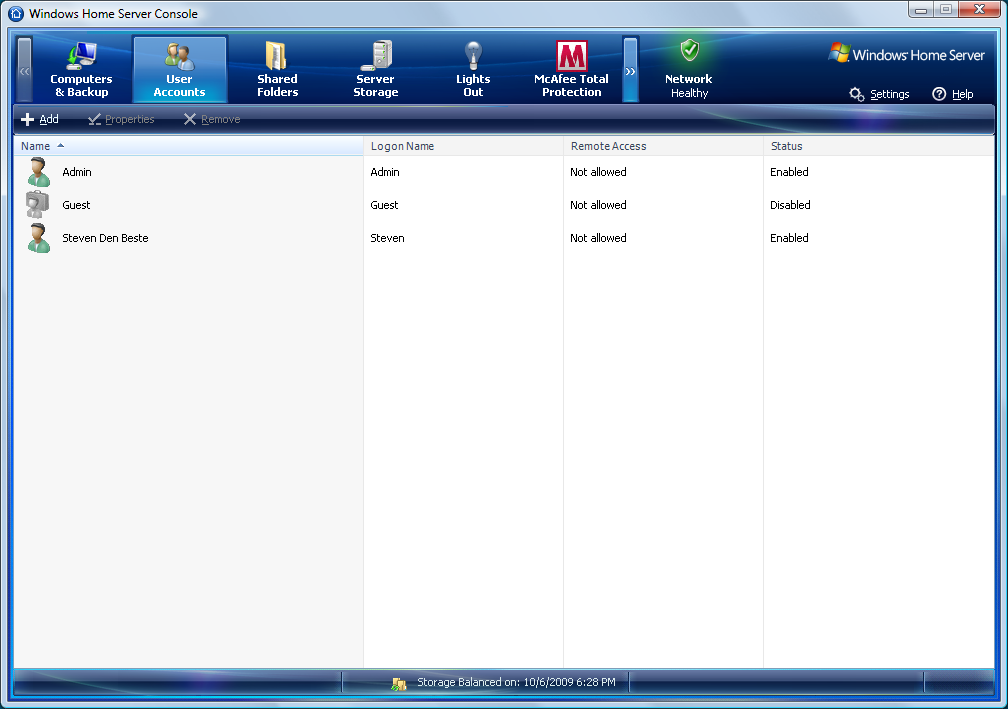
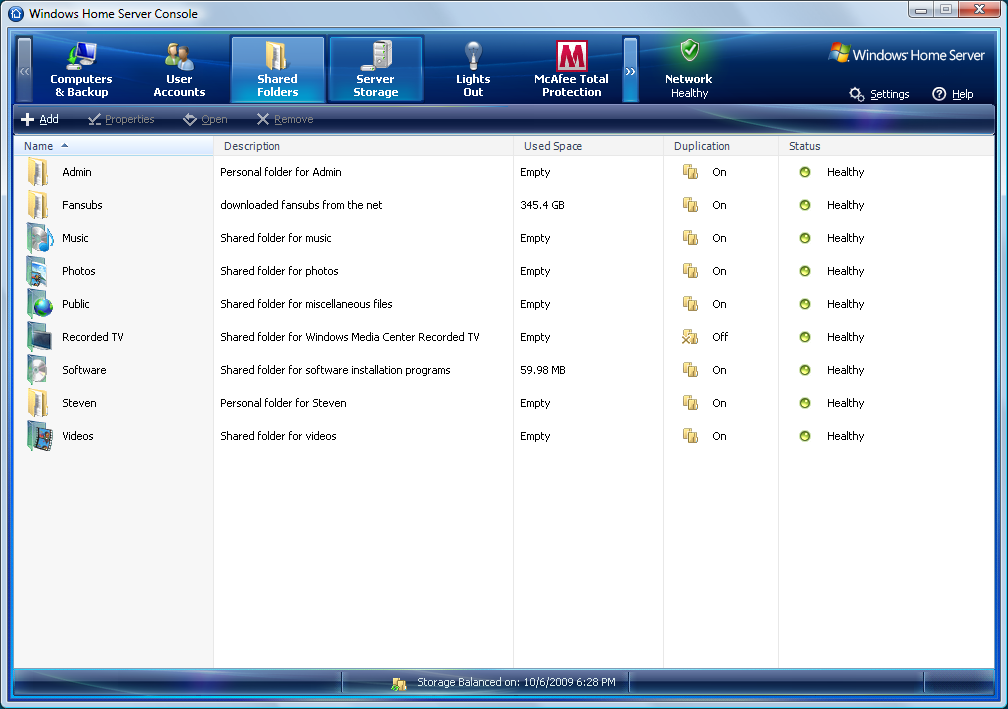
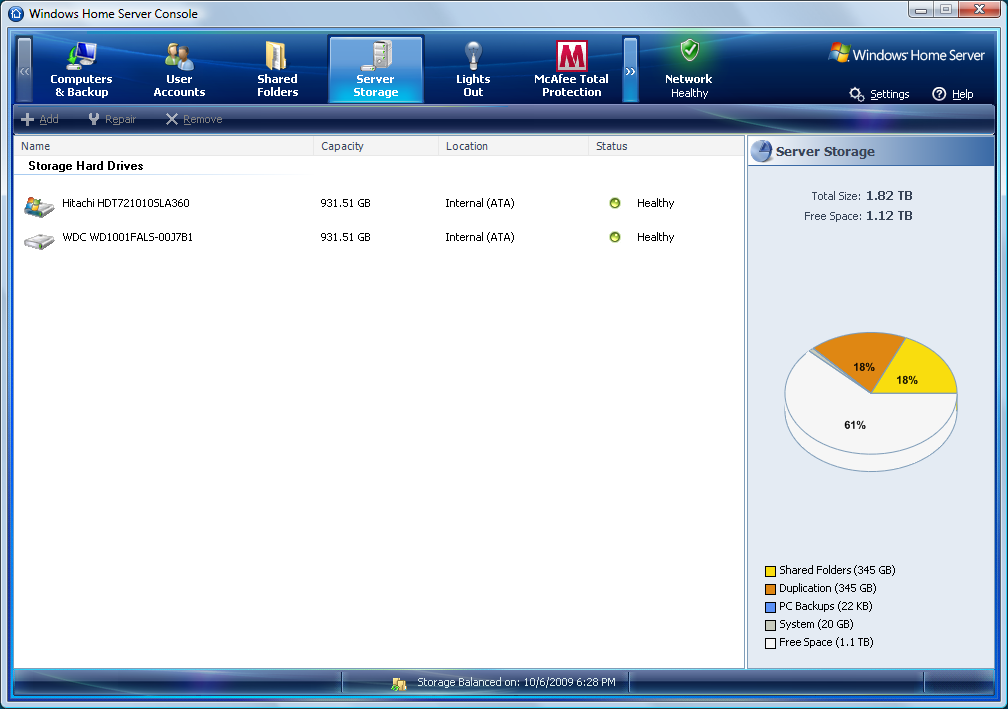
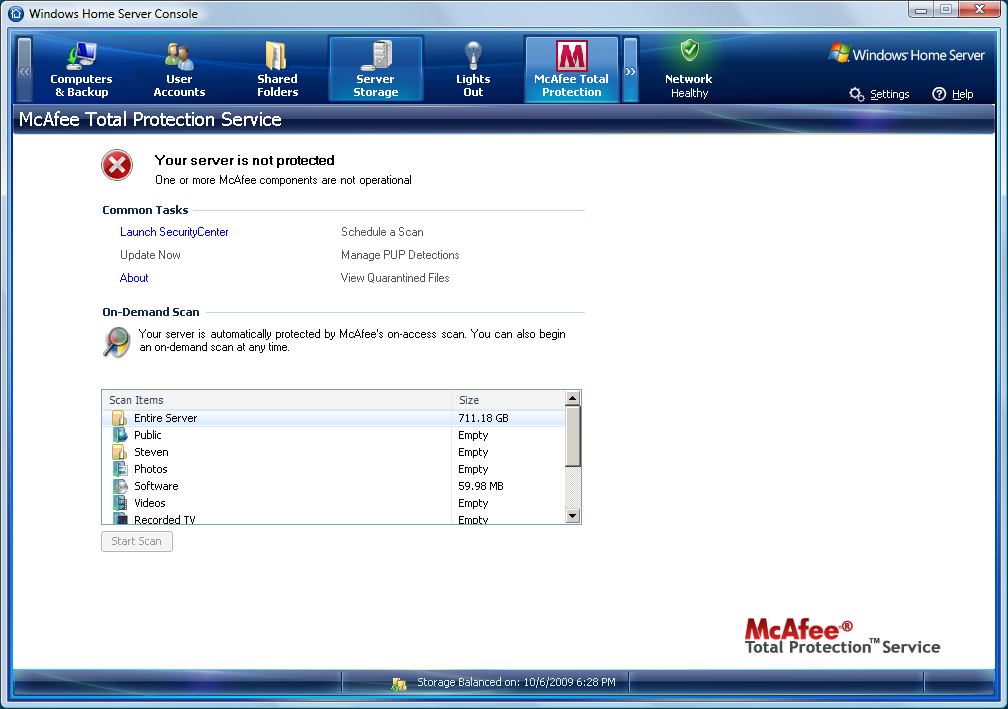
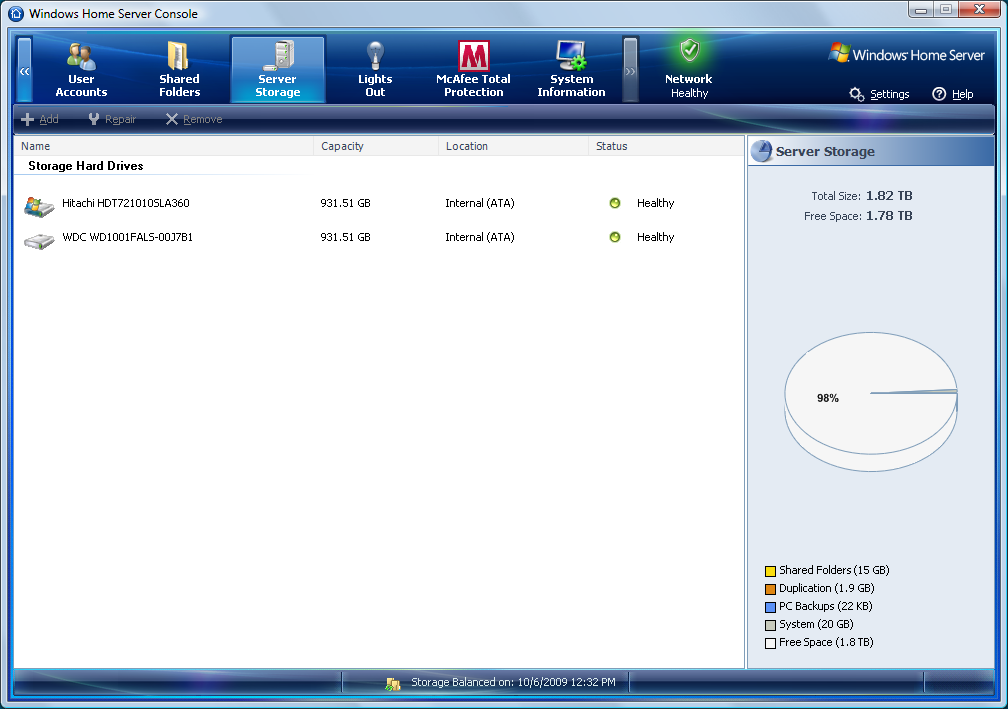
The remote console program that, it turns out, Microsoft developed for running this kind of server is surprisingly clean and easy to use. I promised some frame grabs, and that's what this post is for.
But the window can't be resized, and the frame grabs won't fit in the column formatting I've got set up here, so I'm just going to link to the pictures.
Computers and Backup
User Accounts
Shared Folders
Server Storage
McAfee Total Protection (boo! hiss!)
System Information
As a simple file server it seems ridiculously overbuilt. A dual-core processor? 2 gig of RAM? But I guess it's also possible to use it for other things, like being a media center, or even as a web server (which it does support).
And running the antivirus program is going to consume a lot of CPU power, I would imagine. I don't have it enabled, though.
I wonder if Microsoft will offer their new antivirus program as an alternative to McAfee some day? That would sure be nice.
UPDATE: There is also a "settings" popup which has a bunch of subframes. I didn't grab those.
UPDATE: Damn, I may be forced to turn McAfee on. It's possible to tell it to not complain about the fact that McAfee isn't enabled. But you have to do so every single time the server boots. Such as, for instance, when you install updates. Or when the power blips. Or when you don't expect to need the server and manually turn it off. Every time you turn it back on again, or it reboots, every client computer connected to it who has Connector installed will get a popup error message.
What soured me on McAfee before was the way it was constantly nagging me about things I was doing deliberately. And now it's doing it again. And there's no way I've found to make it stop completely.
UPDATE: I just played a video file that was stored on the server, and it's a lot more pleasant than trying to play it from an attached USB drive, amazingly enough. No cases of stopping or stuttering due to data not being ready on time, at least that I noticed.
Posted by: Steven Den Beste in Computers at
06:21 PM
| Comments (8)
| Add Comment
Post contains 369 words, total size 2 kb.
1
I think you referred to McAfee as "malware" once. Seems like it's determined to keep the crown.
Posted by: Toren at October 06, 2009 09:13 PM (9K6fX)
2
Seems that you're not alone in your dislike of McAfee.

Here's a couple of links of EasyStore owners discussing how to banish it
1 2. The easiest way is to remote desktop into the EasyStore and use the control panel add/remove programs function.
Posted by: Pixy Misa at October 07, 2009 05:05 AM (PiXy!)
3
Have you tried remote desktopping in and uninstalling McAfee the good old-fashioned way -- through the add/remove programs control panel applet? Failing that there is always Revo Uninstaller.
Posted by: kderosa at October 07, 2009 05:43 AM (/qyKz)
4
Pixy, those links confirmed something else I suspected: the McAfee installation is a free trial. After some period of time they expect you to start paying for it, and if you don't then the nags get even more emphatic and annoying.
I'll have to try some of the things they described. I've never used remote desktop before.
Posted by: Steven Den Beste at October 07, 2009 07:33 AM (+rSRq)
5
Has McAfee always ran like a protection racket, or did this only start some time after the industry got going?
Posted by: metaphysician at October 07, 2009 08:23 AM (M5Kik)
6
I don't think it's always been like this. It's been kind of a gradual thing, where McAfee and Norton have been inching more and more in this direction as time has gone on.
Time was when you bought one of their programs and could get updated virus def files for free thereafter. But eventually they both got seduced by the "software as a service" model and switched to the subscription mode. And then the companies got into an arms race with one another to make deals with computer companies to include their stuff as part of the preloads on new computers.
It's kind of built up gradually as time has gone on.
Posted by: Steven Den Beste at October 07, 2009 09:51 AM (+rSRq)
7
I heard Microsoft shipped their own AV a couple of weeks ago. The cries from Norton and such were pretty piercing.
Posted by: Pete Zaitcev at October 07, 2009 10:36 AM (/ppBw)
8
It's available for download but they haven't put it on Windows Update yet, so for the moment I'm holding off.
These days my general attitude is "I'll let someone else be the early adopter."
Posted by: Steven Den Beste at October 07, 2009 10:54 AM (+rSRq)
Hide Comments
| Add Comment
Server pr0n
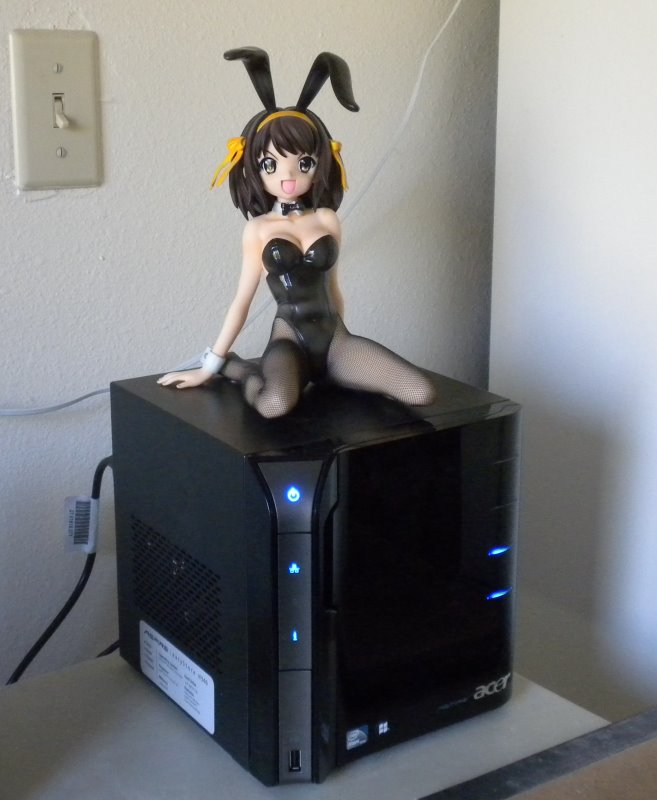
Well, they take publicity pictures of cars and motorcycles with cute girls sitting on them, right? So why not a server?
I was a little afraid to leave her up there, for fear she'd fall off. But it's quite stable up there, and I think I'll leave it that way. Besides which, Haruhi really should be above everything else.
I thought that the client program installed McAfee on the client, but it turns out it doesn't. So I'm going to install the client program on Procyon, and once I do I'll show you some screen shots.
UPDATE: Pixy turned out to be right: it doesn't do RAID. Rather, when you create a shared directory, you can choose whether it is "duplicated" or not. If it's duplicated, then data written into the directory will be held in two places, on two different drives.
Interestingly, it doesn't do that instantly, as it would with RAID. Instead, a background demon makes copies of the files as and when it can. I created a "fansubs" shared directory and set it up to be duplicated, and right now I'm copying my fansub archive off a USB drive onto the server.
Right now the "server storage" report says that there is 15G in shared folders, and 1.9G in duplication. All told I have about 350G of fansubs to eventually write out, and it's all going into a duplicated folder so it'll use twice that in disk space. But that's OK; that's what I bought it for. And if I run out of room, I have two bays left that I can install new drives into.
WD sells a 1.5T drive that's compatible...
At the rate this is going it's going to take most of the day to copy everything up there. The rate limit is probably my ability to read the USB drive where it's all stored right now.
Posted by: Steven Den Beste in Computers at
11:15 AM
| Comments (3)
| Add Comment
Post contains 315 words, total size 2 kb.
1
Now, see, when I saw the pic in the earlier post of Haruhi next to the NAS, I thought, "Put Haruhi on top of the NAS!"
...then I thought, "Hmm, vinyl, warm place...perhaps not."
Still, good image.

Posted by: atomic_fungus at October 06, 2009 11:26 AM (z8tFa)
2
I'll wait and see if heating gets to be a problem, but I don't think it will be. See that big grillwork on the left side? That's holes for cooling air. There seems to be plenty of cooling capacity. Also, I'm not currently using the top two disk bays. If I ever do install two more drives, then I'll probably rethink Haruhi's position on top of the universe. But for now it doesn't seem to be an issue. (The top of the server is at ambient temperature right now.)
Right now the system monitor tells me that the system temp is only 37C (98F). The CPU is/are (dual core) 60C.
Posted by: Steven Den Beste at October 06, 2009 11:40 AM (+rSRq)
3
Mine don't even get warm, and though the CPU in yours is a lot faster, it's still only a 2.5W chip, so Haruhi is probably safe. Maybe you could give her a little cushion to sit on...
The file duplication vs. RAID thing makes sense for the target market, I think. You don't have to know anything about RAID levels, and you don't have to buy four matching drives up front. Also, as I understand it, each drive is set up as a standalone Windows disk. So if two of them somehow fail at the same time - or if the unit itself drops dead - you can just take the remaining drives, pop them in an external drive case, and read the files off.
I just wonder if there's a way to eliminate McAfee completely.
Posted by: Pixy Misa at October 07, 2009 04:44 AM (PiXy!)
Hide Comments
| Add Comment
October 05, 2009
Acer Easystore -- and the process continues
After about an hour of downloading patches, that finally ended. So I changed the workgroup on Arcturus to WORKGROUP and rebooted it.
And I got told that there was a new version of Connector on the server waiting for download. It's installing now.
UPDATE: Done.
And good news: it's possible to tell the server to ignore the fact that McAfee isn't running. And now my "i" light is blue instead of red.
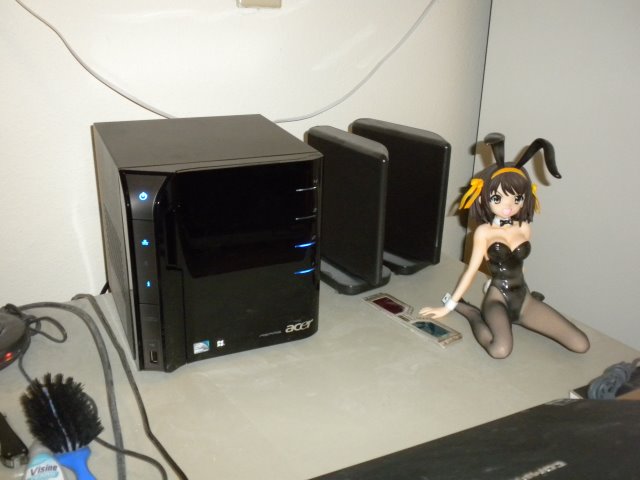
Haruhi sez, "That's how it's supposed to look!"
Next step in the project is to figure out how to set up the drives in RAID 1, but that's for tomorrow.
I suspect the answer is to dismount the second drive. Then it'll be possible to say "Make this a RAID 1 duplicate of the first drive." But I'll need to do some online research first to make sure. And in the mean time it means I can't put anything out on the server.
Posted by: Steven Den Beste in Computers at
06:33 PM
| Comments (8)
| Add Comment
Post contains 162 words, total size 1 kb.
1
I think it actually does file replication rather than block-level RAID. For each share you create you can turn replication on or off. (I haven't actually tried this though.)
Posted by: Pixy Misa at October 05, 2009 07:25 PM (PiXy!)
2
Given that pretty much everything you've talked about for the past few posts is quite a bit above my paygrade, I'm going to interject the one thing I can here:
I suspect, knowing her nature, that Haruhi will be sad if she doesn't get to sit on top of the new box.
Posted by: Wonderduck at October 05, 2009 08:36 PM (/O6qY)
3
I'll keep it in mind. (For tomorrow, when the light is better.)
Posted by: Steven Den Beste at October 05, 2009 09:58 PM (+rSRq)
4
It's using the Windows Homeserver OS which is a modified version of Server 2003. It's not desirable to do RAID on this machine. Rather, you selectively set it to do file duplication on a folder by folder basis, provided you have two or more hard drives installed. Most maintenance can be done through the connector interface. You can also remote desktop into the machine.
Hard drives are put into and removed from the pool in the "Server Storage" tab of the connector control panel.
Shared folders and duplication are set in the "shared Folders" tab.
Also, if you installed the connector software on your client compuer it is going to automatically back up the entire machine every night, so if you want to not back-up certain drives or folders, you do that in "Computers and Backup"
Posted by: kderosa at October 06, 2009 11:38 AM (kd5Ed)
5
KDerosa, thanks for the help but I had already figured all that out.
It's possible to disable backups on a per-machine basis, and I've disabled Arcturus. Just as an experiment, however, I'm going to leave backups enabled for Procyon to see how that goes. I deeply fear it's going to end up being a tremendous disk hog, unless they do incremental backups. But it'll be interesting to see.
Posted by: Steven Den Beste at October 06, 2009 11:56 AM (+rSRq)
6
It does do incremental backups, so it will not become a storage hog. (The following isn't relevant to your set-up, but the back-up scheme is very efficient for multiple computers running similar OSes because the server OS looks for similar blocks of data in the pool of existing backups and only copies blocks that do not already exist in the pool. In this way you can back up, say, five machines in the space of a little more than one.)
The first back-up will take some time. Subsequent back-ups tend to run about ten minutes unless you've made substantial changes or have added lots of data.
And here's a trick for copying large quantities of data, such as video files, from a USB/fireware/SATA hard drive to your shared folders on the server (or vice-versa). Plug the hard drive into the server, but don't add it to the shared pool yet (otherwise you'll lose the data). Then remote desktop into the server and copy the data from the drive (which will show up in explorer) to the unc path of the appropriate shared folder (use the shortcut on the desktop). Copying files over the network is painfully slow even with a GBit connection.
Lastly, check out <a href="http://www.wegotserved.com/">We Got Served</a> for a bunch of useful add-ins for the server and other useful WHS related info. MS also has a useful <a href="http://social.microsoft.com/Forums/en-US/category/WindowsHomeServer/">forum</a>.
If you ever get a large screen monitor and a media connector (such as the PS3) the WHS can also be used to stream all your videos.
Posted by: kderosa at October 06, 2009 05:01 PM (/qyKz)
7
Well, I'll find out. I finished doing all the copying of my fansubs and it cost 345G * 2. Which leaves about 60% of the disk space on Deneb free. I'm going to leave Procyon on tonight and see how much space it ends up taking.
They don't seem to be objecting to doing a backup of a Vista computer. And they included a boot CD to be used to recover from a backup stored on the server.
Vista doesn't have a full backup program. (What it has backs up user files only.) I wonder if this really is a full backup? I guess the only way I could really discover that is if I ever have a catastrophe here and try to recover, so maybe ignorance is bliss.
It was interesting when I set up the backup that it said it can only back up NTFS partitions. Which may be why it ignored the "H:" storage on Procyon. That's the 32G SDHC which I use as a place to store recent fansubs.
Posted by: Steven Den Beste at October 06, 2009 05:58 PM (+rSRq)
8
I have succesfully backed up and restored xp, vista, and win7 (essentially vista 1.1) machines. A typical computer will take about an hour to back-up over a Gbit network.
You can test how well your computer will handle the restore process by booting with the restore cd and stepping through the process. You should be able to get all the way to the last step (which would start the actual restore) without issue. If you get that far your restore will likely be successful when disaster does occur. If you don't get that far, you likely have a driver issue which needs to be resolved. Best to resolve that now than when under emergency conditions.
BTW, your restore disk is probably obsolete with all those patches that were installed. You can burn a new one from server/software/Home PC Restore CD.
Also, if you want to preserve your initial backup (to restore to a cleaner state with less windows disease) change the settings from automatic manage to manually manage for just that backup.
Posted by: kderosa at October 07, 2009 04:12 AM (/qyKz)
Hide Comments
| Add Comment
Acer Easystore -- recovery disk
Looks like the server comes up with a default IP of 169.254.244.117. That's part of one of the IANA "black hole" groups, similar to 10.*.*.* and 192.168.*.*. I use that latter on my LAN, and between that and the subnet mask, looks like I can't reach the server.
Man, it takes a long time after you boot in this mode before the server firmware finally gets around to turning on the ethernet interface!
It was nice of Acer to announce the IP it was trying (and failing) to reach in its error popup before the recovery program gives up and ends. That's how I know that the server has decided to be 169.254.244.117.
The quick answer is for me to temporarily switch the IP on the computer (it's the one I usually use for torrents) to a number in that same group, and that's what I'm about to try.
UPDATE: OK, once I did that they were able to contact each other just fine. Once it's all set up, assuming nothing bad happens, I'll have to use Arcturus (the torrent computer) to change the IP of the server (it's gonna be called Deneb) to 192.168.1.10 so that I can access it. And then Arcturus can be returned to its normal 192.168.1.160.
It's not impossible that there was nothing wrong with it except that its IP was out of the subnet I'm using (192.168.1.*) but it's too late to do anything about that now. The process has already begun and I saw a fast message that said it had redone the partition tables.
I've got both drives in, and it'll be interesting to see what it does with them. E.g. will it even touch the second one? Will it set it up as a separate nominal space? Will it automatically set up RAID 1?
I'm a little surprised that this is using TCP/IP. Given that it's a Windows client and a Windows server, I really did expect that Microsoft would use its own protocol over the network.
The recovery program is showing an advancing progress bar, and the ethernet lights are flickering occasionally. No sign of an HD activity light on the server though; maybe the boot firmware isn't set up to do that in this mode. (I hope. Because otherwise it means it still can't get to the HD's, and I'm screwed.)
UPDATE: Aha! I've seen the HD light blink a few times!
UPDATE: Just for future reference, this process started at 1630. It's now 1700 and the progress bar looks like it's about 15%.
UPDATE: 1720 and it's about a third done.
UPDATE: 1725 and now it's finished loading. The server is rebooting and I'll try the control software on Arcturus when it's through. I have no idea how long it'll take for the server to stop chuckling to itself.
UPDATE: 1730 and the reboot is complete. The "i" light is back to being purple and all four drive bays show purple again. I'm beginning to think that what this means is "the server isn't set up yet".
UPDATE: And it was just the same as before. So just for the hell of it, I tried setting the IP subnet mask on Arcturus to 255.255.0.0. And now it's managed to make contact with ASPIREHOME, and setup is beginning.
Progress being made here.
I have a feeling it is picking a random IP in the 169.254.*.* range, and after it rebooted the new one wasn't in the 169.254.244.* range, which is what Arcturus currently is in. Making the subnet 255.255.0.0 made it so Arcturus could see it anywhere in the 16-bit section.
UPDATE: Awesome! The drive lights are right now! The bottom two bays are blue, and the top two are black. The "i" indicator is red, which means I'm setting up.
UPDATE: Yup! Now it's 169.254.250.101. Gotta change that!
UPDATE: More progress: the server is now named DENEB (rather than the default ASPIREHOME) and it's using IP 192.168.1.10 like I need it to.
The workgroup name is the default WORKGROUP rather than SCDBPRIVATE, which is what I've always used, so I gotta fix that.
Both drives are formatted and available. I have to figure out how to make them RAID 1.
CURSE CURSE CURSE. The Console program installs a version of McAfee Antivirus on the PC, and there's also a version of it on the server. The version on the PC is already nagging me every few minutes to register and update.
UPDATE: I can't figure out how to change the workgroup on the server, so I may need to change it on my computers instead. Pain in the ass, that is.
I'm running Windows Update on the server now. It's got 61 patches to load -- but this is a good thing. It means it's able to operate through Regulus (the Linux Server) and reach the internet.
I think I'm not going to put the console software on my main computer because I don't want McAfee bitching at me all the time.
UPDATE: Oh, even more wonderful: as long as I refuse to register McAfee AntiVirus, the "i" LED on the console is going to glow red. DIE, MCAFEE! DIE DIE DIE!
UPDATE: I changed the workgroup on Procyon to "WORKGROUP", and...
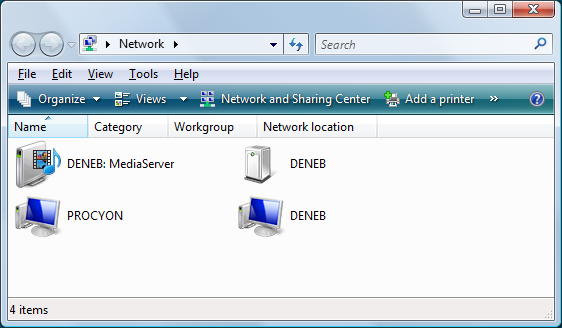
...now I can access the new server from it. I'll do the same for Arcturus in a while, after the server finishes doing its updates.
UPDATE: Why is the keyboard-less screen-less server trying to install IE8? (I know the answer: because it's generic Windows Server 2003 and you can run that with a keyboard and monitor if the hardware support them.)
Posted by: Steven Den Beste in Computers at
03:37 PM
| No Comments
| Add Comment
Post contains 940 words, total size 5 kb.
ASUS Easystore -- not so easy
It's a good thing I got up earlier this morning than I usually do. UPS showed up a lot earlier than they usually do.
Plugging in the EasyStore was, well, easy. Not really very much to it. But it doesn't work. After starting up, once all the blinkenlights stop blinking, what I get is this:
Power indicator: steady blue
Network indicator: steady blue
HDD indicator: off
"i" indicator: purple
drive bay indicators: all four are purple
The power indicator means that power is on normally. The blue network indicator means that the ethernet is working normally. The HDD indicator being off means it doesn't think it has any working HDDs. The "i" indicator being purple? Well, that's not one of the listed states in the documentation, but I think it means "boot failure". And the drive bay lights all being purple? No idea. Also not among the listed states in the documentation.
Which is a bit confusing because one of those contains the drive that was shipped with the unit. That's how it acted when I first used it. So I decided to see whether putting the second drive in would change anything. Unfortunately, it doesn't. With the second drive in, it's still the case that all four drive bay indicators are purple.
Which is not one of the listed states in the documentation. The only states listed are blinking blue and off.
I can't really do anything more right now; I have to stay home because I scheduled a big grocery delivery today. (I do this a couple of times per year when I run low on soda. Safeway is going to be delivering 12 12-can cases of soda, plus a lot of other heavy stuff.)
I'm thinking that what I really should do is to use the recovery CD. But I'm not sure it would help. It's acting like the drive controller doesn't work. Or something; it'd sure be nice if the documentation actually, you know, listed all the states the lights can really be in, so that I understood what it was trying to tell me.
Pixy? Are you around?
UPDATE: The obvious next step was to visit Asus online and look for tech support information. But as far as the Asus home page is concerned, the word "EasyStore" doesn't exist. There is no such product or product line. Cool, huh?
Posted by: Steven Den Beste in Computers at
09:28 AM
| Comments (7)
| Add Comment
Post contains 400 words, total size 2 kb.
1
I went to google, typed in "Asus Easystore" and there was no obvious vendor support page, just a bunch of reviews. This post was the sixth page down.
Posted by: pgfraering at October 05, 2009 12:57 PM (HbS/H)
2
Do you mean Acer rather than Asus? A bit of digging around turned up
this. Blatantly stolen from the thread (about resetting the device):
1. Run the Server recovery CD on a PC and follow the instructions with regards to removing software (IGNORE THE REST FOR NOW)
2. Turn off the Acer, hold power button for 4 seconds
3. Using
a paper-clip, or similar, push in the recovery button on the back of
the unit and KEEP it pressed in WHILST you turn on the unit
4. If you have done this correctly the i will flash RED on the front of the unit
5. WAIT patiently until you see the network icon, on the front of the unit, flash BLUE
6. Now you can press the NEXT button on the Server Recovery Software and it WILL find the server very quickly
7. Follow
the instructions now from the Server Recovery Software. It DOES take a
long time to recover (best part of 1 hour on a Gigabit network). Shame
they didn’t put the 3Gb image on the 1Tb drive to save time!!!
Hope that helps someone save a few days of struggle
PS Acer support are useless
If nothing else, perhaps doing this restore might help?
Posted by: DrHeinous at October 05, 2009 01:35 PM (nFJC+)
3
I found the support page
here, but it doesn't contain much more than the manual.
I think the recovery CD is your best bet.
Posted by: Pixy Misa at October 05, 2009 03:16 PM (PiXy!)
4
Doc, you're right, it is Acer. I guess I really am getting old.
Those instructions are from the electronic documentation and it was what I was going to try if Pixy didn't have any good ideas.
Posted by: Steven Den Beste at October 05, 2009 03:16 PM (+rSRq)
5
And it sounds like you need to follow the instructions DrHeinous posted above, rather than what's in the manual...
Posted by: Pixy Misa at October 05, 2009 03:19 PM (PiXy!)
6
I see that Pixy was posting just as I was, and doesn't have any magic pixy dust for me. So I guess I best be getting on with it.
If it takes an hour at thousand megabit, it should be even longer with hundred megabit. But I don't want to tie up my main computer, so I'm going to use the other one for this.
Posted by: Steven Den Beste at October 05, 2009 03:20 PM (+rSRq)
7
Unfortunately, mine are the previous model, and are quite different, and I've never had to go through this process.
Posted by: Pixy Misa at October 05, 2009 03:20 PM (PiXy!)
Hide Comments
| Add Comment
October 02, 2009
First round toys
UPS just delivered my new ethernet router. Installation was dead easy, as it really should be. Just plug the new one in, move all the cables over from the old one, and networking picks up immediately.
It's got two indicator lights for each connection. The top one blinks for traffic. The bottom one lights if the connection is 1000 megabit, and the one for my main computer does.
Since the connection to my server is 100 megabit, which has the cable modem on its other ethernet port, this won't have any effect on my web browsing. but it means that I'm ready to plug in the NAS when it comes on Monday.
Posted by: Steven Den Beste in Computers at
01:33 PM
| No Comments
| Add Comment
Post contains 115 words, total size 1 kb.
September 29, 2009
Microsoft Security Essentials
Microsoft just released their version of an antivirus program. It's called Microsoft Security Essentials and it's free.
What I'm not clear on is this: how is this different than Windows Defender?
Posted by: Steven Den Beste in Computers at
03:33 PM
| Comments (4)
| Add Comment
Post contains 34 words, total size 1 kb.
1
It supersedes Windows Defender, and adds anti-virus support.
Posted by: renpytom at September 29, 2009 04:37 PM (vkkAp)
2
Then presumably it will eventually end up in Windows Update, just like IE8 did.
Posted by: Steven Den Beste at September 29, 2009 04:48 PM (+rSRq)
3
I've been testing this since the beta started, and it's been much better-behaved than Norton, McAfee, etc. Various independent tests show it to be about as effective, too, which leaves those companies telling you how wonderful all their
other features are. Which just reminds me how often those other features create problems for users...
-j
Posted by: J Greely at September 30, 2009 07:13 AM (2XtN5)
4
I've figured that the main reason MIcrosoft hasn't done this before was fear of antitrust suits akin to the one they faced about IE, or the problems they've had in Europe about Media Player.
Posted by: Steven Den Beste at September 30, 2009 09:06 AM (+rSRq)
Hide Comments
| Add Comment
September 28, 2009
NAS
Today's acronym is NAS, which stands for Network Attached Storage. It's an auxiliary computer that sits on a LAN and acts as a file server. They seem to be designed to be operable without keyboard or screen. Newegg offers a swarm of them, in a bewildering number of sizes, prices, and configurations.
And I'm seriously considering getting one. One of the reasons is that they come with 1000 megabit ethernet. If I can also buy a 1000 megabit ethernet hub, then it would mean my main computer could talk to the external storage without being choked by 100 megabit ethernet. But it would also mean my torrent computer could talk to the NAS directly. That would be very handy.
And yet another nice thing is that the NAS's are all designed to operate in RAID mode. RAID 1 is supported by most of them.
What I don't know is what operating system a lot of them come with. At least one of them is offered as a bargain package along with a load disk for Windows Home Server, which may well be good enough for my purposes. (Yeah, Linux is better. Leave me alone.)
I'm really tempted by that one. It comes empty, so I'd have to buy a couple of HD's for it, but that's no big deal.
Here's the manufacturer's page for it. What I can't tell is what form factor drives I have to order to put in it. All I know is that it supports SATA. Are all SATA drives physically the same size? Is that the deal?
This one might be a better choice. At least it provides example HD's which are compatible. One of the ones listed is 1.5TB, which sounds like a good thing. But for that one I'm not sure what OS it runs. The manufacturer page says "Preconfigured with version software" (whatever that means) but doesn't make obvious just what that software is.
I dunno. Pixy just bought one; maybe I should go look at what he got.
Posted by: Steven Den Beste in Computers at
09:33 PM
| Comments (17)
| Add Comment
Post contains 338 words, total size 2 kb.
1
Indeed, make sure to talk to Pixy before making a move on NAS.
Posted by: Pete Zaitcev at September 28, 2009 09:44 PM (/ppBw)
2
I have a couple of Acer EasyStores. The older (now discontinued) model rather that runs Linux than the
new one that runs Windows Home Server.
The ones I have work very well, but they are no faster than a regular USB drive - about 15MB/second. That's because they run a 500MHz Arm chip, and it just can't keep up.
The new EasyStore has a 1.6GHz Atom chip - much faster - and 2GB of RAM compared to the 128MB in mine, which will make a huge difference. It costs more than the other models you mentioned, but that includes a 1TB drive and it holds four drives rather than two.
I had a drive fail in one of my EasyStores recently, and it didn't even hiccup. It kept on working the entire time, and when I replaced the dead drive the online rebuild did exactly what it's supposed to. Since that's the box that has all my anime on it, I consider it $300 very well spent.
Posted by: Pixy Misa at September 29, 2009 02:53 AM (PiXy!)
3
I think 15MB/s is a respectable platter speed for a 5400 RPM drive. I am not sure ARM is the culprit.
Posted by: Pete Zaitcev at September 29, 2009 09:00 AM (/ppBw)
4
Not so respectable for 4 drives in RAID-5, though. And the same drives do about 60MB each when attached via SATA.
Posted by: Pixy Misa at September 29, 2009 11:06 AM (PiXy!)
5
Pixy, the main thing that confuses me is whether it's possible, and even easy, to manage one of these things without attaching a keyboard and screen to them. I can do that with my Qube because all the management is done through web pages. (In fact, there's no where on the Qube to attach a monitor.) Do they have something equivalent going on with the Easystore?
That one you linked to looks fine for my purposes, and I'm not afraid of the price at all. Plus I like the possibility of upgrading it to 2 TB. But if it needs a keyboard and a screen, it's pretty much useless to me.
Posted by: Steven Den Beste at September 29, 2009 11:16 AM (+rSRq)
6
All the consumer NAS products I've seen are web-managed; they don't even have video cards. My ReadyNAS NV+ allows you to remotely log into its Linux OS, but it's not needed for any file-server functionality; it's mostly for people who want to add unsupported network services.
-j
Posted by: J Greely at September 29, 2009 11:24 AM (9Nz6c)
7
Yep, as J says, they're all web-managed. Some of them run Linux or BSD and allow you to log in directly as well, but all of them offer a web interface.
Posted by: Pixy Misa at September 29, 2009 11:39 AM (PiXy!)
8
The question is how good that Web interface is. My printer has a Web interface; I've seen better ones.
Posted by: Pete Zaitcev at September 29, 2009 12:04 PM (/ppBw)
9
The one on mine is basic but functional. I think Windows Home Server has a console application that you install on your PC. Aha.
Yes, console app, no, install - it's an
RDP app. Makes sense.
Posted by: Pixy Misa at September 29, 2009 04:24 PM (PiXy!)
10
OK, I'm convinced. I just put in an order for that Acer Easystore, plus a 1TB drive, plus a 1000 megabit ethernet router. Total including shipping was $527.
They gave me a $40 discount on the Easystore because I bought a drive along with it, which is pleasant.
Posted by: Steven Den Beste at September 29, 2009 05:03 PM (+rSRq)
11
Probably a moot point now, since you've ordered a box that has a flavor of Windows under the covers, but just a handy data point in case it comes up in the future: many of the NAS boxes out there (sorry, I don't recall exact makers, but I stumbled into more than one of these when I was thinking of getting one myself) have an OS that limits the length of file paths to something unreasonably small, like 128 characters, which can be a pain if you have a directory structure that's nested pretty deep.
128 may seem like a lot, but it's smaller than Win32 allows, which can be annoying if you want to use it to drag some big directory tree off your PC and it turns out there's some leaf that's just over the limit...
Posted by: snark at September 29, 2009 05:48 PM (w47od)
12
Using Linux or BSD also has issues relating to file protection since the file protection systems are entirely different.
Posted by: Steven Den Beste at September 29, 2009 06:37 PM (+rSRq)
13
Linux has EA (Extended Attributes) on files that Samba uses to support the CIFS ACLs fully, so that's not an issue. I honestly don't think there's a whole lot of a difference, except possibly in cost.
Short paths are out of the question because of the way fansub and raw files are named. If that happens, it's time to return the box for a refund.
Posted by: Pete Zaitcev at September 29, 2009 07:14 PM (/ppBw)
14
Everything I've read about NAS devices indicates that speed is the key. Unless you do your homework very carefully, you'll end up with something that's got the performance of an ancient 4800rpm laptop hard drive, if that. One of my friends bought one of the "you supply the hard drive" cases and filled it with mongo high-speed 10k rpm drives in RAID, and the perfomance absolutely sucked.
I gather that the ones that run a micro kernel or a stripped version of linux are faster than the ones that run windows media server, but that's not always a hard rule.
Posted by: David at September 29, 2009 08:26 PM (n/RK7)
15
David - yeah, a lot of the cheap appliances seem to be based on the same controller board, and are most definitely not fast. But for shove-the-drives-in-and-forget storage, they work great. On mine, a drive failure makes the whole front panel glow red, but it keeps right on working.
Posted by: Pixy Misa at September 29, 2009 08:55 PM (PiXy!)
16
That's strange; a comment of mine I am sure I posted isn't here. Maybe I deleted the tab without pushing the post button.
Anyway, despite my comments about thousand megabit ethernet, I don't really care all that much if this is blazingly fast. The main attractions here are RAID and the fact that both computers will be able to access this external storage.
Posted by: Steven Den Beste at September 29, 2009 09:30 PM (+rSRq)
17
Yep, the great thing about these devices is you set them up with RAID and then just stop worrying about storage. Well worth the investment.
Posted by: Pixy Misa at September 30, 2009 03:11 AM (PiXy!)
Hide Comments
| Add Comment
69kb generated in CPU 0.0253, elapsed 0.1406 seconds.
46 queries taking 0.1151 seconds, 129 records returned.
Powered by Minx 1.1.6c-pink.