
February 26, 2009
I just figured out how to deactivate the Windows Media Center. It's been a particular problem for me because this computer has a panel of buttons on the front which invoke WMC, and I can't tell you how many times I've hit them by mistake.
Here's how you kill it off:
From the control panel, run the "Default Programs" tool.
Select "Set program access and computer defaults"
Yes, you know that it's doing something dangerous and you're willing to let it have admin privilege.
Click the expansion tool on the right side for "Custom".
Scroll down to the "Default Media Player" section.
Unclick "Enable access to this program" for Windows Media Center.
Select "OK".
After I did that, I tried hitting the front panel buttons, and I got an error popup:
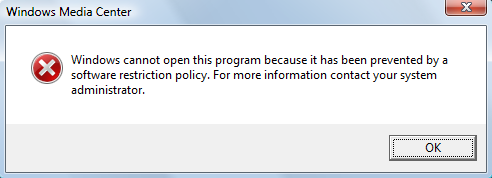
Yes! Exactly right! Getting rid of the popup entirely would have been even better, but this is good enough. WMC took something like a minute before it started listening to "Go the hell away you stupid program" clicks, and it seizes the entire screen in the mean time. What a piece of shit...
UPDATE: There's a degree of irony here. I'm running Vista Home Premium, and the main difference between Home Plain and Home Premium is Windows Media Center, which I hate with a fiery passion.
Posted by: Steven Den Beste in Computers at
10:03 PM
| Comments (1)
| Add Comment
Post contains 222 words, total size 1 kb.
February 09, 2009
So a couple of months ago I triumphed over my fear and installed a year's worth of Vista patches, including SP1. That also included a year's worth of patches to IE.
As to Vista, frankly I haven't really noticed any difference. Whatever they were doing, it was under the hood. The IE patches didn't seem to add any features, either, but now IE tends to behave strangely some of the time.
There are two failure modes. In one of them, it locks up and goes completely CPU bound. This is a dual-CPU system, so I can still interact, but it's still a bit creepy when suddenly the CPU cooling fan shifts up and starts running as fast as it can.
The other mode is more common but just as annoying. IE locks up cold, again, and ignores all input including mouse clicks, but the CPU doesn't get hammered. The only way I've found to kill it is to use the task manager. This happens to me several times per week, and it's really a pain. And it doesn't correlate to visits to particular sites. (Nor, please, do I need any suggestions or advice on this subject.)
On balance I've found Vista to be serviceable. I suspect that XP would consume less CPU and less HD space, but I've got both to spare and it hasn't been so piggy as to be unpleasant.
So it hasn't really been substantially worse than XP. And it hasn't really been better, either. there are things they added in Vista, but I don't use any of them, and I've got most of them shut down. The Macified OS graphic gimcracks, for example.
Based on my experience, Vista doesn't deserve the bad rep it's got in some circles. But it isn't anything special, either. If you have XP on your system and it works, there's no compelling case to be made for upgrading.
I've been reading a bit about Windows 7, and everything I've seen makes it sound even less appealing to me. Microsoft's biggest competition has always been older versions of their own products, and when it comes to operating systems they've pretty much run out of worthwhile additions, and have taken to adding crap and frippery just to differentiate the new ones from the old.
We've reached the "tail fins and chrome" stage.
UPDATE: Originally it was planned that the big deal in Vista was going to be the new filesystem, which used a relational database for its file index. But they ended up postponing that. Is it expected to be in Windows 7, or was it postponed again? Or did they scrap it entirely?
Posted by: Steven Den Beste in Computers at
05:46 PM
| Comments (8)
| Add Comment
Post contains 445 words, total size 3 kb.
 ). There are no systems to reproduce it, it's a 2.4 kernel, it happens very infrequently at customer system, and the diagnostic capabilities of 2.4 are nil in that area (one of the reasons I created usbmon for 2.6.11+). Practically speaking, there's no way to fix it. In theory, if someone were willing to furnish an exact copy of the failing box which I could test... and it would take a while. Last time I had a bug like that, it took months (also EHCI on Sun x4100, turned out it was reading the new address at the end of the frame instead of the start -- who knew!, and so it would drive one transaction with stale (zero) address). And that was 2003. The idea to go back to Windows XP and fix something in its 2001 vintage internals just scares me. NO FRIKKING WAI.

January 26, 2009
Last fall I discovered that you really shouldn't try to pry up the keycaps on one of these itty-thin keyboards they use in notebooks. Several of them went back on fine, but my F key got loused up and has been causing me problems ever since.
The replacement keyboard my brother ordered for me finally arrived today, and we just put it in. It feels a bit funny, really. Especially the F key does. I figure it's kind of like when I get new glasses, where everything looks kind of strange for a day or two, and then I get used to them.
In the mean time, no more accidentally dropped f's in my prose! Yay!
Posted by: Steven Den Beste in Computers at
03:48 PM
| Comments (1)
| Add Comment
Post contains 120 words, total size 1 kb.
January 01, 2009
For future reference: How to delete Flash Cookies
I didn't even know Flash could do this.
Posted by: Steven Den Beste in Computers at
11:53 AM
| No Comments
| Add Comment
Post contains 18 words, total size 1 kb.
December 29, 2008
I just bought another Slysoft product: CloneDVDmobile. If I'd been paying attention I'd have gotten it the first time.
It does what Vidomi does, except that it works a damned sight better. I just used it to convert the Ninja Nonsense extended version of the ED, which is 3:37 long. Converting it to DivX AVI with a downshift to 320*480 took 45 seconds. Converting it to 640*480 only took 58 seconds. (And that was with it only using one of my CPUs. Using both doesn't seem to be an option, but it hardly needs it with those kinds of conversion rates.) And it's amazingly convenient to use; really very fast to set up.
The video that resulted, even with only one pass and the quality set as low as it could go, was surprisingly good, and about 10 megabytes for the 320*240 version. I might try 3 pass to see how much the video quality improves, or maybe see if the resulting file gets smaller. (Presumably it's one or the other.)
Most impressive. I wanted to pick it up before the end of the year. As of now, if you buy one of their products you get upgrades forever. Starting beginning of next year, you get upgrades for one year and have to pay for upgrades thereafter. So if you're inclined to get any of their products, do it now.
UPDATE: Well, with all other settings being the same, 3-pass takes almost exactly three times as long as 1-pass. The output files are nearly the same size; the 3-pass file is actually a bit bigger. The resulting video quality or the 3-pass file is probably a bit better, but with this particular source material I can't really see any important difference. Maybe it'll be different if I convert some of the animation instead of the stop film, which is inherently fuzzy anyway.
UPDATE: In some ways it isn't as good as Vidomi. Vidomi allows me to extract arbitrary subsections out of the source media, and I can control the start and end frames precisely. CloneDVDmobile only allows me to extract out complete chapters.
UPDATE: No, even converting sharp animation, I can't see any significant difference between 1-pass and 3-pass. What's the point of it, anyway?
UPDATE: OK, I just looked it up, and it makes sense. Also, it's not going to matter much when you choose a lousy quality setting, which is what I was doing.
Posted by: Steven Den Beste in Computers at
07:48 PM
| No Comments
| Add Comment
Post contains 407 words, total size 2 kb.
December 28, 2008
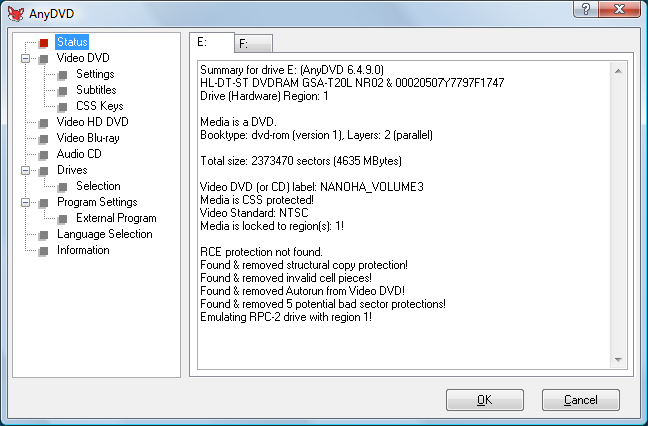
Look at all that crap the AnyDVD found and handled. I wonder what mastering package they're using at Bang-Zoom that permits them to perform that kind of vandalism on the VOB structure.
For all the good it did them.
UPDATE: Indeed, considering some of the other weird aspects of the way these DVDs were mastered, I wonder if it was even deliberate. (As opposed to "default settings on the tool that I didn't notice", for instance.)
Posted by: Steven Den Beste in Computers at
08:24 PM
| No Comments
| Add Comment
Post contains 81 words, total size 1 kb.
December 19, 2008
Looks like Comcast has had enough of Level3. My traceroute to my DNS used to go through Level3 and used to require about 23 hops. Now it's 12 hops, and it's going through something called "ibone".
And my route to mee.nu is shorter, too. This could be good.
UPDATE: It's also faster. My ping time to my DNS used to be about 200 milliseconds. Now it's about 140. Considering that the DNS is in New Jersey, that's not too bad.
Posted by: Steven Den Beste in Computers at
10:03 AM
| Comments (9)
| Add Comment
Post contains 82 words, total size 1 kb.
December 08, 2008
I just ran the "disk cleanup" utility on my C drive. Some of the more amazing wastes of space it found: 265 MB for "System error memory dump files", 332 MB for "per user queued Windows error reports", and a whopping 2.83 GB of "temporary files".
Why in hell aren't programs cleaning up their temporary files? Is this some new meaning of "temporary" I wasn't aware of?
After I got done, I gained fully 3.6 GB.
Posted by: Steven Den Beste in Computers at
11:56 PM
| Comments (8)
| Add Comment
Post contains 80 words, total size 1 kb.
December 07, 2008
Did you know that there's a hidden directory in the root drive called "ProgramData"? It's parallel to "Program Files" and any program that wants a directory in there can create it.
It's for programs to store dynamic files which, under previous versions of Windows, would have gone into the install directory. Vista doesn't allow that; the install directories are all now protected. The entire "Program Files" directory structure now requires admin privilege to change.
Programs are supposed to put dynamic files into the "My Documents" in the "AppData" directory, but a lot of them don't want to because they want their dynamic files to not be user-specific.
And so it is with Zoom Player. I've wondered for a long time just where in hell it was storing the bookmarks, and I just found it. On my system it's in the directory C:\ProgramData\Zoom Player\DVD-Bookmarks.
Each individual DVD gets its own subdirectory in there, and every bookmark is a separate file with file extension .chp.
It's a bit surprising the other stuff I've found in ProgramData. Flash CS3 puts all its help files in there, for some strange reason.
And there's a Symantec directory in there which seems to contain support files for a virus checker. Which is a bit disturbing, because I don't have a Symantec virus checker installed. (I think maybe one was on it when I got this computer, though, one of those "90 days and out" crapware things.)
Anyway, it's good to find that directory for Zoom Player, because I want to be able to back it up. One time a couple of months ago I was having keyboard troubles and did some key mashing when Zoom Player was active, and all my bookmarks vanished. Presumably there's some hotkey combination which does that and I lucked into it.
Today, I have an entirely different reason. After installing AnyDVD last night, all my prior bookmarks (created since that last casualty) no longer work, so I genuinely wanted to delete them. Once I found that directory, it was easy to kill everything below it.
Posted by: Steven Den Beste in Computers at
12:55 PM
| No Comments
| Add Comment
Post contains 347 words, total size 2 kb.
December 06, 2008
I am a law breaker. I just purchased AnyDVD, a package which overrides encryption on DVDs. Actually, I purchased the version of AnyDVD which also cracks HDDVD and Blu-Ray, because I wanted to be covered. But I can't test that part because I don't have a high density drive. (I'm waiting for prices to fall and material worth buying to become available.)
These products are a violation of the DMCA. Ask me if I care.
So how does it work?
With it installed, I can scan through the first Nanoha DVD using Vidomi, which means that the data being handed to it is unencrypted. So it does really decrypt. But there are a bunch of settings that don't seem to be doing what they're supposed to. For instance, I have told AnyDVD to skip directly to the menu, but it isn't doing it with the first Nanoha DVD. It's set to override "prohibited user operations", but Zoom Player still won't permit me to use the jump-forward and jump-backward features.
And all the bookmarks I had set up don't work any more. New ones work, but none of the old ones on that DVD. A bit of a pain, that will be.
But it does do the main thing it's supposed to do: remove encryption and copy protection.
I wish I could buy a copy of Princess Mononoke on Blu-ray. That would be enough to induce me to buy a USB Blu-ray drive.
UPDATE: When I tried ripping the Nanoha DVDs using SmartRipper, it bagged it part way through the first big VOB file. Looks like they deliberately tossed a bad block in. Bad-block copy protection is one of the things AnyDVD is supposed to override, and it seems to. I can scan all the way through that file with Vidomi without having any problems.
Posted by: Steven Den Beste in Computers at
11:05 PM
| No Comments
| Add Comment
Post contains 305 words, total size 2 kb.
43 queries taking 0.1387 seconds, 104 records returned.
Powered by Minx 1.1.6c-pink.