
August 22, 2008
Microsoft has decided that Vista needs a public face, and they've decided to make it Jerry Seinfeld.
If they were smart, they'd realize that the work of creating a public face for Vista has already been done for them. Behold Vista-tan (somewhat NSFW) below the fold:
more...
Posted by: Steven Den Beste in Computers at
11:46 AM
| Comments (7)
| Add Comment
Post contains 86 words, total size 1 kb.


August 12, 2008
The graphics tablet was just delivered.
Most important surprise of all: the surface of the tablet works with my Microsoft optical mouse. The table I'm using doesn't, so I've been using the cardboard on the back of a paper tablet as a mousepad all this time. But now I don't have to, and the reason that's good is that it means I won't constantly be shoving the tablet out of the way to use the mouse.
The installation disk is completely useless. The setup program doesn't have a choice for installing the driver. All it allows you to do is to install sampleware, a lot of things I don't want. Vista installs basic drivers automatically, but all they do is make the tablet a pointing device.
So Flash recognized it as a pen device but didn't let me use pressure control -- which defeated the purpose. A quick visit to the tablet maker's home page, however, and turns out there was a driver package I could download and install. Once that was in, Flash gave me the extra two controls ("use pressure" and "use tilt") which are needed to really fully utilize a tablet with the paintbrush tool. I doubt I'll be using the tilt sensing; I'm not even sure what it's good for. But the pressure sensing really does work, though it'll take some getting used to.
It's probably more natural for someone who's already a good artist, but I'm not included in that category. Stick figures are more my speed, so I'm actually going to have to learn to draw now. (Fat chance!)
Anyway, it's installed, and it works.
More bad news: as soon as the thing was plugged in, Vista started running a new program for me. It's an input pad for handwriting recognition, apparently something Vista has for tablet-PCs and I don't want it. When it isn't in use, it slides to the left side of the screen, and you can bring it out by hovering over it. But that's where I put my start bar, and it's in the way. I finally found a setup setting that gets rid of that, but just now when I was logging back in (after rebooting for the driver install) it popped up when I was entering my password. There's also a setup option I noticed to make it not do that, but I think those settings may be user-specific, which would mean they don't apply when you're not logged in. Guess I'll just have to get used to it.
The program is called "Tabtip.exe" and you can't kill it in the task manager. There are two entries, one large and one small. If you kill the large one, the small one restarts the large one. If you try to kill the small one, you get told you cannot.
But right now at least I've got it set up so it doesn't appear when I'm logged in and running. Close enough for government work.
UPDATE: Biggest culture-shock: a tablet is an absolute-position device. Mouses, which I've been using since about 1983, are relative position. To move a long distance with a mouse you "scrub"; move a distance in that direction, pick up the mouse and return it, then drop it again and move it further.
You can't do that with a tablet, or at least not with this one. If you try, you end up moving your cursor over the same are over and over. It's going to take me a while to stop doing that, I think; a 25 year old habit will be hard to break.
I tried to see what some of my other programs would do with the tablet. Paint Shop Pro 8 does support pressure, and I did some messing around with the paint brush tool there, with it set up to use pressure for the color intensity (rather than for the brush size). It works really well.
I have another image editor I use called PhotoMagic 4. It's really old; I think that version of it dates back to about 1996. But I like it, and I've long been used to it, and it allows me to do some things easily that are not easy with any other tool I own. I wanted to see what it would do with the tablet.
Turns out it doesn't know about tablets, but the tablet is useful with it anyway. In particular, it's really nice to use the tablet with the airbrush function, and the reason is that the airbrush turns on with the pen is down and turns off when it's lifted. When the brush intensity is really low, it makes it really easy to do "over and over" stuff.
You could do that with a mouse, too, but it means using the left button a lot to turn the flow on and off. I don't use it that way with the mouse; I hold the button down and spray continuously. But with the tablet it's really easy to turn the spray on and off, and it works better that way.
That also applies to PhotoMagic's clone tool; and I think it will allow a better result with that than using the mouse.
Um, not only is the pen position absolute, it's oriented to the physical tablet rather than to my hand. Right now I've got the tablet square to the table, but I'm going to experiment with having it rotated so that it's square to me. That may be better and it may be worse; only one way to find out.
UPDATE: Another thing I'm used to with the mouse is being able to lift and move without moving the pointer in order to move my hand to a more comfortable position. With the tablet I can't do that.
UPDATE: The box says that this tablet "Makes your life fashionable!" Can you tell? Notice the change? Glamor, baby, glamor!
...I haven't been fashionable in my entire life and I wouldn't recognize fashionable if it landed on my head...
UPDATE: There's a new applet in the control panel, called "Pen Pad". One of the choices in it is whether the tracking mode is absolute or relative. When you switch to "relative", you can scrub to move the cursor. DEFINITELY leaving it set that way!
There's also a "Pen and Input Devices" applet, which is nice because it has a place where I can disable "flicks". I know a lot of people love those, but for me they're a boobytrap I want nothing to do with.
Posted by: Steven Den Beste in Computers at
02:11 PM
| Comments (7)
| Add Comment
Post contains 1092 words, total size 6 kb.

August 06, 2008
NewEgg says my tablet shipped today. (From Tennessee, for some reason. I thought they were in Los Angeles.) It's coming by UPS third day, so unless I'm really within 2 days of TN, which I doubt, I'll get it Monday.
UPDATE: These kinds of mail-order places quite often have multiple shipping sites, mainly as a way of avoiding paying sales tax. If someone in California orders from NewEgg and NewEgg ships from Los Angeles, then they have to charge sales tax on it. But if NewEgg ships from Tennessee (or Nevada), they don't. Which is easier for the company (less paperwork) and better for the customer. (Have you seen what the California sales tax rate is these days? Ye Gods! And Arnold wants to hike it another 1% "temporarily" to solve the state's budget problems.)
I would guess that this is an inventory issue: likely Los Angeles was out. Or maybe this is what I get for not paying the extra fee for expedited shipping.
Posted by: Steven Den Beste in Computers at
04:55 PM
| No Comments
| Add Comment
Post contains 167 words, total size 1 kb.
August 05, 2008
This would be about the time of the month when I would put in a new order for DVDs, but sad to say there just isn't anything I want. I've got a list of things but none of them are particularly urgent. (Sorry, Bob.)
So I decided to spend some money on a computer toy instead. I've been messing around with Flash 9 off and on for quite a while now, and have become somewhat dissatisfied with my mouse as a means of doing fine drawing and fine control. So I just took a look at NewEgg and they had a special today: a crap, small, no-name tablet for $100.
I have no idea whether a tablet is something that I'd find useful, and the only real way to find out is to have one and use it for a while. So I'm getting the absolute cheapest tablet I can find. If, after a while, I find that I like using it but that I want better features (or more fine resolution, or faster response, or something) then I can spring for another for more bucks. And if it turns out that I don't like it, I'm not out very much.
So the order went in today; it'll ship whenever, and probably I'll have it by next week some time. This time I didn't pay the extra few bucks for expedited shipment, and it'll be interesting to see just how long it does take NewEgg to get the thing out the door.
One of the reasons why a tablet is superior to a mouse is pressure control. When you use the "paintbrush" tool, the tool size is a function of how hard you press. There's no way to do that with a mouse, and it should make it easy to create shapes that now I can only achieve by manually manipulating keypoints and splines.
Posted by: Steven Den Beste in Computers at
01:37 PM
| Comments (2)
| Add Comment
Post contains 316 words, total size 2 kb.
August 03, 2008
I've been trying to use Zoom Player for DVDs now in preference to PowerDVD, mostly because continuous experience with it is the only way to really understand its faults and virtues.
And it does have both. Virtues:
* Doing a frame grab grabs the frame that's being displayed. That was the case with earlier versions of PowerDVD, too, but as of the most recent version, you get a grab of the frame several steps later than the one you're looking at.
* When you stop and then do single steps, you have direct control and it acts like you expect it to. In PowerDVD (all versions I've used) your first "step" takes you forward ten or fifteen frames before it finally freezes. Which is a pain.
* When you're using Zoom Player to look at a stored MP4 (e.g. the Strike Witches episodes I've been buying from CrunchyRoll) you can single-step backwards.
* There's more control over jumps. With PowerDVD the PgUp and PgDn buttons respectively jump backwards and forwards by an amount that you can control from a setup page. (I have it set to 10 seconds.) In Zoom Player, currently I'm using the cursor keys for that. Likewise controllable from setup, my "up" key goes ahead 20 seconds, my "right" key goes ahead 5 seconds, my "left" key goes back 5 seconds, and my "down" key goes back 20 seconds. Much handier to readily have more step sizes available.
* One of my biggest bitches with PowerDVD is that the display window size doesn't have anything to do with the native size of the material being displayed, and there's no way to make it have any relationship to that size. Zoom Player has a 100% hotkey (alt 2) and a 200% hotkey (alt 3). When your display size is a reasonable multiple of the native resolution, the display is more crisp. (On the other hand, choosing "100%" doesn't always get you 100%. See below.)
* You can name your bookmarks. Also, you can designate one bookmark per DVD as an auto-start point, which I'm not likely to use much but which I can see as being quite handy as a way of skipping obnoxious logos and advertisements in some cases.
* Frame grabs are named after the disk or file they came from, with a sequence number appended. PowerDVD's frame grabs use a base filename you enter in a setup field, so changing that is a pain.
Faults?
* No graphic thumbnails for bookmarks. In PowerDVD there's a frame you can enter which shows you miniature frame grabs for every bookmark, which is really handy. (Being able to rename bookmarks only somewhat mitigates this.)
* To set a bookmark you have to use a hotkey to bring up a popup, then click a button. There's no direct hotkey for creating a bookmark.
* It has a readout of the native size, but it isn't always right. I watched some of the first season re-release of DBZ last night, which is anamorphic wide screen, and the readout said it was 720*540 (i.e. 4:3) even though it was clearly 16:9.

(full) The video area is 960*540, even though I set it to "100%". That means it is resized and thus less sharp than it ought to be. It really should be 853*480. (Which is to say, resized in only one dimension, not in both.) And the size readout should be correct.
* Frame grabs are not raw. They're resized to correct the aspect ratio. It looks as if ripping and then using Vidomi on the rip will continue to be my tool-of-choice for getting high quality frame grabs for things like the top rotation.
(Oddly enough, a frame grab of that DBZ DVD shown above is 853*480.)
* Frame grabs include the subtitles if those are turned on. This is something about which I'm highly ambivalent.
* The "single step backward" function (shift-comma) does nothing at all on a DVD. On PowerDVD it steps back by keyframes, which is more coarse than single frames but still useful. (Though the tendency for it to play forward a bunch of frames once you start moving forward again tends to diminish the utility quite a lot.)
* Single-stepping forward (shift-period) makes the sound blurp briefly. I can't see any use for that.
* Setup is a nightmare. Too many choices, not enough explanation, cryptic choices, catastrophic consequences for wrong choices, and no help. Fact is, this program is not ready for prime time because like so many hobbyist-developed packages there's too much concentration on flexibility and not enough concentration on hand-holding for non-cognoscenti users.
Other comments:
Where is it storing the bookmarks? PowerDVD has a function for saving all your bookmarks to a file, which you can transfer to a new computer. In the past I've had trouble making that work, but it did work fine for the most recent version under Vista, so I was able to transfer 2 years of bookmarking onto my new computer. I looked in the Zoom Player home directory, and in all the "usual" places (i.e. in my "user" directory) and couldn't find a ZP-specific file for bookmarks. I'm really afraid they've decided to put them in the registry.
Last night I tried watching the first DVD of the first "Ranma 1/2" series. When it got to the second episode, I thought for a while that Zoom Player had suffered a partial crash. Virtually all of the hotkeys stopped working.
For instance, I couldn't use semi-colon to get to the disk menu. The cursor keys didn't work for doing skips. Also, there was no elapsed-time display bar on the player window. I was afraid something had gotten permanently broken, but it worked fine for the first episode and it worked fine for another DVD I tried, and finally it occurred to me that this is how ZP responds to DVDs which were mastered to shut off some kinds of user functions.
That's part of the DVD specification, and I think that licensed DVD players, software or hardware, are contractually obligated to honor those flags on DVDs. I've always hated that, but I can't blame the makers of player programs since they have no choice. Fortunately, not very many DVDs have those kinds of restrictive settings.
Still, it seems as if ZP has gone rather too far. In PowerDVD I can still get to the DVD menu in those kinds of sections, but the semicolon key in ZP didn't work in that episode, which is how you usually get to the menu.
Now that I have subtitles working, I'm finding that ZP really is a nice alternative to PowerDVD. I'll keep PowerDVD installed on this computer, but I'm beginning to think that ZP will become my standard player. At least no show stoppers yet, now that the subtitle problem has been cleared up.
Posted by: Steven Den Beste in Computers at
01:47 PM
| No Comments
| Add Comment
Post contains 1150 words, total size 7 kb.
July 30, 2008
One of the things I did yesterday was to run Zoom Player as administrator. That was so that I could register a couple of filters, which didn't work.
But it occurs to me that some other setting change that I had made earlier was in abeyance, and only went into effect when the program was run with administrator privilege, and that's why subtitles on DVDs started working yesterday.
Posted by: Steven Den Beste in Computers at
02:05 PM
| No Comments
| Add Comment
Post contains 73 words, total size 1 kb.
July 29, 2008
And I have no idea why, because I didn't think I made any substantive change between the last time I checked it and this time.
You can read the gory details in this support thread.
I'm grateful for the help, but...
...but I shouldn't have needed it. If someone is charging $30 for a product, which is what I paid for the "professional" version of Zoom Player, then it ought to work out-of-box.
UPDATE: The frame grab function for DVDs grabs the corrected screen, not the raw, and it includes subtitles if they're displayed:

There are good sides and bad sides to that, I think. That's 720*540, which is the default display size for 4:3 DVDs. I'll have to try a wide-screen DVD later and see how that looks.
UPDATE: More discussion below the fold:
more...
Posted by: Steven Den Beste in Computers at
07:45 PM
| Comments (4)
| Add Comment
Post contains 2034 words, total size 41 kb.
July 27, 2008
So I tried to get Zoom Player to display subtitles with my newly discovered knowledge -- and failed utterly.
The help menu told me that Control-A would cycle among the audio tracks, and it does. It said that Control-B would cycle among the subtitle tracks, and it seems to. Each time I hit it there's a popup that tells me which subtitle track is being displayed. I tried it with the second DVD of Ninja Nonsense, which has two subtitle tracks, and cycling through with Control-B showed me three choices in sequence: two real subtitle tracks and "subtitles disabled".
That part's fine. But nothing gets displayed that I can see.
So I broke down and posted a plea for help to the tech support forum. Let's see if I get any answer at all, and if so whether it's of any use.
UPDATE: One response so far, but it wasn't helpful. Still, better than nothing. Maybe tomorrow, when the real guys working on this get into the office, it might be better. (Oh, Steve, you're such a comedian! "Get into the office...")
Posted by: Steven Den Beste in Computers at
06:03 PM
| No Comments
| Add Comment
Post contains 185 words, total size 1 kb.
March 25, 2008
Behold, my friends, the wonder of internet security with IE7 and Vista. View, for example, this directory window:
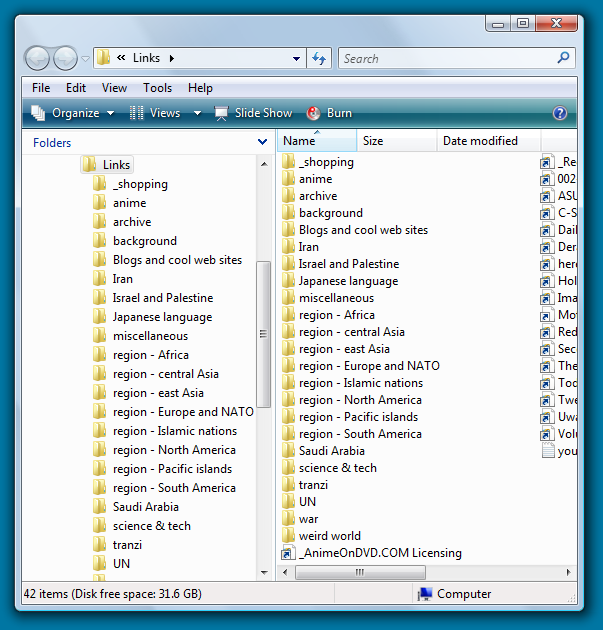
If you have IE7 open, and there is an link inline on text, if you drag-and-drop it onto one of the folders in the left pane, it stores it.
If you drag-and-drop it onto the exact same folder in the right pane, you get asked this:

UPDATE: Some of the cases where I get asked if I'm really sure what I am doing are really bewildering.
For instance, I can drag-and-drop a shortcut onto the desktop. I can rename it there. (Sometimes I need to do that, because the default names are preposterously long, or not descriptive.) If I then try to drag it from the desktop into IE7's "favorites" pane, I get asked for admin privilege.
On the other hand, if I drag-and-drop a shortcut from a page I have open directly into the favorites pane, no problem, and no special privilege needed.
Posted by: Steven Den Beste in Computers at
07:18 PM
| Comments (3)
| Add Comment
Post contains 165 words, total size 1 kb.
March 21, 2008
I haven't run Windows Update since I finished setting up this computer at the beginning of November. Now I hear tell that Microsoft has released Service Pack 1 for Vista, a few days ago.
Horror stories about it are already creeping out. I've heard of people who installed it and can no longer boot their computers at all. So I've been pretty hesitant to muck with it.
Now, it seems, I may not have to worry about that. I just checked Windows Update and SP1 wasn't offered to me at all.
There are a bunch of accumulated patches since November that I haven't installed, and maybe if I were to let those all install then Windows Update might let me see SP1. But maybe not. Seems that a lot of people will never be permitted to install SP1 through Windows Update, because their Vista computers have old drivers that are incompatible, and the drivers themselves are not being maintained.
I wonder if that's what my issue is? I'm not sure there's any easy way for me to find out. The impression I get is that the only way to determine why you're being excluded is to manually check each of a long list of reasons Microsoft provides for why SP1 might not be offered to you.
Since Windows Update is already making that decision algorithmically, couldn't Microsoft provide a tool that told you why you were out in the cold?
Another of the reasons why SP1 won't be offered to you is if you have installed an obscure language pack. I think I might have Chinese installed, and that's one of the obscure, little known and little used languages that SP1 doesn't support.
Seems there's going to be another version of SP1 becoming available in another month or so, which might have a bit more comprehensive support. Better be; they're planning to push it out with Automatic Update at that time. (Automatic Update is a tool of the devil. One of the first things I did was to disable it.)
Maybe I'm becoming gunshy as I get older, but I'm not totally certain I want to install any patches. "Don't fix what ain't broke", they say, and right now this system works pretty well.
UPDATE: I just confirmed it: I do have Chinese installed. I don't have the slightest idea how or when that happened. It sure as hell isn't anything I'd ever need or use.
That's been causing me problems, actually. Sometimes when I'm using Frontpage I mistype something and suddenly I find myself using chinese entry, and the HTML being created has all kinds of weird spans around it. The only way to make that stop I've found is to quit FrontPage and restart it. Probably there's a hotkey combination I hit by accident that would get me into that mode, and likely another that would get me out. But I can't tell; it's FrontPage 2002 and its help files use a format that requires a package called "WinHLP32" which Microsoft decided to leave out of Vista. You can manually install it, but again I don't want to mess with it.
Anyway, I just got rid of that entry in the Control Panel "Regional and Language Options" tool, so that should be good enough. ...unless hitting that hotkey combination in FrontPage helpfully reinstalls it again...
UPDATE: And with it gone, Windows Update still doesn't offer me SP1. Maybe if I let it install all the existing patches I don't yet have, that would do it, but I'm not really eager to find out.
Posted by: Steven Den Beste in Computers at
06:19 PM
| Comments (5)
| Add Comment
Post contains 597 words, total size 4 kb.
44 queries taking 0.1052 seconds, 105 records returned.
Powered by Minx 1.1.6c-pink.