May 06, 2009
Windows 7
Kurogane writes about Windows 7. Reports about it based on the betas and release candidates have pretty much been uniformly positive, at least the ones I've seen. Seems as if Microsoft learned its lesson from Vista and has cleaned things up massively.
Vista works. I've been using it since I bought this computer, and it isn't like it's total crap. But it has its crochets, and it's bloated, and some things are unreasonably slow. Now that I've started using my older laptop again, I'm beginning to realize just how crummy some aspects of Vista really are.
For instance, my old XP laptop can wake up from hibernation in about 20 seconds. The Vista computer takes at least twice as long. Going into hibernation is similar.
Now it's true that the new computer has twice as much RAM as the old one, but loading and restoring the memory image is only a small part of the process. That isn't the reason why Vista is so much slower.
There are other things that are unpleasant. I still find it hard to believe that Microsoft didn't include a system backup solution with Vista.
And deep down, I've wondered what it would be like to run in 64-bit mode. The dual-core in this machine is an Intel T7700, which most definitely supports 64-bit mode. Is that enough?
Dunno. Maybe it's also a matter of the mobo chipset. Digging into the Device Manager, I think what I have is something called an "ICH8M" as the mobo chipset. Maybe "82801" is another piece of it. North bridge and south bridge respectively, maybe. I've been out of circulation for a few years and I don't know the jargon any longer.
If Microsoft runs true to form, then when Windows 7 finally does come out, they'll offer a free program for download which will check a given computer's hardware and determine if it can be fully supported by the new OS, and of course I'll do that just to find out. But I have to admit that I'm curious now.
If it told me that I could run 32-bit Win7 but not 64, I probably wouldn't bother with it. But if it could run the 64-bit mode, well then...
UPDATE: Maybe that "Can you run it?" program is already available, so people can determine if they want to run the betas. Does anyone know?
UPDATE: Doesn't look like. Oh, well.
UPDATE: By the way, Fledge needs some hardware advice. Give him a hand.
Posted by: Steven Den Beste in Computers at
08:18 PM
| Comments (10)
| Add Comment
Post contains 417 words, total size 3 kb.
1
I've been running the first beta on my main desktop since shortly after it was publicly available, and I've been loving it. I'm actually in the process of installing the release candidate on a machine this evening.
Windows 7 looks and functions like Vista with some tweaks, but it solves tons of issues large and small, and just "seems" so much better. There are some technical articles out there that talk about some of the under the hood things that Microsoft fixed, and most of them are so obviously superior that you wonder how they managed to release Vista in the state it was. The most obvious one I've read about is that in Vista, multiple applications can't access the display system at the same time, and when they try they just freeze until it's their turn. Given how many widgets and applications on the average desktop are all trying to update themselves all the time, that just results in tons of stuttering and lock-ups. In Windows 7 they've changed that whole concurrency model and the result is that everything is just snappier and more responsive.
Usually there is a hardware compatibility program on the install screen when you put it in while already running windows, but the release candidate I have doesn't seem to have that. But largely speaking, if you can run Vista, you can run Windows 7. I'm having a bit of trouble getting it to run on one of my oldest machines, but the OS itself installed and runs fine, it's just some secondary driver support that is lacking.
On the 64-bit front, if you have a functional 64-bit CPU, then everything else in the system is 64-bit as well. The CPU, socket, and chipset are all tied together at all kinds of levels and trying to mix and match simply wouldn't work. That being said, in the real world the main benefit of going 64-bit is the ability to use more than 3gb of RAM, or get access to some of the 64-bit server applications if that's your need. For a desktop, going 64-bit can actually be a drawback, as most of the third party software vendors are really only now beginning to reliably offer 64-bit support, and certain things like VPN software, anti-virus programs, and other low-level applications aren't always available in 64-bit, especially if you want to keep using an old version rather than shelling out for the newest version. I tried XP 64 when it came out and had to give up within the day, Vista 64 was the same when it came out. Today I have Vista 64 and Windows 7 64 both working fine, but if I still had a need to connect to the office through a VPN I'd be on 32 bit, as most of the VPN vendors haven't bothered to offer 64 bit clients yet.
Posted by: David at May 06, 2009 09:41 PM (n/RK7)
2
That's an interesting point. I wonder if AnyDVD will work with Win7-64? (Actually, I wonder if it'll work with Win7 at all.)
Well, I'm not going to run the RC; I'll wait until it's a real product, and by that point this computer will be two years old, and maybe it'll be time to get another.
Posted by: Steven Den Beste at May 06, 2009 11:23 PM (+rSRq)
3
I've never upgraded to a new OS unless I'm buying a new computer, and I've never regretted that. W7 is a long way off in my future. Hell, by the time I get to that point , Linux might be ready for prime time.
It's a shame 64-bit is clearly not something we're going to see in general use for a while--the advantages are obvious, and I'd sure love to use it for my more CPU-intensive graphics and audio work.
Posted by: Toren at May 07, 2009 04:08 AM (g0nz7)
4
Toren's got a point. A lot of the problems people had with Vista was upgrading older machines that didn't have new device drivers. And the same thing applied to XP, and Win2K.
Then again, your laptop almost certainly has the horsepower to run Win7, and the RC is nearly final, so most of the debug crap has been cut out, so it doesn't run like a dog.
All the Intel core and core 2 duos are 64-bit capable.
Posted by: RickC at May 07, 2009 05:45 AM (RwtAE)
5
The sad truth about Vista is that most of the stuff that really mattered was under the hood, and just wasn't
sexy enough to sell millions of copies to consumers. When sexing it up and getting it out the door became the priority, a lot of the architectural changes were either compromised or dropped on the floor (not to mention the whole "revised" requirements to keep Intel happy...).
Unfortunately, when you scrap a whole bunch of legacy interfaces, you break the drivers for entire classes of devices, some of which were still using 16-bit APIs (!). I have a remote-control app for one of my digital cameras that will never run under Vista, because they never released the protocol used by their USB driver, and the company who now owns all of their IP has no incentive to write a new one for a product that's been off the market for years. [VMware+XP to the rescue!]
-j
Posted by: J Greely at May 07, 2009 08:57 AM (9Nz6c)
6
"[VMware+XP to the rescue!]"
Or, you know, the new XP Mode in Win 7.

Posted by: RickC at May 07, 2009 07:17 PM (9+N7h)
7
Not all virtual machines handle oddball USB devices well. VMware does, and since I already have it working that way, I probably won't try to install it under Windows 7 XP mode. Also, I'll mostly be running Win7 under VMware, since my primary machines are all Macs.
-j
Posted by: J Greely at May 07, 2009 11:32 PM (2XtN5)
8
You may have already run across it but it look's like a beta version of the Windows 7 Upgrade Advisor
is available.
Posted by: Mike at May 08, 2009 01:12 PM (j94v4)
9
Hm, sorry about that; I can't seem to get a direct link to work. Here's the
Download Squad article that links to it.
Posted by: mgsisk at May 08, 2009 01:15 PM (j94v4)
10
OK, it says everything would work. Thanks for the link.
Posted by: Steven Den Beste at May 08, 2009 01:27 PM (+rSRq)
Hide Comments
| Add Comment
April 29, 2009
Torrents -- confusing
It would seem that I don't totally understand how this torrent business is supposed to work. I've got one download going (for some meaning of that word) that's been active for two days and has managed to accumulate a total of 448 kB of data. uTorrent reports 1(1) seed and 0(6) peers, so why aren't I getting any traffic on that channel at all?
The novelty is probably going to wear off, but I have to admit that the uTorrent program is well enough designed so that messing with it is kind of fun.
UPDATE: Another thing I've noticed that's odd:
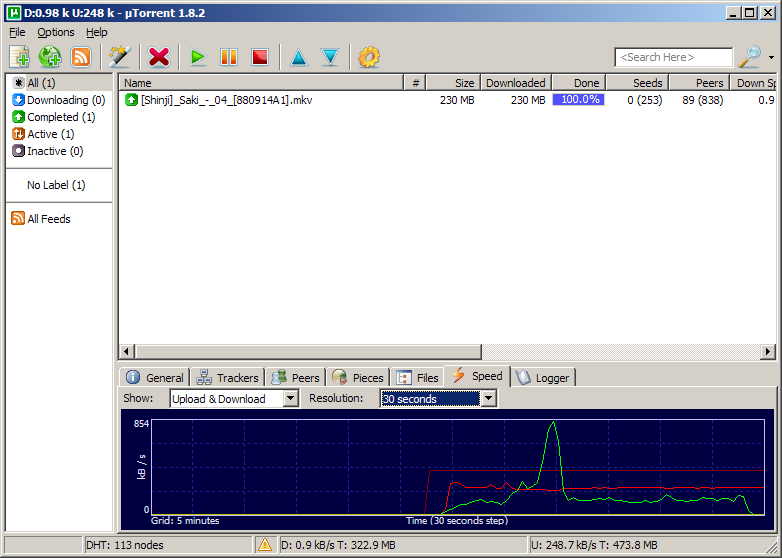
When I'm involved in a popular torrent, I've noticed a couple of times that my upload (red line) soon stabilizes at a very constant rate of about 240 kB/s, whereas my download (green line) fluctuates like mad.
The obvious first thought is that the upload is running into a programmed limit, except that I've got the limit set to 400 kB/s. So it's running pretty consistently at 60% of what I've allocated. Curious.
Posted by: Steven Den Beste in Computers at
09:21 PM
| Comments (10)
| Add Comment
Post contains 177 words, total size 1 kb.
1
Well, if the seeder has a brutally low upload speed, and that file is being sent to seven people (you plus the other six peers), all of whom are trying to pull from said low upload speed, you all would get practically nothing.
That being said, it sounds like something's wrong with that particular torrent. Even with dialup, I'd get 448kb in a minute or so, not two days.
Posted by: Wonderduck at April 29, 2009 09:49 PM (/nYBT)
2
Seed refuses transfers for some reason, I suspect. It may simply not be connected well. Bet these 448KB came over in 10 minutes or so, when the connection succeeded. Such problems are common with miniscule torrents like that. Try IRC if you need something ancient and unpopular.
Now, why there are 0 in the swarm? Possibly these people connect, see that the torrent is dead, move along.
Posted by: Pete Zaitcev at April 29, 2009 10:52 PM (/ppBw)
3
Data trickles in once in a while, in dribs and drabs. Now I'm up to 688 kB.
Posted by: Steven Den Beste at April 30, 2009 03:36 AM (+rSRq)
4
Most likely, that person is "seeding" dozens or hundreds of files, but only has enough upstream bandwidth for one or two at a time, forcing their client to round-robin between them. This is often worse than having no seed at all; it
looks like an active swarm, but doesn't show up in the tracker's "needs seeding" filters, so no one else who has the file is encouraged to help out.
The other 5 leechers probably aren't accepting incoming connections through their firewalls, so none of you can talk to each other.
-j
Posted by: J Greely at April 30, 2009 04:41 AM (2XtN5)
5
I can believe that. Anyway, I've given up and shut it down.
Posted by: Steven Den Beste at April 30, 2009 08:45 AM (+rSRq)
6
This happens, especially with a new torrent. The seed is many hops away in Asia, your peers/leechers are in North America. Once there are a few peers with most of the file, there is a torrent explosion/swarm, and the download and upload speeds increase dramatically. You really do need to open your torrent port to incoming (as mentioned somewhat indirectly in previous comments - in consumer routers it is opening a game port in high address space like 30587, so peers can contact you outside of the central torrent's knowledge) torrents and set your torrent client and router to accept that port. When your torrent client is shut down, those port connections are refused. Myself, although there seems to be no back door traffic with mtorrent, or microsoft update, or anything esle, I physically disconnect my switch from the cable router when I am not at home using the internet.
Conrad
Posted by: conrad at April 30, 2009 03:52 PM (X5Mq+)
7
The port it's opening is 58267, though I have no idea if that's what is really presented to the internet. The computer that's doing this is on my LAN, and has a 192.168 IP. It's talking to my Linux server, which uses its second ethernet port to talk to the cable modem. Everything out there which is communicating with me is really talking to the server, which is doing NAT to allow the sacrificial lamb computer to do this.
That's how I've been doing internet ever since I bought the server in 2001. Physically disconnecting isn't really necessary here; Arcturus and Procyon cannot be directly seen at all by the universe.
Posted by: Steven Den Beste at April 30, 2009 07:45 PM (+rSRq)
8
Easy to test if you have access to a machine that's outside of the house. "telnet $REALIP $PORT", and if your Linux router is passing incoming connections to that port through the NAT to your sacrificial download machine, utorrent will answer.
-j
Posted by: J Greely at April 30, 2009 07:55 PM (2XtN5)
9
240 KB/s is about 2.5 mbit/s. I'm surprised your cable can do that much uplink in the first place. I seem to recall you aimed for 80% of declared capacity (which is sensible because you want to leave some space for TCP ACKs too), and from what I know about typical consumer cable, this cannot be right. Try limiting uplink to 200 KB/s. Your downlink may suddenly jump up. I limit my uplink to 25 KB/s, BTW. It works well enough.
Posted by: Pete Zaitcev at April 30, 2009 08:15 PM (/ppBw)
10
Benchmarks say I have 4 megabits of uplink (and 12 megabits of downlink). After Verizon wired this whole town for FIOS, Comcast drastically raised our bandwidth allocation at no charge. (Ah, competition; ain't it wonderful?)
I don't need to limit anything; while it was running at that rate I was also using my web browser on the other computer and didn't notice any performance issues at all.
The 400 kB limit I placed on the uTorrent uplink is about 80% of what the benchmark says I have.
Remember, I don't have a normal bottom-tier consumer cable modem connection. I'm using the second-tier with Comcast Commercial.
Also, note that huge green spike. I was downloading three 30 megabyte files along with Saki 4 during that period, and peaked at 850 kB/s downlink, even as the 240 kB/s uplink continued to run. Obviously there's no problem with getting acks out.
Posted by: Steven Den Beste at April 30, 2009 08:58 PM (+rSRq)
Hide Comments
| Add Comment
April 18, 2009
Vista -- good news and bad news
Most recent set of patches at Windows Update included an omnibus security update for IE7. And, apparently, tucked away in there were some bug fixes too, because IE7 hasn't locked up on me since then. Whew!
On the other hand, in the last couple of days, two times when I managed to get both of my CPUs pegged busy, suddenly without warning my screen went black and my system powered down. It wasn't an instantaneous death; it took about 10 seconds. All of which says "heat fault" to me. This computer is now a year and a half old, and I wonder if it's fouled with dust inside?
I may try using a can of air with a straw through the cooling fan entryway (when it's off sometimes), but if this happens again, I'm going to have to take it somewhere to get them to open it and vacuum it. Were it a tower, I'd do it myself, but notebook computers scare me. I don't want to louse it up.
UPDATE: Air blowing complete. At best it's only a temporary solution, of course, in case the problem is air inside a particular cooling fan. But it doesn't seem likely that it'll cause any harm.
There used to be a computer repair place about two blocks from here, but they moved. I think I know where they are now but I'm not certain, and anyway it's about a mile-and-a-half walk. So if I have to do this I'll have to rely on the kindness (and car) of my brother.
Posted by: Steven Den Beste in Computers at
08:46 PM
| Comments (3)
| Add Comment
Post contains 265 words, total size 1 kb.
1
Sounds like the problem a friend of mine had.
He'd take a Shop Vac to it and suck out as much as he could. He also built a little wooden support that left the bottom of the lap top higher and that helped the cooling. Very rarely did he get the "death by heat" shut down after that. Your mileage may vary.
Posted by: toadold at April 18, 2009 11:24 PM (zcbXo)
2
I've done a couple repairs on notebooks.
The experience made me forswear laptops in favor of towers.
Posted by: Zyrkon at April 19, 2009 09:18 PM (PBdV8)
3
For the things you want to be able to get to, this thing has hatches. The RAM is under a hatch, and the HD is under a hatch, and there are a couple of others I don't know what are because I don't feel like hunting through the tech manual to figure it out. But those hatches won't do me any good with regards to getting rid of fluff inside the computer.
We'll see how it goes.
Posted by: Steven Den Beste at April 19, 2009 09:40 PM (+rSRq)
Hide Comments
| Add Comment
April 03, 2009
USB == Universal sloth bus?
I must be doing something really wrong. It shouldn't take 2 or 3 hours to copy 80 gigabytes from one external USB2 HD to another external USB2 HD, both formatted NTFS. I did a quick calculation, and USB in principle can handle about 200 gigabytes per hour. That's if it's maxed out, which can never happen. But I'm not getting even an fifth of that. It's not filesystem overhead, either; it's a bunch of huge zip archives, averaging about 200M. (Yes, I know that each byte copied has to travel over the wire twice.)
Both of the drives are plugged into the same hub, which also has my mouse plugged into it. Could the hub really be fouling things up that badly?
I think I may have to do some experimenting, copying one file over and timing how long it takes. But I fear I'm going to have to plug both drives directly into my computer if I want any kind of reasonable performance out of them.
Posted by: Steven Den Beste in Computers at
08:40 PM
| Comments (7)
| Add Comment
Post contains 172 words, total size 1 kb.
1
Sadly, 2 hours for 80GB is about right in my experience. The best sustained speeds I've seen are around 20MB/second, and for two drives on the same hub, the throughput will be half that.
Posted by: Pixy Misa at April 03, 2009 08:52 PM (PiXy!)
2
USB is clocked at 480 mbit/s. With its heavy protocol overhead, the practical data transfer speed is about 25 MB/s, maybe 30 MB/s at the most. If we assume that an hour has 3600 seconds, it comes to 72 GB/h in one direction. 80 GB copy should take about 2 hours with chage, then.
Posted by: Pete Zaitcev at April 03, 2009 09:14 PM (/ppBw)
3
Looks like I'm going to have to leave the 146G copy to run over night. (Initial estimate in the progress box is 3.5 hours.)
Posted by: Steven Den Beste at April 03, 2009 09:53 PM (+rSRq)
4
The good news is that I can watch a DVD while it's going on. And even though my sound module is USB, it's not breaking up.
Posted by: Steven Den Beste at April 03, 2009 09:57 PM (+rSRq)
5
Sound is an Isochronous transfer, so it's a guaranteed throughput. Bulk cannot steal ISO bandwidth on USB. Although, if OS does not schedule the application that drives the sound, it may still skip.
Posted by: Pete Zaitcev at April 03, 2009 10:27 PM (/ppBw)
6
The transfer is about a quarter of the way through, and Vista reports a transfer speed of 11.8 MB/s. Which, of course, is really double that, about 22MB/s, which is right where you said.
I did some cable rearranging; right now both of those drives are directly connected to the computer. But somehow I don't think that will make much difference. The transfer speed was about the same when I was working through the hub.
Posted by: Steven Den Beste at April 03, 2009 10:38 PM (+rSRq)
7
On most computers there's only one EHCI onboard, so plugging directly into the computer won't help the speed. This trick only works for workstations with large numbers of built-in ports.
Posted by: Pete Zaitcev at April 03, 2009 11:04 PM (/ppBw)
Hide Comments
| Add Comment
March 31, 2009
Adios, Encarta
Microsoft is ceasing to sell and support Encarta. Apparently the encyclopedia part of it was being hurt competitively by Wikipedia, and I would guess that the atlas was equally being hurt by Google Earth, which I suspect will also soon kill off "Streets and Trips".
Plus there are free online dictionaries and thesarusi.
As to the "Encarta Africana", frankly, who needs it? Who ever needed it? I have never installed it on any computer I've ever owned. I've never tried to use it. (And I always resented it a bit. How much was the price of the package increased by it being there? How much did this Microsoft political-correctness tax cost me?)
I have a copy of Encarta 2001, and I couldn't get the encyclopedia part of it to install in Vista. But these days I don't miss it. I have the atlas and dictionary installed, but they are hardly what I'd consider essential. Time has moved on and Encarta no longer serves a need -- at least, not one worth $100, which I think is what I paid for my copy, and what I'd probably have to pay to get one that could install in Vista.
I wonder what they'll do with the database. It would be a pity to just ashcan it.
Posted by: Steven Den Beste in Computers at
04:08 PM
| No Comments
| Add Comment
Post contains 216 words, total size 1 kb.
March 28, 2009
Vista -- so why not Firefox?
So after my misadventure with IE8 this evening, and all my bitching about IE7, the rhetorical question would be, "Why haven't I switched to Firefox?"
I have Firefox and I do use it sometimes, but they don't act the same and I'm used to IE7. Until recently it was very reliable.
There are some ways in which Firefox isn't adequate for me. For instance, when I use it with this blog to enter posts, using IE each paragraph is enclosed in p tags. In Firefox the whole article is a single paragraph and paragraphs are terminaged by two breaks.
Yeah, it looks the same, but it goes against the grain. That's now what we want. And there are a bunch of other little things like that, which just aren't what I want.
There are some places where Firefox is what I want, and for those I do use Firefox. That's maybe a third of the time. For the other two thirds, what I really want is IE7 that doesn't lock up.
I sure as hell don't want IE8, that made my whole system unstable. Until I see that Microsoft acknowledged these problems, says they're fixed, and the fixes are confirmed by outsiders, I won't have anything to do with that piece of shit again.
Posted by: Steven Den Beste in Computers at
10:39 PM
| No Comments
| Add Comment
Post contains 220 words, total size 1 kb.
Vista -- IE8, the adventure begins
UPDATE: DO NOT INSTALL IE8 ON VISTA HOME PREMIUM!!!!!
They implemented full spec compliance in IE8. They also included a "compatibility mode" for use with pages that didn't work in full spec compliance mode.
To do post composition here, I have to turn compatibility mode on. Otherwise all the tool icons on the composition window don't show up.
Unfortunately, with compatibility mode on, the checkmarks still show up inside the "more inside" composition window instead of below it. (In spec compliance mode they didn't show up at all.)
UPDATE: After installing IE8, when I click on a directory in an Explorer window, it opens in a separate window. I wonder what else global IE8 changed for me?
UPDATE: Which is curious, because the folder options in Explorer is set to "Open each folder in the same window".
UPDATE: The "favorites bar" can be turned off, which is nice. On the right side of the other command bar is a section which has the "Page", "Safety", and "Tools" menus, and the "Home" button, and the "Help" button. There are other things you can add in there, and of course it adjusts its size to fit what it holds.
And it places itself so that the last of the tools is always off screen to the right. I just removed about five tools from it, things I don't want or need, and the "help" button is still off screen.
There's plenty of space; the bar could be moved over to hold it. But I can't do that; it isn't under my control.
One time I figured out how to create an obnoxious page which always was just a bit wider than the browser window, so that you always had to scroll left and right to read it. This feels like that.
UPDATE: Well, this is gonna get real old, real fast. Nothing I can figure out to do will make Windows go back to opening directories in Explorer without popping a new window for them.
If I select them using the left pane, they open in the same window. But clicking them pops a new window even though I have chosen that I want them opening in the same window.
I thought maybe it was a case of something needing an edge rather than a level. So I switched to "open in new window" and rebooted. Then I switched back to "open in same window" and rebooted, and it had no effect at all.
I think it's time to go visit Windows Update.
Meanwhile, something else obnoxious: the command bar in Explorer (that is, the file explorer, not the internet explorer) now has a shortcut to the program uninstaller. Yeah, right, like that's something I do multiple times per day. Why in hell would I want that there?
UPDATE: Seems I'm not the only person to notice this. They say that I have to run IE8 once as administrator. I'll give it a try.
UPDATE: He's full of it. That doesn't fix it.
UPDATE: Even worse: middle-clicking links opens a new tab, but they don't load anything. The browser doesn't make a net request (no blink on my ethernet hub).
And no one seems to have a fix for the problem of folders opening in their own windows. That's it; IE8 is being removed now.
UPDATE: Or maybe not. I have a convenient link to the uninstall program now, but there's no entry in there for IE8.
UPDATE: And now explorer has gotten completely flaky. Right-clicking many icons in the shortcut bar leads to a hang, a timeout, and eventually that popup asking me if I want to restart it. That shouldn't happen with Explorer.
Microsoft, didn't you test this thing before releasing it onto an unsuspecting public?
It looks like I'm going to have to figure out how to revert to the last save point, whatever the hell those are called. I can't even remember the keyword, let along how you do such a retreat.
I hope it doesn't come to me having to reload from backups, because my last backup was last November, just before I installed SP1.
UPDATE: It's called "System Restore" and it's running now. I had a restore point from yesterday afternoon, the last time I ran Windows Update.
I'm posting this using my old laptop.
The Asus machine just did a reboot. Presumably that means it's done the restoration. I wonder if I just bricked it.
UPDATE: It let me log in, and it told me that the restore was successful. The boot, and the login, are taking forever. It remains to be seen whether doing this also uninstalled IE8.
UPDATE: Explorer folders no longer open in new windows.
UPDATE: And the "About Internet Explorer" popup says it's IE7. Looks like it did what I wanted it to. (Whew!)
And right-clicking on icons in the shortcut bar no longer hang up explorer. (Whew, again!)
Jesus Christ, what a piece of shit IE8 turned out to be. I didn't expect Microsoft would release something so awful.
UPDATE: I wonder if this is the reason they didn't roll it out on Windows Update? Is it still a beta?
Posted by: Steven Den Beste in Computers at
08:51 PM
| Comments (10)
| Add Comment
Post contains 866 words, total size 5 kb.
1
Apart from that, Mr Den Beste, how did you enjoy the browser?
Posted by: Pixy Misa at March 28, 2009 11:41 PM (PiXy!)
2
Tell me about it.
One good thing did come out of tonight: I figured out how to turn off the directory tree pane on explorer windows. That's been something I've hated since I started using Vista, but I thought I couldn't get rid of it. Tonight I figured out that it can be disabled.
You click "organize" and then choose "layout" and uncheck "Navigation pane".
Posted by: Steven Den Beste at March 28, 2009 11:47 PM (+rSRq)
3
"Sorry for the general dearth of posting around here lately. There just hasn't really been very much to talk about."
...be careful what you wish for, eh?
Posted by: Mikeski at March 28, 2009 11:54 PM (GbSQF)
4
Insert obligatory XP Luddite comment here. (Misaki is still on Win2k.)
Posted by: ubu at March 29, 2009 04:46 PM (o1LWB)
5
Good lord. . . *goes to turn off Windows Update, just in case*
Posted by: metaphysician at March 29, 2009 07:09 PM (h4nEy)
6
Windows Automatic Update is evil. Virtually the first thing I do when I get a new Windows machine is to disable that spawn of the devil.
Posted by: Steven Den Beste at March 29, 2009 08:23 PM (+rSRq)
7
Amen on automatic update. I was in the middle of burning a
double-layer DVD once and up pops that message, that they'll be
rebooting your computer in 10 minutes to install updates. Of course
you have that nice button that allows you to delay it. Except it was
grayed out.
Well, one DVD-9 coaster. I said a bad word and shut auto update off for good.
Posted by: Toren at March 29, 2009 08:38 PM (pZCLJ)
8
Actually, I thought I *had* turned it off. I think it got turned back on when the PC was last in the shop for repairs, as part of "general maintenance".
Posted by: metaphysician at March 29, 2009 09:45 PM (h4nEy)
9
"I wonder if this is the reason they didn't roll it out on Windows Update? Is it still a beta?"
It's nominally out of beta, but in reality... well, you've seen the reality. But they'll wait a few months to push it out via Windows Update, to let it get more testing & patches. They did the same thing with IE7, I believe.
Posted by: AnthonyDiSante at March 30, 2009 12:42 AM (xJ4r5)
10
As a related aside, is there any way to get XP to go "No, I don't want Windows Genuine Advantage. I never would want it. Never even mention it to me again"?
Posted by: metaphysician at March 30, 2009 07:19 AM (h4nEy)
Hide Comments
| Add Comment
IE8
UPDATE: DO NOT INSTALL IE8 ON VISTA HOME PREMIUM!!!!! (here's why)
Does anyone have any up-to-date info about IE8? It's formally released now. And I'm getting fed up with having IE7 lock up on me; these days it happens two or three times per day.
On the other hand, these days I'm really afraid to be a first-adopter. Time was I was first in line for lots of stuff like this, but as I've grown older and slower I've become more fearful.
I've read the magazine articles and mostly they've been pretty positive, but you know how that goes.
Anyone using it? SiteMeter says that 4% of the visits in the last week have been with IE8. Who are you? Whatcha think of it?
(I'm also not sure I believe that statistic. SiteMeter also says that 56% of my visitors are using FireFox 1.0. That seems unlikely.)
UPDATE:
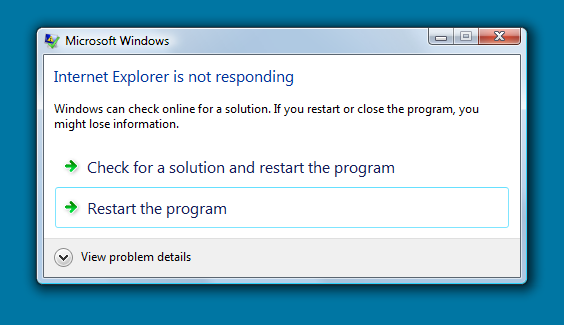
Dear Microsoft: What if I don't want to "restart the program"? (Just a couple of days ago I discovered that if you click the x in the upper right corner, it shuts down without restarting.)
Anyway, that's the fourth time IE7 has locked up on me today. I am going to upgrade to IE8.
Posted by: Steven Den Beste in Computers at
12:25 PM
| Comments (12)
| Add Comment
Post contains 203 words, total size 1 kb.
1
Actually I thought it was rather weird that IE7 and Windows Update did not bug me or even list that IE8 is available. Probably some obscure option that I didn't set...
Since I can't get it automatically (and I use Chrome as my default), I'll probably just leave my system as-is until Microsoft sees fit to alert/force me to upgrade.
Posted by: gaiaswill at March 28, 2009 12:56 PM (gctoU)
2
I too was surprised that it didn't show up in Windows Update. You have to get it from
here.
Posted by: Steven Den Beste at March 28, 2009 12:58 PM (+rSRq)
3
I'm one of the users. I've had a few issues with it, the biggest being an infection of the Vundo trojan from an advertisement, and it runs somewhat more slowly when I'm using Spybot-SD. I don't think that the trojan is an issue limited to IE8, so it's probably not fair to count that as a strike against it. As far as the Spybot, I'm using an older computer, with only 512 MB of RAM, so that's a more likely explanation.
Overall, I'm happier with IE8 than IE7. The interface is a bit easier to use, once you learn it. It replaces the standard drop down menus with a toolbar, so there is definitely a learning curve attached to using it.
Posted by: CatCube at March 28, 2009 02:34 PM (vwpdy)
4
Can't say, I only have IE7, and I almost never use it. As for those Firefox numbers, they *have* to be wrong. While I could believe over half your visitors use Firefox, it stretches credibility that so few would have updated, seeing as that's two updates back.
The only program I know where users routinely stay that out of date is AIM.
Posted by: metaphysician at March 28, 2009 05:29 PM (h4nEy)
5
There might be one way to explain that statistic about Firefox: it's spiders, not real people. I wouldn't be at all surprised, for instance, to learn that the Googlebot claims to be "using" Firefox 1.0.
Why? Because there are a lot of foaming-at-the-mouth Microsoft haters out there who use Javascript to prevent anyone who is using IE from visiting their site. Or at least there are some; I've run into them. I don't think I've ever heard of anyone doing that for Firefox, though.
Posted by: Steven Den Beste at March 28, 2009 06:26 PM (+rSRq)
6
Google does not lie about its agent.
A large
number of banks and such used to work with IE only (I've hit it just
recently with Progressive Insurance). Who cares about some idiots when
important websites tilt the other way.
BTW, Opera for DS masquerades as IE6. Bet the reason is the above.
I have not ever seen a search bot masquerading as Firefox, but I have seen bots masquarading as IE6. HOWEVER, I have seen worms either masquerading as Firefox or operating as a malicious extension. In my experience neither was significant.
Your 56% is a suspect. When I ran Analog, it showed about 25-30% on Firefox of various versions, half was IE (including people running really ancient versions on Win98), and the rest fell to Safari, feedreeders, etc. In your case, most likely it's just Sitemeter being buggy and counting unknown agents as Firefox or something like that. Another possibility is, active users skewing counters not filtered for uniques. It's a noticeable effect. I myself pulled about 3% of both bandwidth and counts of my own site, and another active reader pulled just a little less.
Posted by: Pete Zaitcev at March 28, 2009 07:43 PM (/ppBw)
7
Google does not lie about its agent.No, of course not. They would NEVER do something like that.
Posted by: Wonderduck at March 28, 2009 08:09 PM (tMdKd)
8
They have to say something. The spider isn't using a browser at all, but they have to identify themselves as doing so anyway; the protocol requires it.
Posted by: Steven Den Beste at March 28, 2009 08:14 PM (+rSRq)
9
Mozilla/5.0 (compatible; Googlebot/2.1; +http://www.google.com/bot.html)
Posted by: Pixy Misa at March 28, 2009 08:46 PM (PiXy!)
10
I think I know what's going on with Sitemeter. I'm using the free version of it, so for specific statistics about users I can only see info about the last fifty visitors. Right now it says that 66% of my users are using Firefox 1.0, which is absurd.
But it's entirely possible that two thirds of a randomly chosen group of 50 visits would be using that particular version of Firefox.
When I look at the OS breakdown, it says that 29% of my visitors are using WinNT. 54% are using XP. That number for XP is believeable, but there's no way a third of my users are on NT (i.e. Win2K). But I could believe that as the result of a sample that's too small to be statistically significant.
Posted by: Steven Den Beste at March 28, 2009 10:59 PM (+rSRq)
11
Actually, I am wondering if I might be a significant portion of your firefox 1.0 component. I use Firefox 1.5 to surf to this website, and if that shows up as 1.0, well, sometimes I check here a lot.
Posted by: PatBuckman at March 28, 2009 10:59 PM (h7HNv)
12
Will be interesting to see how it compares to Urchin. Hope to be ordering the new servers in the next couple of days.
I could extend Minx's own stats facilities, but for $5 a month per 1000 sites, it's easier to just license Urchin and plug it in.
Posted by: Pixy Misa at March 28, 2009 11:22 PM (PiXy!)
Hide Comments
| Add Comment
March 27, 2009
Conficker C
Will the Internet melt down next Wednesday?
A really evil worm called "Conficker C" is programmed to wake up on April 1 and to try to phone home. It's also programmed to try to contact other infected computers to create an ersatz P2P network. The ones who successfully phone home will download whatever patches, upgrades, and/or payloads are waiting there, and they will then share them with everyone else via the P2P network. It's anyone's guess what it will become afterwards.
I gather that diagnosis is easy. If you try to load Microsoft's web site and cannot, you're infected. There's a list of maybe 50 strings, and it won't let you access any web URL that contains any of those strings.
But removing the sucker is a damned sight more difficult. Among its other interesting tricks, it modifies the registry so that you can't boot in safe mode, and it deactivates Windows Defender. And it does a whole lot of other nasty shit.
Apparently this is prime nuke-it-from-orbit territory. But as with all successful worms, the vast majority of those who are infected won't do a thing, so Wednesday will be interesting. What do the bot-owners have in mind?
Posted by: Steven Den Beste in Computers at
04:46 PM
| No Comments
| Add Comment
Post contains 201 words, total size 1 kb.
March 17, 2009
Zoom Player -- interaction
All my stored Zoom Player bookmarks went away again about a week ago. This time I figured out why.
They weren't deleted. It's an interaction problem with AnyDVD. What happened was that I installed the most recent version of AnyDVD, and it started reporting the DVD ident hashes slightly differently.
For example, the DVD that used to be reported as NANOHA_A_VOLUME1.38309A188A8374F8 changed to NANOHA_A_VOLUME1.3830A2188A8374F8 which, to Zoom Player, is different. You have to look closely to see the difference, but it's there. (In the middle, "9A" got changed to "A2".) So the old bookmarks are still there, but Zoom Player can't find them.
One other time when this happened, I figured out that I could create one bookmark under the new ident hash, and then copy all the bookmarks out of the former directory into the latter one. That time it worked, but for the Nanoha A's DVDs it didn't. I have no idea why.
Which, I think, means I'm going to have to be really cautious about installing AnyDVD upgrades in future, as in like I probably won't be doing it.
UPDATE: So I reported it to both InMatrix and SlySoft. It'll be interesting to see what kind of response I get, if any.
Posted by: Steven Den Beste in Computers at
10:09 AM
| Comments (4)
| Add Comment
Post contains 209 words, total size 1 kb.
1
Bookmark right after the transformation scenes? "Skip! SKIIIIIIP!"
Posted by: Avatar_exADV at March 17, 2009 12:11 PM (pWQz4)
2
Yeah, I definitely put one there.
Posted by: Steven Den Beste at March 17, 2009 01:29 PM (+rSRq)
3
These days most of the AnyDVD upgrades are for Blu-Ray and one-off
fixes for obscure movies from regions you've never heard of. I haven't
updated in over a year and have had no problems.
Posted by: Toren at March 17, 2009 03:07 PM (uaRzq)
4
If I ever buy a Blu-Ray drive and start buying stuff in that format, I may upgrade but it looks to me as if you're right about what they're working on.
I can't imagine what they did to cause the hash to change. (I wonder if I should report the error to them.)
Posted by: Steven Den Beste at March 17, 2009 03:25 PM (+rSRq)
Hide Comments
| Add Comment
64kb generated in CPU 0.0265, elapsed 0.1016 seconds.
45 queries taking 0.0834 seconds, 133 records returned.
Powered by Minx 1.1.6c-pink.
