
July 10, 2009
My desktop computer bluescreened twice this evening. I don't think that's ever happened before.
What is more peculiar is that both times I was using IE8 to work with my user account for "Disqus", a commenting system used by one particular web site where I wanted to leave a comment.
That's a little scary. I wonder if it's coincidence?
Posted by: Steven Den Beste in Computers at
09:15 PM
| Comments (1)
| Add Comment
Post contains 63 words, total size 1 kb.
July 07, 2009
Brian tells us that VLC version 1.0.0.0.0.I'm-not-sure-how-many-0's is now out.
Which doesn't affect me (I'm happy with Zoom Player) but might be of interest to some.
Posted by: Steven Den Beste in Computers at
01:30 PM
| No Comments
| Add Comment
Post contains 27 words, total size 1 kb.
June 29, 2009
The Wikipedia article on ReadyBoost is really very informative. One of the things it talks about is the difference between USB flash drives and real HDs. Basically, a flash drive has negligible seek time, but HDs have faster data transfer.
Seems to me a lot of that is due to the USB interface, which is more than a bit clumsy. I'm not doing that. I've got an SDHC card, and the SDHC controller is directly on the bus, so there isn't any USB protocol involved. It's still a hokey interface, but not the same hokey. And I'm curious about just how fast it might be.
Does anyone have a favorite HD benchmarking tool I can download for free from somewhere? I want to find out just how this card compares to my HD.
UPDATE: Never mind. I found something called CrystalDiskMark.
For my HD:
Sequential Read : 43.031 MB/s
Sequential Write : 44.406 MB/s
Random Read 512KB : 27.635 MB/s
Random Write 512KB : 28.719 MB/s
Random Read 4KB : 0.711 MB/s
Random Write 4KB : 1.045 MB/s
For the SDHC:
Sequential Read : 21.779 MB/s
Sequential Write : 10.188 MB/s
Random Read 512KB : 21.685 MB/s
Random Write 512KB : 2.057 MB/s
Random Read 4KB : 8.833 MB/s
Random Write 4KB : 0.024 MB/s
So it's not surprising that at high speeds the HD wins everything. It's also only a little bit surprising that write times to the SDHC are crappy no matter what. But it's a pleasant surprise that sustained writes are 10 MB/s when they only promised me 6 MB/s. Good stuff!
And it's not surprising that reading smaller files that the SDHC totally whomps the HD. Seek time predominates and the SDHC doesn't have any.
I really wish I had a flash drive, just so I could try the same benchmark on it. I bet it would be slower than my SDHC.
Posted by: Steven Den Beste in Computers at
08:06 PM
| Comments (4)
| Add Comment
Post contains 320 words, total size 2 kb.

TADAA! 32G of SDHC card, ripe for using as a ReadyBoost Cache!

TADAA! Fail! I guess the internal memory is being used after all.
Pretty idiotic program that can't use two or more caches instead of just one, you know that? Anyway, it's internal memory on this guy, and how do I find the device to disable it? Well, it shows up in the disk management screen:

It's the device called "NVCACHE".
And it shows up in the device tree:
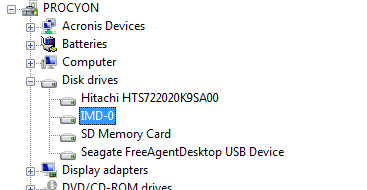
It's that thing called "IMD-0". I think I can just uninstall it.
Wish me luck.
UPDATE: I figured as much. When you uninstall it, it tells you to reboot. When you reboot it sees uninstalled hardware and installs drivers for it. Sheesh.
For most devices it's possible to "disable" it, using a button in another frame, but for this device that button is grayed out. Sheesh.
UPDATE:

Victory? No, I'm afraid not.
The new plan was to uninstall IMD-0, and before rebooting to enable ReadyBoost in the new card. Then reboot.
And during the reboot the system reinstalls drivers for IMD-0, and then ReadyBoost goes back into it, and when I look at the SDHC card it once again tells me I can't use it for ReadyBoost.
There has to be something, somewhere, that directly interfaces to and controls ReadyBoost. Seems like something that ought to be in the Control Panel, or in the Device Manager, or something. I think I'm going to have to do some googling.
UPDATE: New plan: go into the disk management section, and assign a drive letter to the NVCACHE. It now shows up in the Explorer as Z:, and now I can access its properties from there, including the ReadyBoost tab, and turn it off.
Having done that, I can then enable ReadyBoost in the SDHC card. And now to see if it stays that way when I reboot, or if this is something I'll have to do each time I boot up.
UPDATE: Success! It remained the same on a reboot. So here's the process:
In the control panel, open the Administrative Tools.
Select Computer Management
In the new window, select "Disk Management"
In the lower middle pane, find the NVCACHE device.
Right-click and select "Change Drive Letter"
In the resulting popup, give it a letter. I used "Z:"
Close everything.
Open the file explorer.
Right-click the new drive (Z:) and select "Properties"
Select the "ReadyBoost" tab.
Choose "Do not use this device". Then click "OK"
Now you can right-click on your SDHC card, select properties, select Readyboost, and enable it.
UPDATE: And then I found the control console. Oh, well. It is lost in the start menu, in a directory called "Intel Turbo Memory", and if you unclick anything it requires a reboot. Once it's complete, that IMD-0 device is gone outright. There's no longer a Z: device in the file explorer. Meanwhile, the SDHC still shows 4G being used for ReadyBoost.
Posted by: Steven Den Beste in Computers at
06:29 PM
| No Comments
| Add Comment
Post contains 494 words, total size 3 kb.
June 19, 2009
Microsoft is absolutely convinced that everyone just loves using "My Documents" and its brethren in order to store their stuff. Me, I want nothing to do with the things.
I keep various user files all over the place, organized according to what they are and how I use them. For instance, in the root of my C drive I have a Chizumatic directory, and I bet you can guess what it contains.
One of its subdirectories is called 2009, and that's where I keep my local copies of all images I've uploaded this year. You won't be surprised to learn that there's also a 2008 and a 2007.
In order to upload pictures to mee.nu we use a standard secure HTML mechanism which I don't understand the details of, but which Pixy does understand, and which works. We've got an "New File" page in the secure area, and it has a special input field for entering the path of the file to be uploaded. Next to it is a "browse" button, which brings up a standard file selection popup.
By default that begins in "My Documents". (In Vista it's slightly different. They changed it to "UserName\Documents". A cowflop by any other name... The use of the word "My" for that kind of thing was something of a fad about five years ago, what with "My Google" and "My NYTimes" and "My Yahoo" and so on, and I'm really glad the fad has passed. You still see it, but it isn't as common anymore.)
IE7 opened in that same directory, too, and I long since solved the problem by putting a shortcut in there which lead to the this-year directory in Chizumatic. (Which I updated each year.) In IE7 if I clicked that shortcut, the file-selection popup context would change.
In IE8, clicking the shortcut makes it the file you've chosen to upload. The file selector menu closes, and it fills in the upload field with the path to the shortcut, which has file extension ".lnk". I couldn't believe it the first time it happened. (I suppose I should mention that I have "single-click-to-open" as my mouse default. I hate double-clicking.)
For me to get to the directory I want, I have to right-click the shortcut and choose "Open". Which is even more of a pain in the butt, because it takes something like 20 seconds after I click before the menu pops up. Then the file selection popup's context changes to the place the .lnk pointed to, and I can select the file I really want.
What good does it do to upload a shortcut file? Hmm? Why would I ever want to do that?
Posted by: Steven Den Beste in Computers at
09:32 PM
| Comments (6)
| Add Comment
Post contains 449 words, total size 3 kb.

June 17, 2009
Here's how to control the drive-letter assigned to USB drives so that they're consistent:
With the drive running and available in the explorer, open the Control Panel.
Run "Administrative tools".
Select "Computer Management".
In the popup window, left bar, choose "Disk Management".
In the upper center window, right-click the drive.
Select "Change Drive letter and paths"
I just made it so that my two monstro USB drives are now R: and S:
UPDATE: I just installed Vista SP2, with much trepidation, but it went fine. And then I decided to give IE8 another try. It fouled things up again, just like last time, and running it as administrator didn't help, just like last time. But I found this somewhere on the web:
Open up a command prompt running as administrator and execute the following command:regsvr32 actxprxy.dll
Don't have the slightest idea what it did, but it did the trick. So IE8 is now running and seems to work correctly. The only think now is to figure out how to tell IE8 to disable nearly all its new whizbang features that I don't want. Like popping up a "LiveSearch" icon whenever I sweep-highlight anything.
UPDATE: Ha! Nailed that sucker, and now it's gone!
The real question will be whether it locks up like IE7 did. At one point I thought that bug was fixed, but I was wrong. Here's hoping it is fixed in IE8.
Posted by: Steven Den Beste in Computers at
06:23 PM
| Comments (1)
| Add Comment
Post contains 240 words, total size 1 kb.
May 28, 2009
Will there ever come a time when we are free of blue-screens?
Actually, Vista has been very stable for me. The only times it's ever shut down unexpectedly, it was when I was running two CPU-intensive flash files simultaneously and pegged the CPU usage. I'm pretty sure it was a heat fault. And it didn't just die; it did a controlled shut down.
But I've seen a lot of blue screens. They happen sometimes when I start up again from hibernation. I get told there was an unexpected power fail, and then the kernel says it's collecting information for a crash dump -- and everything stops. No HD activity either. Only way to stop it is to hold the power button down for six seconds. Next startup I get a "Do you want safe mode?" prompt and say no, and then it does a normal boot (rather than a de-hibernate).
I used to leave my mail program running constantly, even when going into hibernation. But one time after a restart blue-screen, Agent's database was corrupted. Fortunately it was able to fix the problem, but since then I haven't fully trusted things and now I leave no programs running when I hibernate.
I got a startup blue screen this morning, grumble. And later, when I tried running Spider Solitaire, it told me I had a saved game and asked if I wanted to play it. No, I didn't.
Problem is, it kept asking me, every time I ran the game again. Even if I played it. Even if I saved another game. Somehow or other that particular saved game had become immortal.
I tried doing a disk check on the C drive, which turns out to require a reboot, and that didn't help any. Finally I stumbled on the answer: if you open the "games" folder, and right-click on the Spider Solitaire icon, one of the choices is "saved games". That opens another window showing where the saved games are kept. I was then able to delete the damned file.
Posted by: Steven Den Beste in Computers at
10:52 AM
| No Comments
| Add Comment
Post contains 343 words, total size 2 kb.
May 09, 2009
Posted by: Steven Den Beste in Computers at
07:15 PM
| Comments (9)
| Add Comment
Post contains 39 words, total size 1 kb.
May 07, 2009
Some of the music for Dragon Ball Kai reminded me of some of the in-game music for the Microsoft game Pandora's Box, and I suddenly got all nostalgic for it.
I tried playing that on my old laptop, but it didn't really work. It was fine with XP, but the problem is that the game runs full-screen in what I think is 1024*768 mode. That means that on any kind of LCD it's going to look blurry, but that wasn't the real problem.
The other laptop has a 1280*768 display, an aspect ratio of 5:3, 1.67. The game is 4:3, and that meant that the image was horribly stretched horizontally. Considering how many of the games are "reproduce this picture from distorted pieces", the additional distortion substantially increased the difficulty, and decreased the pleasure. I soon gave up. That was about three years ago.
Today I installed it on the Vista machine, wondering if there was a way to force the game to run in a window. First thing I discovered is that it has to run as administrator. But the second thing I discovered is that the distortion wasn't as bad. My new computer's display is 1920*1200, which is 1.6. You'd think that wasn't so big a deal, but it really was different, and the game was comfortable to play. (I think that the pixels on the old display weren't square.)
Anyway, one of the early games was a bit poignant. It was a "reconstruct this picture" game, and the picture was a skyline shot of Manhattan with the Statue of Liberty in the foreground.
Pandora's Box came out in 2000, and a lot of the pictures they're using are even older. So right in the middle of that skyline was the twin towers.
Which aren't there any more.
Posted by: Steven Den Beste in Weird World at
06:50 PM
| No Comments
| Add Comment
Post contains 302 words, total size 2 kb.
IE8 just hit Windows Update. Ye Gods.
It's really a good thing I always look at the update list, rather than just automatically hitting the "install updates" button. And it's a damned good thing I have automatic updates turned off!
Posted by: Steven Den Beste in Computers at
02:54 PM
| Comments (1)
| Add Comment
Post contains 42 words, total size 1 kb.
44 queries taking 0.1105 seconds, 99 records returned.
Powered by Minx 1.1.6c-pink.