
August 10, 2010
Someday, Regulus (my Cobalt Qube 3) is going to die. It's nine years old now, and it's been running 24/7 for nearly that whole time. When it does, I'll need something to replace it -- but that exact system configuration isn't available for sale now. The best I could do would be to put something together myself, and set up Linux on it -- and I don't have the mental energy any longer for such a project. Not possible.
So a different possibility would be for me to buy another Acer Easystore like the one I've got now. It only has one ethernet port, but it also has full USB support and my cable modem can be connected to via USB.
The real issue, and the question I have, is whether Windows Home Server supports Network Address Translation. That's what I use now, with Regulus, to access the internet. If a second EasyStore could be rigged to do that, I could use it as a web host the way I use Regulus now.
Also, is it safe to connect Windows Home Server directly to the internet? Or would it become a zombie within five minutes?
Posted by: Steven Den Beste in Computers at
06:56 PM
| Comments (1)
| Add Comment
Post contains 198 words, total size 1 kb.
July 21, 2010
So I've had my HP iPaq 210 (which I named "Uiharu") for several months now, and gotten used to it, and thought I'd write up my general impressions.
The physical device design looks good and feels great. It has a solid feel to it. It passes the "weight" test. Actually, it is perhaps a bit heavier than I expected it to be, but not to the point of making it unpleasant to carry. It's large enough to have a display about the size of a playing card.
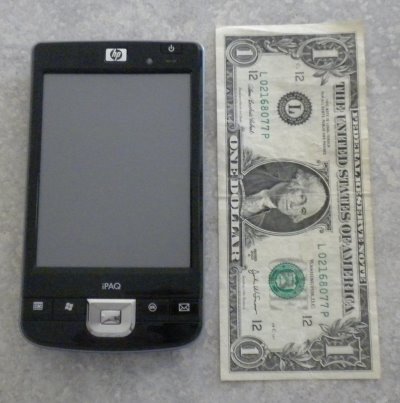
It's very comfortable to look at and read.
There's a decent set of apps built into it, including Office Mobile (mobile versions of Excel, Powerpoint, and Word), a browser (IE mobile), an image browser (HP Photosmart mobile), and Windows Media Player mobile. Plus there's a calendar/appointment manager, which is hooked into the machine's clock, and can be set to sound reminders just before critical appointments.
The display can be used either in landscape or in portrait orientation. To swap between them you press-and-hold one of the hard buttons.
All in all it's a very solid design. But there are some serious issues, too.
By far the most important is a problem either in the USB driver or in the USB hardware. This was an issue for me when I originally got it, and after a couple of days of messing with it I gave up. It took me a month to figure out what was going on.
You "synchronize" the iPaq with a Windows PC with a USB cable. The problem is that after two or three times doing that, something gets wedged and thereafter the PC doesn't recognize the presence of the iPaq when you plug it in. What I eventually found out was that you have to physically reset the iPaq in order to get that back.
But it doesn't fix it permanently, and it means that it's a good thing that the reset button is readily available (on the right side).
I used to do firmware for a living, back when I was still able to work. I've worked on test equipment, on robots, on factory automation, and on consumer products. No where that I worked would have permitted a product to ship with a bug this huge. I don't know if it's Microsoft's bug or HP's bug, but it's HP's product and I am astounded that they were willing to ship the product without fixing it.
If they didn't detect it during their QA cycle then their QA is deeply flawed. If they did but decided not to fix it, that's unconscionable too.
Anyway, once I figured that out, use of the iPaq became a lot better, because a lot of the best features use, or are enabled by, the interface to the PC.
The iPaq has an SDHC slot and a CF slot. I've got both of them filled, with 32G of memory each, so my iPaq has a lot of storage. It turns out that you can install apps on that kind of storage, which is good because the iPaq itself doesn't have all that much memory. Mine currently shows 156 MB of free storage on the main unit. At least one memory chip is pretty much a requirement -- but that isn't a very onerous requirement given how cheap those chips have become these days.
The biggest source of confusion for someone used to Windows is the fact that Windows Mobile changes a lot of conventions. In Windows, there's an "x" icon in the upper right, and clicking it makes an app stop running. In WMP, clicking that sends a signal to the program, but some programs respond to it by quitting and some by putting themselves into the background. If you're not careful, you can end up with a lot of programs running in the background and no memory left to run new things.
To actually kill them you have to get into the "Running Programs" tab of the Memory applet, either from the control panel, or by clicking an icon which is usually present on the main screen.
In Windows, a fast double-click has a unique meaning. In WMP it doesn't. Clicking an object once selects it. Clicking it again does something else, and it doesn't matter how close together the clicks are.
You're using the stylus to do all this on the touch screen, and a stylus doesn't have a right-click. The way you get a popup menu is to press-and-hold. So, in Word Mobile, you can sweep-highlight test using the stylus, and if you want to cut-and-paste it, you press-and-hold to get a menu with a "cut" choice. Then you find the past point, put the cursor there, and then press-and-hold to get the popup menu which includes the "paste" choice. For someone like me who has been using Windows in its various incarnations for 20 years, it's not very natural.
In some cases clicking something once will run a program or a function. In other cases you have to click a second time. GUI consistency is pretty poor, so you have to learn and remember how each one goes.
The biggest thing which is strange is the power button. "Turning it off" doesn't actually turn it off. The CPU keeps running when it's "off". (And that's why power cycling the unit didn't fix the USB problem: "turning it on" didn't cause it to reinitialize the hardware.)
I suppose that was necessary. The CPU has to keep running so as to serve the calendar function. But it's another unexpected paradigm shift. I was able to figure it out because I'm a firmware engineer myself, but someone who isn't as technically experienced as me could find it very confusing. The only way to genuinely turn it off is to take the battery out.
So what do I use it for? I didn't buy it because I had any legitimate need for the thing; I bought it because I wanted to own something nifty. It's just a toy for me. About the only real job I use it for is keeping my grocery shopping list, using the WMP equivalent of Notepad. I also have some games I run on it. Aside from that, it doesn't do a lot.
Nonetheless, now that I've got everything figured out, I must say I am glad I bought it.
Posted by: Steven Den Beste in Computers at
04:21 PM
| Comments (4)
| Add Comment
Post contains 1066 words, total size 6 kb.
June 27, 2010
I dunno if anyone cares, but I bought some games for Uiharu. Frame grabs and descriptions below the fold.
more...
Posted by: Steven Den Beste in Computers at
07:47 PM
| Comments (1)
| Add Comment
Post contains 874 words, total size 6 kb.
June 17, 2010
It turns out that IE Mobile on Uiharu can't display Japanese:

I wonder if there's a way to install an extended font? It's not like I'm short of storage space.
UPDATE: Probably not. There's a "Font" directory in the Windows directory, but there's nothing in it and I can't copy anything into it. I think it's in the ROM.
I could put something like Ariel Unicode (23 megabytes) into my CF with no difficulty; the only real question would be whether the system would be willing to use it.
Ah, well, it's not like I really need it.
Posted by: Steven Den Beste in Computers at
02:23 PM
| Comments (3)
| Add Comment
Post contains 102 words, total size 1 kb.
June 10, 2010
This morning I had Uiharu plugged into Alcyone. There's a program I have installed which permits me to see a copy of Uiharu's display on Alyone, and to run it remotely. And I used it to invoke Mobile IE on Uiharu, and to browse the web a bit.
It didn't work very well. It also reminded me of this cartoon from 4 years ago.
Anyway, after the novelty wore off (about a minute) I stopped punishing myself.
Posted by: Steven Den Beste in Computers at
10:23 PM
| No Comments
| Add Comment
Post contains 82 words, total size 1 kb.
June 01, 2010
The nice man at the company that created the "ThemeArt" program for the PPC responded rapidly to my email, and investigated the problem. He got back to me with a workaround. (According to him, it's a problem with Windows Mobile.)
If you are trying to use a 480*640 image (for your 480*640 screen) you have to make it the background for both "Today Background" and for "Start menu". Then it works:
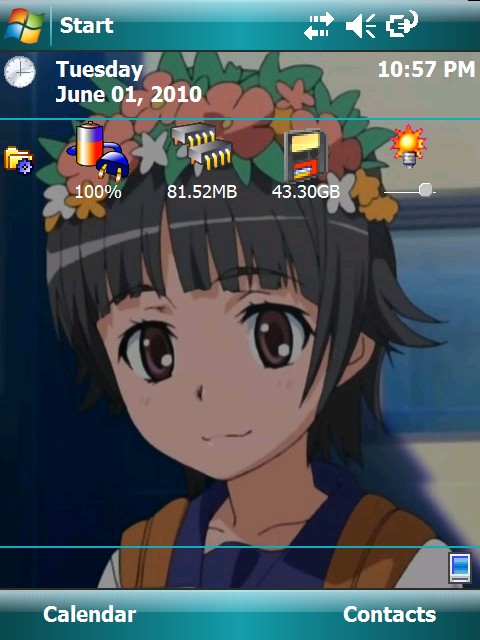
Second point: to remove the ThemeArt help HTML from the start menu, plug it into your computer and open it as an attached device on your Windows system. You have to enable viewing of protected system files. (Which you're not permitted to do on the PPC itself, which is why you have to use Windows to do this.) Then go to this directory on the PPC:
\Windows\Start Menu
Find the "lnk" file that points to the HTML file and delete it.
And now that those two things are settled, I want to say that ThemeArt is a nice program and I'm glad I bought it.
Third point: If you plug your PPC in and it doesn't connect, reset the PPC. On my iPAQ there's an indented button on the side that you push with the stylus. You can do this while it's plugged in or not. Either way, once it's rebooted (which takes about a minute) it will connect and synchronize. You don't have to manually invoke ActiveSync on your PPC; it happens automatically.
Fourth point: now that connections are reliable, a couple of days ago I wanted to transfer a bunch of data from my Windows machine onto the CF in my iPAQ. The transfer happened at about 600 kilobytes per second, which is not really too bad. (Since I was transferring 4.4 Gbyte, it still took a long time.)
UPDATE: Once the PPC is successfully connected with USB, I still haven't figured out how to connect out with mobile IE. I can access my own server but I can't get past there.
UPDATE: Success: I had Uiharu set up to use a proxy server, and once I disabled that, connection works.
It's not really something genuinely need. If it's connected, then I'm sitting next to Alcyone, which is better. But it was a mental itch that I couldn't get it to work. Now it does, and the itch is scratched.
Posted by: Steven Den Beste in Computers at
10:11 PM
| Comments (10)
| Add Comment
Post contains 395 words, total size 2 kb.

May 24, 2010
I just downloaded a PPC registry hacker, and for the moment I'm just looking around with it. It's a fully functional trial with a 14-day timeout, which is fine for me. (It's only $5, and I'll probably buy it.)
In this registry entry:
HKCU\ControlPanel\Desktop
...the value is a path to the default backdrop file \Windows\Default.2bp
That file displays without being washed out, and I wonder if the key here is to use 2bp format instead of JPG. Only I don't have any idea what it is.
Wikipedia says it's a variant bit map, related to BMP. But none of my standard image-processing tools have any idea what it is.
I'm going to mess around now and see if I can break it.
UPDATE: Whatever that registry entry is, it doesn't have anything to do with the wallpaper that's displayed.
I've seen some tools available that allow you to create your own themes. The themes which are included in the firmware have their own backdrops and they aren't whited out. I'm beginning to think that the only way to get Uiharu's picture in there is to make an Uiharu theme.
UPDATE: This is our new tool. And our first attempt is an improvement:

I think that the image it's using is set to 75 dpi. I'm going to take a look at the ones they provided, but I'll bet they're set to 300 dpi.
UPDATE: Nope. Mine was 150 dpi and theirs were 192. That won't explain it. Probably a setting in the tool that I missed.
UPDATE: I tried creating a version of the picture which was also 192 dpi, and it had no effect at all. So I tried creating a theme using one of the built-in pictures, and the exact same thing happened. It only uses the upper corner of the image.
I have a sneaking suspicion it's using 240*360, which I think was the standard screen size for older Pocket PCs, especially phones. Probably this theme editor doesn't know what to do with large screens like mine.
UPDATE: The area it's filling on the screen is 480*536. And it's using 240*268. So it's blowing the picture up 2:1. I suppose I could shrink it.
UPDATE:
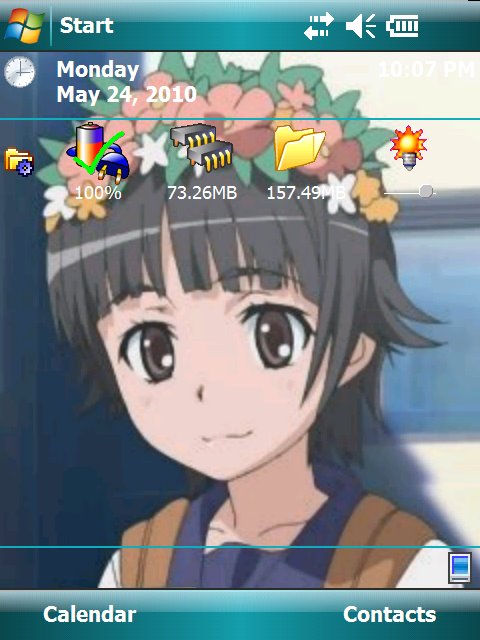
But there are all kinds of jaggies. Anyway, I'm going to experiment with making the image somewhat darker so that the text stands out more.
I think this is a problem with the theme editor. I suspect it's old. The background is included in the theme file, and that conversion is where the problem is happening.
UPDATE: On the contrary, the program is quite new. The most recent version was released in January of this year.
I just created a web page describing my trials and travails, and I mailed it to them to ask for help. (It contains a megabyte of frame grabs, so I didn't want to email it all directly.)
UPDATE: By the way, I'm still having problems with getting Uiharu to sync. But I've figured out the answer: when it doesn't work, I have to reset Uiharu. There's a reset button on the side of the case. Pushing that results in a long powerup, which apparently unwedges the hardware. Likely it's a driver bug. It's entirely possible that Microsoft has issued a fix.
But I'll never know. I still can't get out to the internet with Uiharu through my LAN. I can load any file I want off of my own server, but not from anywhere else.
Ironically, if I want to visit Windows Update, I might have to walk out to the coffee shop and use their WiFi.
Posted by: Steven Den Beste in Computers at
07:58 PM
| Comments (3)
| Add Comment
Post contains 608 words, total size 4 kb.
May 23, 2010
Using this picture as the screen backdrop:

...the result looks like this:

White letters on a very bright background are difficult to read, and anyway why did the image change so much? It's fun trying to navigate all this stuff without any documentation.
UPDATE: I'll be damned if I know how to change it, though. It doesn't have anything to do with how I encoded the picture. When I use one of the two they included on the device, they do exactly the same thing.
How do I make it so that the background picture isn't glowing like that?
Posted by: Steven Den Beste in Computers at
06:50 PM
| Comments (4)
| Add Comment
Post contains 105 words, total size 1 kb.
I'm beginning to get the impression that the Pocket PC platform is end-of-life. Not hugely surprising, really, but active development on it has mostly ceased. The OS itself in Uiharu is copyright 2007, for instance, and as I look through the web sites having software to sell, most of it was developed 5 or more years ago.
Adobe did support the platform, for quite a while. There is a Flash plugin, for Flash 7. The current version of Flash is 10, so Adobe too has abandoned support for it. But Flash 7 isn't useless.
I haven't tried using it yet, but from the documentation it isn't a standalone player. Rather, when it's installed, Pocket IE gains the ability to play flash files in web pages. Which is no big deal; it just means you need to create an envelope HTML file for any flash file you want to run.
But it'll have to wait until tomorrow. I'm copying the contents of Uiharu's CF chip onto Alcyone's HD, and at the rate it's running it won't be finished until midnight. It contains 12G of video files I reconverted to play on Uiharu, that being all of Aika Zero, Mai Otome Zwei, Railgun, Negima Ala Alba, Macademi Wasshoi, and RealBout High School.
UPDATE: A little while ago it said it would be 5 hours. Now it says 23. There was a cartoon I saw one time which made fun of the way that the Windows Copy time estimates vary so wildly.
Hell with this. I want to play. I'll do the copy later.
UPDATE: Hey, it works! But no one will ever accuse it of being speedy.
Posted by: Steven Den Beste in Computers at
05:18 PM
| Comments (2)
| Add Comment
Post contains 278 words, total size 2 kb.
May 22, 2010
This afternoon I needed to know the model number of the HP iPaq, which is named "Uiharu". Oddly enough there is no model number anywhere on the external case. And I couldn't find anything in the software itself.
So it occurred to me that it might be underneath the battery, and I popped it. It wasn't. (I eventually found the box it came in. It's a "210".)
This evening it occurred to me that it had been a long time since I'd tried plugging it into the PC. So I dug out the cable -- and it worked!
And so I unplugged it, and plugged it in again, and it didn't work!
So I logged off and on again (to make sure the Sync Center on Windows was gone), and I again unplugged and replugged the battery in Uiharu, and it worked!
It's hard to believe that I should have to go through that kind of crap. I'll do some experimenting in the morning to find out just what I do need to do to get it right. But it means I can download software to Uiharu -- which means I need to go buy some.
IpaqChoice seems to be an interesting place. It's one of the two official places that HP pointed me to. When I got Uiharu, there were a couple of colorful pieces of paper included which had strange serial numbers, being vouchers for this site. But I can't find the damned things, so I guess I have to do without. I've just spent the last hour browsing the place to see what they offer.
Coolest thing? There's what is claimed to be a version of Civ IV. There's also a game which looks to be first-person.
Biggest chutzpah? This program costs €584. That's more than Uiharu cost. And the use makes no sense: who would put one of these in a kiosk? It'd last about a week.
Strangest thing? Even though the product was created by an American company, and I'm logged in with an account that clearly states I'm living in the US, why are all the prices being quoted to be in Euros?
I still haven't figured out just which version of Windows Mobile I'm running, but I may not need to. this site allows me to tell it my model (214, which is essentially the same thing) and they're filtering the programs I see so that it all works for me.
Anyway, onward to the shopping.
UPDATE: OK, now this is cool. It's free, and it allows you to see the iPaq display on the PC in real time:

UPDATE: And then I downloaded and ran the free tool that turned on font anti-aliasing.
UPDATE: I'll tell you what I really want: I want to run flash files on Uiharu. Adobe announced a flash runtime for Windows Mobile way back in 2002 but it was for Flash 6, and doesn't seem to be available any more, and I can't find anything newer. Grumble.
Posted by: Steven Den Beste in Computers at
11:37 PM
| Comments (7)
| Add Comment
Post contains 504 words, total size 3 kb.
47 queries taking 0.1072 seconds, 112 records returned.
Powered by Minx 1.1.6c-pink.