
November 08, 2007
It turns out that in the Services administrative tool, if you double click on a service, the popup includes the precise string which was used to invoke it, including the path to the executable. So the one that has the strange name, "##Id_String1.6844...." etc. turns out to be this:
"C:\Program Files\Bonjour\mDNSResponder.exe"
And indeed there is a directory by that name, and that file is in it. Which is to be expected, because if there weren't the service wouldn't start.
So let's take a look at it, shall we? Right-clicking that executable and selecting "properties", and then the "Details" tag, and we get this:

Ho-kay. And this is doing what to for me? Well, it seems to be something that Adobe installed for me when I loaded up Flash 9 (which they think is called "Flash CS3") in order to make something called "Version Cue" work. Whatever it is, I don't need it, so I'm going to kill it off.
I remember that XP had a pile of services it auto-ran that you didn't really need, and without them it was more brisk. Like as not I'm loaded up with those here, too.
(Of course, knocking off services is perilous; get the wrong one and you get to reinstall everything.) Hey, what happens if I turn off the "Plug and Play" servi
Posted by: Steven Den Beste in Computers at
10:20 PM
| Comments (2)
| Add Comment
Post contains 223 words, total size 2 kb.
I've complained about not being able to find the IE7 cache -- or rather, of being able to find it, but not seeing anything in it.
Turns out that's by design, and they've gone out of their way to deliberately make it as difficult as possible to get into the cache. This is the first feature of Vista that's going to seriously cause me trouble.
I understand the logic, but I hate the result. And Firefox's cache is nearly as useless.
Posted by: Steven Den Beste in Computers at
06:20 PM
| Comments (9)
| Add Comment
Post contains 84 words, total size 1 kb.
Following Doug's pointer, I gingerly followed the instructions to turn off all system security. You use the "User Accounts" applet in the Control panel and flip one check mark, then reboot.
After rebooting, I did a full install of Encarta, including copying everything to hard disk. Just as a test, I tried Encarta Atlas, and it worked.
So I turned all the protections back on again, and rebooted, and found that the Atlas now works but the Encyclopedia does not. "Aha!" I said; "I need to turn protection back off again, and run Encyclopedia once."
So I did, and Encyclopedia worked great without the CDs. Then I turned protection back on again, rebooted, and tried Encyclopedia -- and it asked me for the CDs.
Damned if I know why. Anyway, of Dictionary, Atlas, and Encyclopedia, the Encyclopedia is the least useful to me. I usually consult Wikipedia when I need to look up that kind of stuff. So about the only thing I can really do at this point is to delete the gigabyte or so of Encyclopedia database and just never run the sucker.
UPDATE: It's possible that if I were to delete Encarta again, turn off security, go through the full install without security, and run everything once, then turn security back on and reboot, that the Encyclopedia would work. But frankly I don't care enough to give it a try.
UPDATE: It looks like I'm going to have to do exactly the same thing to get Streets and Trips to install. What a pain in the butt.
UPDATE: Nope, I can't get the Streets and Trips installer to run even with security disabled.
Posted by: Steven Den Beste in Computers at
02:28 PM
| Comments (3)
| Add Comment
Post contains 281 words, total size 2 kb.
Just some stuff I've encountered while I look for how to make the damned admin acount a real and full administrator:
Preventing passwords from expiring:
Open an elevated command prompt (right-click, run as administrator)
Type: net accounts /maxpwage:unlimited
As it currently stands, the new account I set up doesn't obviously differ from the one I was already using. So I'm going to try an experiment, using Encarta.
I'll do an installation of it. But I'll make a shortcut to the "move everything to HD" program, and tell it to run as administrator. I think that may make it possible for it to complete whatever magic it was trying to do to the registry and suchlike.
UPDATE: Well, that's interesting. I can't set "run as administrator" on that shortcut. I can do so on my shortcut to notepad, but not on my shortcut to the "copy Encarta to HD". How peculiar. I guess I'm going to have to figure out what program it's trying to call.
It won't let me do "open file location" either, so I can't figure out what program it's trying to run.
If one program runs with administrator privilege, and spawns another, does the second inherit it? I think it does, and maybe that's the answer here. Maybe I can make the encyclopedia program itself run as administrator, and invoke the copy from there.
Except that I can't do that, either.
UPDATE: Open the task manager, look at the "processes" page, and try running the copy program. Turns out it's called "encchd.exe". Now to locate the sucker on the disk and see if I can shortcut it directly.
UPDATE: When you nuke the indexing service, then you get told about it every time you use the search box. grumble grumble...
UPDATE: Full path: c:\Program Files\Common Files\microsoft shared\Referende 2001\EncCHD.exe
And yes, when I make a direct shortcut to that I can turn on administrator status. Now to see if it works.
UPDATE: Ta daa!

I'm sure I know what's wrong. The shortcut is passing in parameters, especially including some sort of script file, and the shortcut I created doesn't do that. And since I can't look inside the shortcut to see what it contains, I can't tell what they did.
I wonder if I can open their shortcut using notepad? Dig through all the binary and see what the invocation string was?
UPDATE: Doug just pointed out that it's possible to completely deactivate all the security stuff with a single menu choice. That idea gives me the heeby jeebies, but what the hell? This is an experiment. So I've done that and now I'll try the Encarta install. Then I'll turn everything back on again afterwards.
But I'm damned if I'll do anything else while the system is in that state, so I'm back on my old laptop making this update while I wait.
Posted by: Steven Den Beste in Computers at
12:59 PM
| No Comments
| Add Comment
Post contains 481 words, total size 3 kb.
So I used the account management applet in the control panel to set up an Administrator account. The only thing that worries me is that it looks exactly the same as the account I'm currently using, which was set up for me by the first boot process, and that's not good enough.
The account I'm using is actually sort of a hybrid between a full administrator and what I am used to calling a "power user". I have administrator privilege, sometimes, but only by saying that certain operations are acceptable. The problem has been that sometimes I don't get asked, and operations just bounce.
What's needed to do some of the things I want to do is an account where administrator privileges are actually on 100% of the time. Doing that requires a different tool; I went through this with XP, too. Problem is, I don't remember where it was on XP, and even if I did it's probably somewhere else now.
I vaguely remember that it was in the deep table-drive system administrator tool before. I'll have to hunt and see if I can locate an equivalent now.
UPDATE: Just in passing, here's how to permanently nuke the indexing service.
In the control panel, choose "Administrative Tools". Select "Computer Management". In that, open "Services and Applications" and select "Services". Scan down to "Windows Search" and double-click. Select "disabled".
That doesn't make it stop running, but it means that it won't start running the next time you reboot your computer.
I thought the "Computer Management" tool was also where you could do detailed account control, but I was wrong.
You know something? It's rather disturbing to see a service called "##Id_String1.6844F930...." and on for about another 20 characters of garble, and see that it's set to autostart and that it's running. Even worse when the "description" field for that contains exactly the same garble.
UPDATE: To check on what things are autostarting, use the control panel to get into "Administrative Tools" and select "System Configuration". Under the "Startup" tag are all such, and you can uncheck them if you want to get rid of them. I'm going to kill "chkMail" right now; it's useless to me.
Unfortunately, I don't see an entry that looks like the ASUS utility that's doing weird things to my screen.
UPDATE: Ah! It turns out you can have a "My Computer" icon, it just defaults to "off". Right-click on blank display and choose "Personalize". On the left side, select "Change desktop icons" and enable the "Computer" icon from there.
Once it's there, it's much more convenient than mucking around with the Start menu to get into it. And the "properties" choice on it brings up the Control Panel "system" applet, which is just what you'd want.
Posted by: Steven Den Beste in Computers at
12:08 PM
| Comments (2)
| Add Comment
Post contains 465 words, total size 3 kb.
I'm pleasantly surprised by Vista so far. In most ways it's actually pretty nice. The new "gadget bar" is an interesting idea (essentially ripped off from OSX, but who's counting?) but most of the available gadgets are of less than zero interest to me e.g. the one that monitors RSS feeds. But the CPU/Memory meter gadget is something I've wanted, and the clock gadget ain't bad. And I might end up messing around with the "notes" gadget some day, but not now.
Not everything is a bed of roses. Some kinds of operations take more mouse clicks now than they used to. The biggest and most obvious change is that there is no longer a "My Computer" icon on the desktop. I could create one, as a shortcut, and I might end up doing exactly that, but it wouldn't be quite the same. For one thing, the "properties" on a right click would be a lot different.
So getting into the disk drives involves more clicks, since I haven't created such a shortcut yet.
I've certainly got a lot of fine tuning to do yet, and I definitely need to create an administrator account to handle certain things.
One thing that's a bit annoying is not Microsoft's fault. It's an ASUS program called "ASUS Splendid Technology Utility" and what it does is control the screen settings. NVidia also has such a mechanism. The problem is that I'm using the NVidia control to decrease the brightness and contrast on the screen, and the ASUS utility auto-runs on login and overrides that, leading to the screen being way too bright. I need to get rid of that auto-run. It's probably in the registry, but that's not really the way to do it. Toren told me about a utility which shows you everything that autoruns, but you have to be an administrator to use it -- yet another reason to set up an administrator account.
As it stands now, when I turn the computer on and log in, I have to open up the display settings to reach the NVidia menu, then make a minor change so that it will adjust the screen and override all the violence that the ASUS utility automagically did to me. It's a bit of a pain.
As marvelous as all the other hardware is, I'm not too impressed with the built in sound. Watching one DVD last night, I had everything maxed out on volume and it still wasn't all that loud. Plus, the built in sound has no tone controls, no bass or treble.
I have an external sound box, from Creative Labs. It's USB 2, and I thought I'd give it a try last night. I used to use it with my workstation, and the controls for it under XP were marvelous. It had a full ten-band graphics equalizer, for instance. I dug it out, and then I got online to locate the latest drivers for it on Creative's site.
Maybe I got the wrong package. The external module worked, but the controls for it were lackluster, and the sound coming through it was muddy and distorted. I think that some of the "simulate weird environments" things were running, despite the fact that the controls available to me seemed to indicate that I'd shut them off.
I also didn't see anything that looked like a graphics equalizer.
So it actually sounded even worse. I unplugged again. Maybe sometime I'll do more searching to try to see if there's a better driver package for it, but right now there are more important things to work on.
The volume issue was a localized one. I think the sound on that particular DVD (one of the older DBZ disks I own) is particularly low amplitude. I'll try some others and see, but if that turns out to be the norm, I really am going to have to get the external module working.
My main impression of Vista so far is that the bitching about the differences I've heard elsewhere has been vastly overblown. It isn't really as much of a change as some seem to say it is compared to XP.
Posted by: Steven Den Beste in Computers at
11:53 AM
| Comments (6)
| Add Comment
Post contains 696 words, total size 4 kb.
November 07, 2007
Just thought you all might find this interesting. It's what my desktop looks like right now.
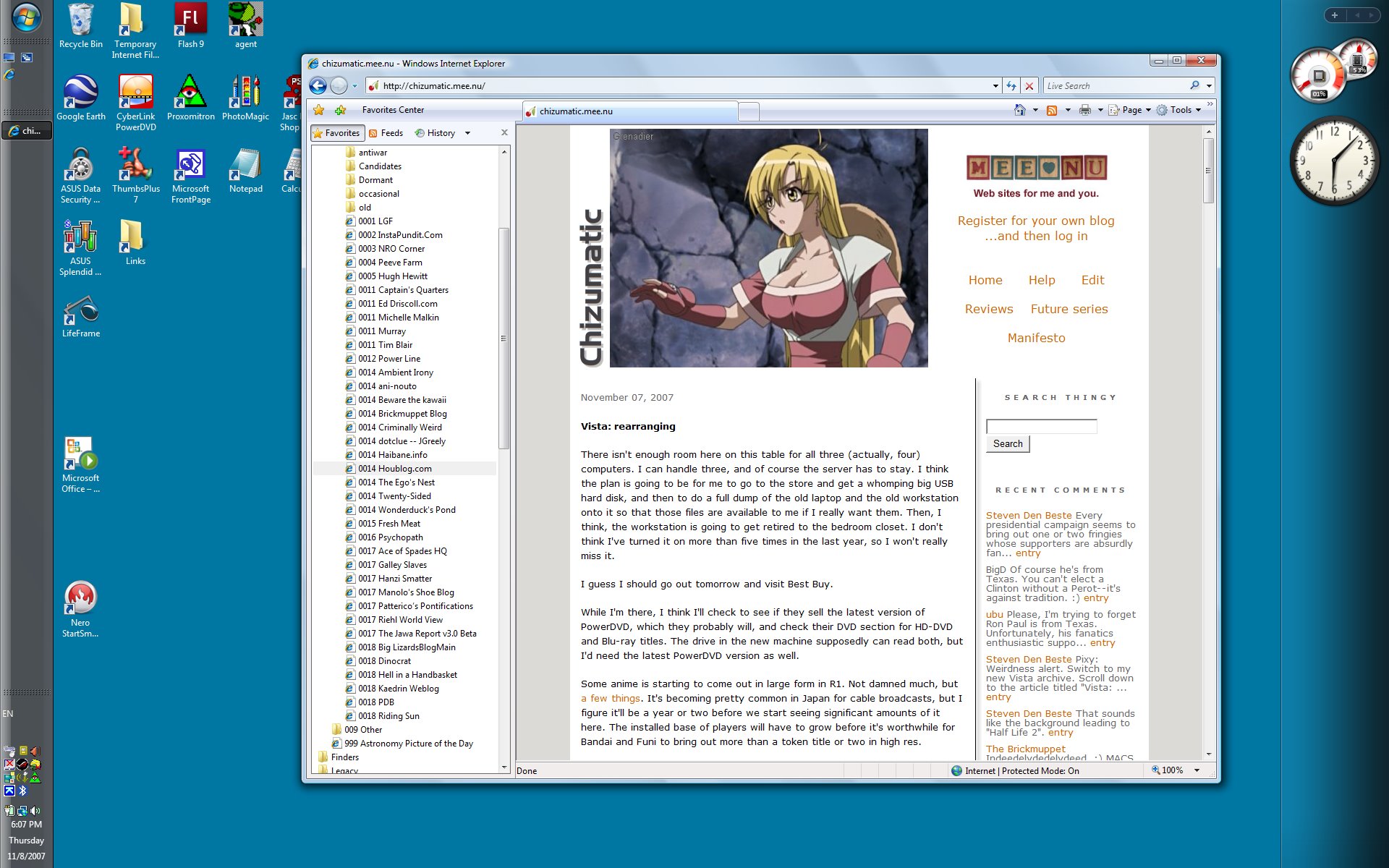
It's not going to stay that way. The clutter of shortcuts up there is eventually going to get moved into the shortcut section of the start bar, and some of the ones that ASUS put on the screen are going away.
UPDATE: After all the fuss I made about Noein, and getting the rest of the DVDs delivered overnight, I'm feeling a bit guilty now. I'm watching something, but not that. I'm a little fried, and Noein is a bit heavier than I feel like watching right now.
Turns out that PowerDVD has three sizes you can cycle through by double-clicking the screen, not two. The new one is 1080 pixels tall, even for an existing normal DVD. So I'm watching something at that size, and the CPU utilization meter is never exceeding 10%, even though I'm not using any hardware acceleration. Not too shabby.
In the control panel there's an applet titled "Performance Information and Tools". It says:
Processor 5.3
Memory 4.8
Graphics 5.9
3D graphics 5.5
Disk data transfer rate 5.3
Which means nothing to me. I was thinking of trying to find some sort of benchmarking program that I could run here and on the old laptop, and maybe on the workstation, to compare them, but it's been so damned long since I used to be involved in the PC "mine is bigger than yours" wars that I've long since lost track of what ones exist and where you get them. Oh, well.
Posted by: Steven Den Beste in Computers at
06:15 PM
| Comments (3)
| Add Comment
Post contains 264 words, total size 2 kb.
There isn't enough room here on this table for all three (actually, four) computers. I can handle three, and of course the server has to stay. I think the plan is going to be for me to go to the store and get a whomping big USB hard disk, and then to do a full dump of the old laptop and the old workstation onto it so that those files are available to me if I really want them. Then, I think, the workstation is going to get retired to the bedroom closet. I don't think I've turned it on more than five times in the last year, so I won't really miss it.
I guess I should go out tomorrow and visit Best Buy.
While I'm there, I think I'll check to see if they sell the latest version of PowerDVD, which they probably will, and check their DVD section for HD-DVD and Blu-ray titles. The drive in the new machine supposedly can read both, but I'd need the latest PowerDVD version as well.
Some anime is starting to come out in large form in R1. Not damned much, but a few things. It's becoming pretty common in Japan for cable broadcasts, but I figure it'll be a year or two before we start seeing significant amounts of it here. The installed base of players will have to grow before it's worthwhile for Bandai and Funi to bring out more than a token title or two in high res.
I might include the hires DBZ disk in my next order, just for the hell of it. I've already got both in DVD, and the original wasn't created deliberately for hires, so it won't be a massive extraordinary experience, but it could be interesting.
Posted by: Steven Den Beste in Computers at
04:21 PM
| Comments (7)
| Add Comment
Post contains 296 words, total size 2 kb.
Starting to get down to less important stuff, like Google Earth.
I installed the old version I had, and then let it install the update. When the latest version ran, it popped up a "tip of the day". Here's what it said:
<!--//--><script>PrxModAtr=1;</script><!--//--><script> function NoError(){return(true);} onerror=NoError; </script>
<!--//--><script> function moveTo(){return true;}function resizeTo(){return true;}</script>
<!--//--><script> function status(txt){return(1);} </script>
<html>
<head>
</head><body>
<img width="1" height="6" border=0 src="C:\Users\Steven\AppData\Local\Google\GoogleEarth/images/khimg0.gif">
<table cellpadding="0" cellspacing="0">
<tr>
<td colspan="2">
<img src="C:\Users\Steven\AppData\Local\Google\GoogleEarth/images/khimg1.gif" width="19" height="19" align="top"> <font size="+2"><b>Tip:</b> Viewing the sky </font>
<br>
Etcetera.
Posted by: Steven Den Beste in Computers at
03:39 PM
| No Comments
| Add Comment
Post contains 87 words, total size 1 kb.
When you decide to preemptively kill an unresponsive program, it doesn't wait 30 seconds and then ask you again. If you say "Kill it now" it kills it now.
UPDATE: Bad things: PhotoMagic 4.0, the program from my Win95 days that I cannot live without, tosses an error every time it starts running. "Failed to update the registry. Please run REGEDIT." Which, of course, tells me nothing whatever.
Maybe a reboot will help.
UPDATE: No, a reboot didn't help. I may just have to live with it.
What's much worse is that Agent, my mail program, won't run. It goes CPU bound and hangs.
UPDATE: Folks, I'm gonna be distracted for the next few days, so you're just going to have to put up with me.
UPDATE: PhotoMagic problem solved. I changed the shortcut to give it administrator privilege, ran it once, then removed the privilege. Whatever it was trying to do to the registry got done, and now it's happy.
And now to install Encarta. Which is going to take forever.
This is sort of like moving into a new home. You gradually unpack things, and at a certain point you get enough unpacked so that you can live.
UPDATE: Getting the dictionary installed on the HD was interesting. The initial install went fine, but when I tried to use the command in the program to copy everything to HD, I got a protection bounce. Turns out I had to temporarily change the protection on the Encarta directory to give normal users full access. After everything's in and working, I'll change it back.
UPDATE: Things to do: nuke the Indexing service.
UDATE: Well, it doesn't seem to be possible for me to install Encarta 2001 Encyclopedia to the HD. It works from CDs, but even though I go through the whole process of putting it onto the HD, it doesn't take. The program still asks for the CDs.
Probably it would work if I installed it as an administrator. I'm beginning to think I need to create an overt administrator account.
But of course what Microsoft would prefer is that I buy a new copy of Encarta. It may come to that.
Unfortunately, Encarta Atlas is the same way.
It's not entirely unfair, I suppose. This copy of Encarta was designed to run on Win 98, after all.
For now I'll just uninstall it. I want to see if I can get Frontpage to install.
UPDATE: Frontpage works.
I forgot to mention something. My copy of Flash 9 is an upgrade to my copy of Flash 8. I didn't think about that, and I installed Flash 9 directly. After it was in, it came and told me it was an upgrade -- and permitted me to enter the validation serial number from my copy of Flash 8 to prove I owned it. I didn't actually have to insert the CD for Flash 8, let alone actually install the sucker.
Points to Macromedia on that one. That was very nice.
UPDATE: Re nuking the Indexing service, here's how it should have been done: right-click on the start bar, run the task manager, select the "services" tab, scan down to "WSearch", right-click it, and select "stop" from the popup menu.
Problem is, you get a security bounce. "Unable to stop service."
So, the obnoxious, slow, and stupid solution that works: right-click on each of your drives and select properties. On the popup, unclick the "index this drive" box. On the next popup, tell it to change that property for every fucking thing. When you get a security popup, tell it to go ahead. When it fails the first time, tell it to "ignore all". Then watch the drive light flicker for about a hundred years.
Do that for every drive, and remember to do it for any USB drive you happen to plug in, too, the first time you plug it in.
Probably you have to be an administrator to shut down the service. I really am going to have to see if I can create a second account that's a full admin.
Posted by: Steven Den Beste in Computers at
12:55 PM
| Comments (9)
| Add Comment
Post contains 685 words, total size 4 kb.
46 queries taking 0.149 seconds, 118 records returned.
Powered by Minx 1.1.6c-pink.