
December 29, 2007
Now there's a stupid way to do this, which is easy. You figure out ahead of time all the things you're going to allow, a very short list, and then you animate them using Poser, render the lot into individual frames, read all those frames into Flash, and use it as a frame-switcher with a tiny amount of logic on top to control what plays, when. The result can look damned good, as long as you don't try to resize it. But the resulting SWF file will be mammoth.
The second way is to do that same work, but to look at the finished images and to cut out the parts that move. Then you use a base background, and make smaller sprites which you place on top of that background. So for instance, if you want a figure which is standing perfectly still but whose eyes are blinking, you can render with the eyes open, again with the eyes shut, and use a graphics editor (or other tool) to cut out just the little bitty bit on the face which contains the closed eyes. Then place that on top of the figure periodically.
That can be quite elaborate, and it's a lot of work. But it has virtues, if you're careful. For one thing, it means that multiple animated parts can be doing what they want to do asynchronously, which is impossible for the first approach.
If you want to get really fancy, you actually use Poser itself to create those parts. It turns out that if you render against the "background color" and store the file out as a PNG, it creates an alpha channel. It looks amazingly good, too, when composited on top of something else:
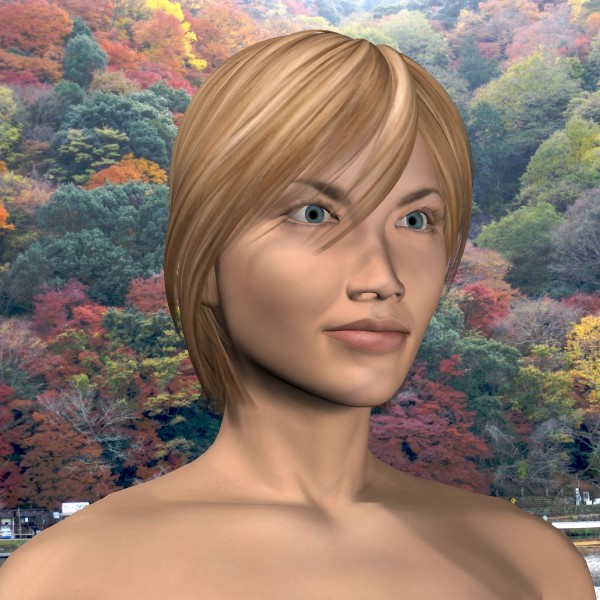
I composited that with Paint Shop Pro (on top of a picture I stole from J), but Flash can do that at runtime.
I can animate a scene, and then render it multiple times. For instance, if I want the figure's arm to move, I can turn off everything else. What will show up in the render is a disembodied arm and hand, which will do all the things I told it to do, and the render against the neutral background will include an alpha channel for the lot. Trim that, read it into Flash, and now you're really cooking.
But the resulting SWF will still be immense. If you're doing anything at all complicated, you're talking multiple megabytes. And in any case you're using pixels, so you can't scale anything. And if you want to rotate anything, you have to do it in the render. Rotated bitmaps look terrible.
I've become more and more impressed with using stroke graphics for things. It renders quickly if you don't do anything really weird, and it's infinitely scalable. The Guchuko flash I did one time came in at only 6.5K for the SWF file. That same SWF done as a bitmap would have come in at upwards of 100K and it wouldn't have looked as good.
So here's what I really want to do: use Poser to create images, and then convert them to vector images. And that's a real bitch, especially with the tools I have.
Flash has a tool which can convert an image into a vector representation. But if you don't process your image heavily, it doesn't do a very good job. In practice what it does is to turn each pixel into a vector square. So it "scales" but it looks just like the bitmap does scaled, and it's even larger, and renders gawdawful slowly at run time.
So... what you do is to threshold the image. Like this:
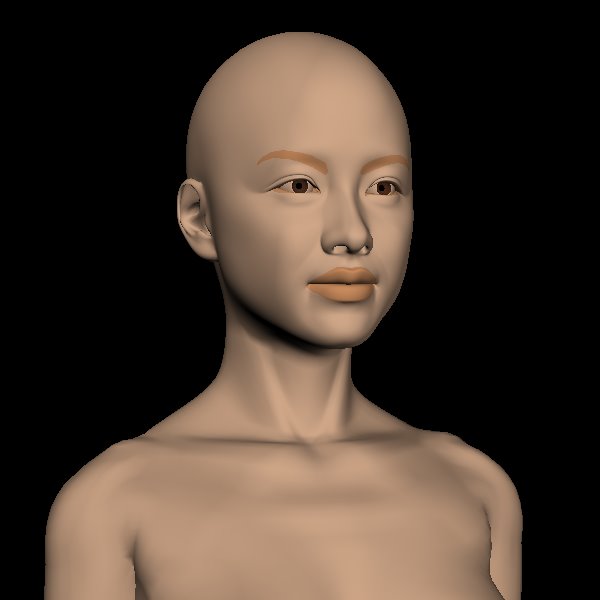

Then you can read that into Flash and tell it to vectorize it, and this time the result is quite clean and small. All those big areas with sharp edges? It eats those right up, if you use the right parameters on the conversion.
I did it, too.
(The flickering around the edges of certain areas is a Poser rendering issue having to do with lighting. I know how to prevent that, but this was a test run and it wasn't worth going back to do it again.)
That resizes cleanly, and it's only 63K. But it was really painful to produce that. For one thing, the vectorize option in Flash can't be batched, so I had to manually convert every frame. For the 19 discrete frames you see here, that was annoying. If I had a couple of hundred, it would be out of the question.
What I need is something that will threshold and vectorize a bitmap image in a single pass, which I can somehow use to batch process a swarm of images all at once (via a shellscript if no other way). In other words, I need Potrace.
Or rather, I need Potrace which is smart enough to handle color, multiple colors at once. Probably Photoshop can do this (Photoshop can do anything) but I can't afford to buy it, and I won't steal it.
Bummer.
Posted by: Steven Den Beste in at
06:23 PM
| Comments (11)
| Add Comment
Post contains 868 words, total size 5 kb.
-j
Posted by: J Greely at December 29, 2007 08:13 PM (2XtN5)
I've found it to be a great free replacement for Illustrator in practically every respect.
Posted by: Gothmog at December 29, 2007 10:25 PM (Cpc20)
I knew about that Stanford thing, but it's not really a very good alternative if you want to transform about 200 images, since each one has to be uploaded and then downloaded manually. That's assuming they don't have a troublemaker cap, too.
I'll look at Inkscape. I already have a link for it.
Posted by: Steven Den Beste at December 30, 2007 12:06 AM (+rSRq)
Well, Inkscape is more impressive than I thought it would be. You can load your image in and fire up a special Vectorize frame, and if the image is conducive (and rendered frames are nearly ideal) and you set your parameters right, the result is fast and clean.
Of course, like nearly all open source packages, it feels a bit unpolished. Hit the "help" button, and it fires up your browser to access an online manual stored on a server in France.
I haven't looked yet to see if it can do batch processing. If not, it's not going to be as nice, but it will still be a lot better than the approach I used before.
It just occurred to me that I didn't check to see if it could save vector images in a format that Flash can load.
Posted by: Steven Den Beste at December 30, 2007 02:16 PM (+rSRq)
The good news: Inkscape can write EMF files, and Flash can read them in.
The strange news: it creates a separate plane for each color threshold. That works in Flash, but it's a bit strange.
The bad news: I don't see any way to do batch processing. Sob.
The worst news: Inkscape isn't consistent about where it places imported bitmaps on its workbench, but the emf file it produces contains the origin offset, so I have to manually place all the images so they line up.
It'll work. But it means doing something like 20 manual operations per frame to do the conversion. (The vectorize control frame doesn't remember its settings, so I have to manually enter them all every time.)
It's about what I expect from Open Source: it works, but it doesn't work well.
It's worth what I paid for it, that's for certain.
Posted by: Steven Den Beste at December 30, 2007 02:33 PM (+rSRq)
It's not just that it's inconsistent about where it places imported bitmaps. They're deliberately randomizing it. I suppose the idea is that if you import several at once, it doesn't lay them all on top of one another -- but I don't want to do that.
Randomizing the positions would be fine, were it not for the fact that the randomized position ends up in the resulting EMF file.
Posted by: Steven Den Beste at December 30, 2007 02:40 PM (+rSRq)
Flix can vectorize to flv or swf. http://www.on2.com and you can download a demo version of Flix Pro It also does batch files. A little pricey for the pro version, though. Dunno how good that function is, though, since I haven't tried it.
Posted by: Norm at December 30, 2007 08:57 PM (5/84L)
Posted by: Steven Den Beste at December 30, 2007 10:25 PM (+rSRq)
Posted by: Steven Den Beste at December 30, 2007 10:47 PM (+rSRq)
I have Adobe CS3 on my laptop, and only the Flix Pro demo installed, and I'm not at home at the moment. I made a single bmp image, and exported it from the Flix Pro demo as swf. I could successfully import it into Dreamweaver and preview shows the original (photo) image with the "x." Nothing vectorized, and that's strange. But Flash CS3 shows only the "x" as you described.
The timeline may be the problem; there doesn't appear to be any way to specify duration in Flix for a still image. Sorry; I didn't think about that when I recommended it; only thought about its vector ability and batching.
Posted by: norm1034 at December 30, 2007 11:26 PM (5/84L)
Posted by: Steven Den Beste at December 31, 2007 12:03 AM (+rSRq)
Enclose all spoilers in spoiler tags:
[spoiler]your spoiler here[/spoiler]
Spoilers which are not properly tagged will be ruthlessly deleted on sight.
Also, I hate unsolicited suggestions and advice. (Even when you think you're being funny.)
At Chizumatic, we take pride in being incomplete, incorrect, inconsistent, and unfair. We do all of them deliberately.
How to put links in your comment
Comments are disabled. Post is locked.21 queries taking 0.0198 seconds, 28 records returned.
Powered by Minx 1.1.6c-pink.