
July 05, 2008
Comcast just sent me a mailing telling me that they've doubled everyone's upload speeds. I think that was a mailing intended for residential customers, and I'm a commercial customer. (It's a long story.)
So I'm curious to know if it's true, but the only way to find out is to try it. I remember once there was a web site where you could benchmark your speed, but I don't remember any more where it was. Anyone got a URL for me?
UPDATE:

Well, that stinks. It's exactly the same as before, and what this means is that I, as a "premium" customer (business class) who pays twice as much per month as a normal user, now have the lowest upload speed the company offers.
I know why this happened. There is parallel hardware using the same wires. We commercial customers have our own backbone. The company that serves the normal home users just did a change to their backbone, and the company I get my service from didn't. But it still reeks.
UPDATE: This was ill-conceived on Comcast's part. It looks as if they sent this message to every one of their customers, even though not everyone got the upgrade. And there's nothing I can find which formally allows me to determine if I'm one of the people who was supposed to be upgraded. For instance, I would have expected somewhere on their web site that I could go which would tell me "Yes, you should be getting the higher speed" or "No, you should not be". After all, they should be able to tell from my IP.
UPDATE: Maybe I spoke too soon. I power cycled my modem for the other test but I only left it off for about 10 seconds. When I've been on the phone to tech support and they want me to power cycle the modem, they always say to leave it off for 30 seconds. So I just did it again, and gave it a count of 30.
Then I tried the test again, and this time it told me I had a megabit per second of uplink. I used to have a nominal 768 kilobits, so this does tend to suggest that I've gotten some benefit here.
Another difference is that I picked a different server for the test. I think I'm going to wait until late tonight and try it again, with more than one test server. But I'm beginning to think it's real after all.
UPDATE: Or I could find a test closer to home:
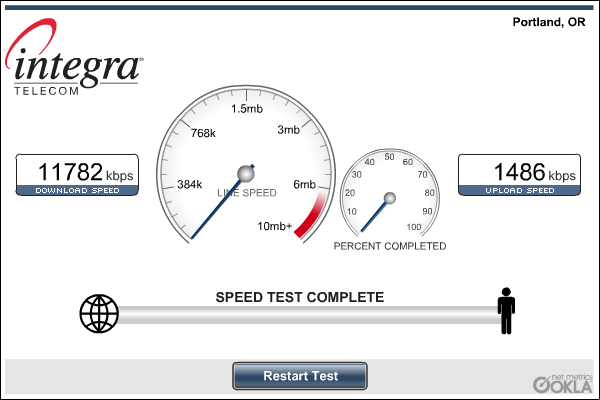
I wonder if they upgraded our downlink, too? I thought I only had 8 megabits of downlink, not 12.
Posted by: Steven Den Beste in Site Stuff at
10:39 AM
| Comments (3)
| Add Comment
Post contains 445 words, total size 3 kb.
I can't find the site that I've used in the past, but this UK-based one just gave me results that "feel" about right for my connection: http://www.thinkbroadband.com/speedtest.html
Posted by: Siergen at July 05, 2008 10:49 AM (H+VVO)
Posted by: David at July 05, 2008 10:52 AM (UpR/+)
Posted by: Steven Den Beste at July 05, 2008 11:01 AM (+rSRq)
Enclose all spoilers in spoiler tags:
[spoiler]your spoiler here[/spoiler]
Spoilers which are not properly tagged will be ruthlessly deleted on sight.
Also, I hate unsolicited suggestions and advice. (Even when you think you're being funny.)
At Chizumatic, we take pride in being incomplete, incorrect, inconsistent, and unfair. We do all of them deliberately.
How to put links in your comment
Comments are disabled. Post is locked.20 queries taking 0.0124 seconds, 20 records returned.
Powered by Minx 1.1.6c-pink.