
February 26, 2009
I just figured out how to deactivate the Windows Media Center. It's been a particular problem for me because this computer has a panel of buttons on the front which invoke WMC, and I can't tell you how many times I've hit them by mistake.
Here's how you kill it off:
From the control panel, run the "Default Programs" tool.
Select "Set program access and computer defaults"
Yes, you know that it's doing something dangerous and you're willing to let it have admin privilege.
Click the expansion tool on the right side for "Custom".
Scroll down to the "Default Media Player" section.
Unclick "Enable access to this program" for Windows Media Center.
Select "OK".
After I did that, I tried hitting the front panel buttons, and I got an error popup:
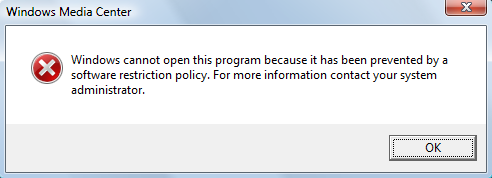
Yes! Exactly right! Getting rid of the popup entirely would have been even better, but this is good enough. WMC took something like a minute before it started listening to "Go the hell away you stupid program" clicks, and it seizes the entire screen in the mean time. What a piece of shit...
UPDATE: There's a degree of irony here. I'm running Vista Home Premium, and the main difference between Home Plain and Home Premium is Windows Media Center, which I hate with a fiery passion.
Posted by: Steven Den Beste in Computers at
10:03 PM
| Comments (1)
| Add Comment
Post contains 222 words, total size 1 kb.
Posted by: Toren at February 27, 2009 05:53 AM (ImdFE)
Enclose all spoilers in spoiler tags:
[spoiler]your spoiler here[/spoiler]
Spoilers which are not properly tagged will be ruthlessly deleted on sight.
Also, I hate unsolicited suggestions and advice. (Even when you think you're being funny.)
At Chizumatic, we take pride in being incomplete, incorrect, inconsistent, and unfair. We do all of them deliberately.
How to put links in your comment
Comments are disabled. Post is locked.20 queries taking 0.0093 seconds, 18 records returned.
Powered by Minx 1.1.6c-pink.