
June 01, 2010
The nice man at the company that created the "ThemeArt" program for the PPC responded rapidly to my email, and investigated the problem. He got back to me with a workaround. (According to him, it's a problem with Windows Mobile.)
If you are trying to use a 480*640 image (for your 480*640 screen) you have to make it the background for both "Today Background" and for "Start menu". Then it works:
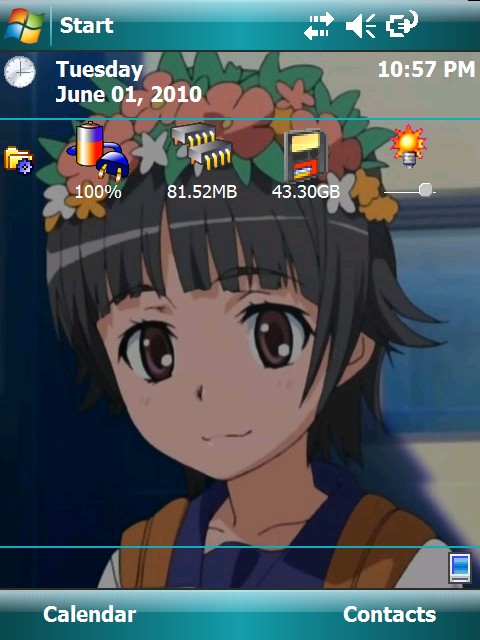
Second point: to remove the ThemeArt help HTML from the start menu, plug it into your computer and open it as an attached device on your Windows system. You have to enable viewing of protected system files. (Which you're not permitted to do on the PPC itself, which is why you have to use Windows to do this.) Then go to this directory on the PPC:
\Windows\Start Menu
Find the "lnk" file that points to the HTML file and delete it.
And now that those two things are settled, I want to say that ThemeArt is a nice program and I'm glad I bought it.
Third point: If you plug your PPC in and it doesn't connect, reset the PPC. On my iPAQ there's an indented button on the side that you push with the stylus. You can do this while it's plugged in or not. Either way, once it's rebooted (which takes about a minute) it will connect and synchronize. You don't have to manually invoke ActiveSync on your PPC; it happens automatically.
Fourth point: now that connections are reliable, a couple of days ago I wanted to transfer a bunch of data from my Windows machine onto the CF in my iPAQ. The transfer happened at about 600 kilobytes per second, which is not really too bad. (Since I was transferring 4.4 Gbyte, it still took a long time.)
UPDATE: Once the PPC is successfully connected with USB, I still haven't figured out how to connect out with mobile IE. I can access my own server but I can't get past there.
UPDATE: Success: I had Uiharu set up to use a proxy server, and once I disabled that, connection works.
It's not really something genuinely need. If it's connected, then I'm sitting next to Alcyone, which is better. But it was a mental itch that I couldn't get it to work. Now it does, and the itch is scratched.
Posted by: Steven Den Beste in Computers at
10:11 PM
| Comments (10)
| Add Comment
Post contains 395 words, total size 2 kb.
Posted by: RickC at June 02, 2010 10:18 AM (cuVa4)
Posted by: Steven Den Beste at June 02, 2010 10:45 AM (+rSRq)
Posted by: RickC at June 02, 2010 06:28 PM (aXVvl)
Posted by: benzeen at June 02, 2010 08:56 PM (wptAN)
Posted by: benzeen at June 02, 2010 09:59 PM (wptAN)
Yeah, exactly.

That's how my LAN looks. All the connections are ethernet except the one between Uiharu and Alcyone.
When I use IE Mobile on Uiharu, all top-level URLs act as if they're Regulus. From there I can access all the USS Clueless archives and all the Chizumatic stuff that I keep local.
That's true even when I use a direct IP. For example: http://209.81.13.65/ is JGreely's site, and that's where it'll lead you. But when I try that with Uiharu, I still get Regulus.
Posted by: Steven Den Beste at June 02, 2010 10:02 PM (+rSRq)
Uiharu is set to use a proxy server. but the server is "127.0.0.1:8080" which is (or should be) the address of Proxomitron on Alcyone. That's what IE and Firefox on Alcyone are set to use.
So just for the hell of it, I turned that setting off -- and now the direct IP access does get me to J's page. Isn't that interesting? (Thank you!)
Posted by: Steven Den Beste at June 02, 2010 10:06 PM (+rSRq)
And I just now reached google, by name. Looks like that was the problem.
Now let's see if Windows Update has anything useful to say to me.
Posted by: Steven Den Beste at June 02, 2010 10:08 PM (+rSRq)
Posted by: Steven Den Beste at June 02, 2010 10:10 PM (+rSRq)
Oh well. It works now and it isn't my itch to scratch, so I will post this comment and then I will let it be.
Posted by: benzeen at June 02, 2010 11:21 PM (wptAN)
Enclose all spoilers in spoiler tags:
[spoiler]your spoiler here[/spoiler]
Spoilers which are not properly tagged will be ruthlessly deleted on sight.
Also, I hate unsolicited suggestions and advice. (Even when you think you're being funny.)
At Chizumatic, we take pride in being incomplete, incorrect, inconsistent, and unfair. We do all of them deliberately.
How to put links in your comment
Comments are disabled. Post is locked.20 queries taking 0.0076 seconds, 27 records returned.
Powered by Minx 1.1.6c-pink.