
May 24, 2010
I just downloaded a PPC registry hacker, and for the moment I'm just looking around with it. It's a fully functional trial with a 14-day timeout, which is fine for me. (It's only $5, and I'll probably buy it.)
In this registry entry:
HKCU\ControlPanel\Desktop
...the value is a path to the default backdrop file \Windows\Default.2bp
That file displays without being washed out, and I wonder if the key here is to use 2bp format instead of JPG. Only I don't have any idea what it is.
Wikipedia says it's a variant bit map, related to BMP. But none of my standard image-processing tools have any idea what it is.
I'm going to mess around now and see if I can break it.
UPDATE: Whatever that registry entry is, it doesn't have anything to do with the wallpaper that's displayed.
I've seen some tools available that allow you to create your own themes. The themes which are included in the firmware have their own backdrops and they aren't whited out. I'm beginning to think that the only way to get Uiharu's picture in there is to make an Uiharu theme.
UPDATE: This is our new tool. And our first attempt is an improvement:

I think that the image it's using is set to 75 dpi. I'm going to take a look at the ones they provided, but I'll bet they're set to 300 dpi.
UPDATE: Nope. Mine was 150 dpi and theirs were 192. That won't explain it. Probably a setting in the tool that I missed.
UPDATE: I tried creating a version of the picture which was also 192 dpi, and it had no effect at all. So I tried creating a theme using one of the built-in pictures, and the exact same thing happened. It only uses the upper corner of the image.
I have a sneaking suspicion it's using 240*360, which I think was the standard screen size for older Pocket PCs, especially phones. Probably this theme editor doesn't know what to do with large screens like mine.
UPDATE: The area it's filling on the screen is 480*536. And it's using 240*268. So it's blowing the picture up 2:1. I suppose I could shrink it.
UPDATE:
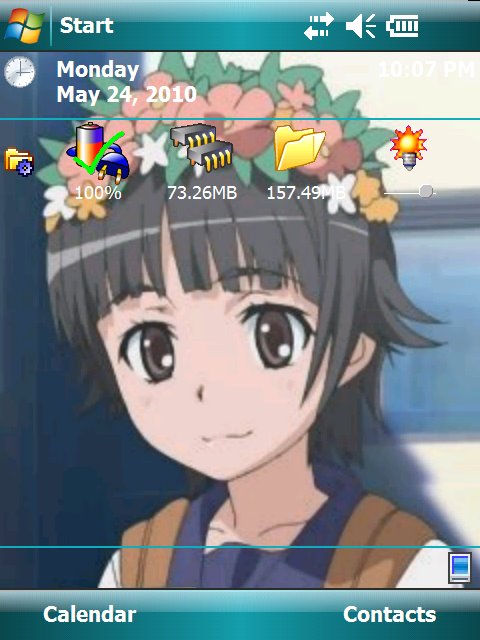
But there are all kinds of jaggies. Anyway, I'm going to experiment with making the image somewhat darker so that the text stands out more.
I think this is a problem with the theme editor. I suspect it's old. The background is included in the theme file, and that conversion is where the problem is happening.
UPDATE: On the contrary, the program is quite new. The most recent version was released in January of this year.
I just created a web page describing my trials and travails, and I mailed it to them to ask for help. (It contains a megabyte of frame grabs, so I didn't want to email it all directly.)
UPDATE: By the way, I'm still having problems with getting Uiharu to sync. But I've figured out the answer: when it doesn't work, I have to reset Uiharu. There's a reset button on the side of the case. Pushing that results in a long powerup, which apparently unwedges the hardware. Likely it's a driver bug. It's entirely possible that Microsoft has issued a fix.
But I'll never know. I still can't get out to the internet with Uiharu through my LAN. I can load any file I want off of my own server, but not from anywhere else.
Ironically, if I want to visit Windows Update, I might have to walk out to the coffee shop and use their WiFi.
Posted by: Steven Den Beste in Computers at
07:58 PM
| Comments (3)
| Add Comment
Post contains 608 words, total size 4 kb.
Posted by: RickC at May 25, 2010 06:28 PM (aXVvl)
That does sound like it might be the problem I'm having. Unfortunately, my unit's Product ID isn't among those listed. (Mine is FB040AA#ABA.)
Now that I know how to cope with it, it's not really a big deal.
Posted by: Steven Den Beste at May 25, 2010 08:02 PM (+rSRq)
Posted by: Steven Den Beste at May 25, 2010 08:03 PM (+rSRq)
Enclose all spoilers in spoiler tags:
[spoiler]your spoiler here[/spoiler]
Spoilers which are not properly tagged will be ruthlessly deleted on sight.
Also, I hate unsolicited suggestions and advice. (Even when you think you're being funny.)
At Chizumatic, we take pride in being incomplete, incorrect, inconsistent, and unfair. We do all of them deliberately.
How to put links in your comment
Comments are disabled. Post is locked.20 queries taking 0.0674 seconds, 20 records returned.
Powered by Minx 1.1.6c-pink.