
April 29, 2009
It would seem that I don't totally understand how this torrent business is supposed to work. I've got one download going (for some meaning of that word) that's been active for two days and has managed to accumulate a total of 448 kB of data. uTorrent reports 1(1) seed and 0(6) peers, so why aren't I getting any traffic on that channel at all?
The novelty is probably going to wear off, but I have to admit that the uTorrent program is well enough designed so that messing with it is kind of fun.
UPDATE: Another thing I've noticed that's odd:
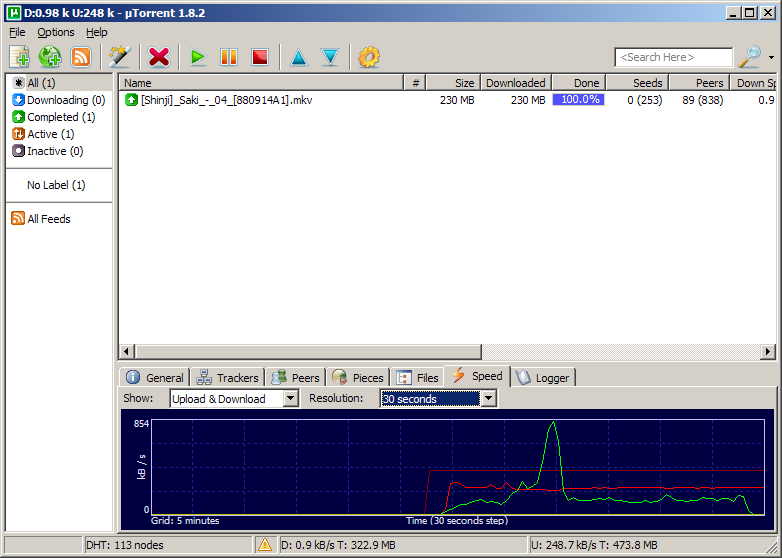
When I'm involved in a popular torrent, I've noticed a couple of times that my upload (red line) soon stabilizes at a very constant rate of about 240 kB/s, whereas my download (green line) fluctuates like mad.
The obvious first thought is that the upload is running into a programmed limit, except that I've got the limit set to 400 kB/s. So it's running pretty consistently at 60% of what I've allocated. Curious.
Posted by: Steven Den Beste in Computers at
09:21 PM
| Comments (10)
| Add Comment
Post contains 177 words, total size 1 kb.
That being said, it sounds like something's wrong with that particular torrent. Even with dialup, I'd get 448kb in a minute or so, not two days.
Posted by: Wonderduck at April 29, 2009 09:49 PM (/nYBT)
Now, why there are 0 in the swarm? Possibly these people connect, see that the torrent is dead, move along.
Posted by: Pete Zaitcev at April 29, 2009 10:52 PM (/ppBw)
Posted by: Steven Den Beste at April 30, 2009 03:36 AM (+rSRq)
The other 5 leechers probably aren't accepting incoming connections through their firewalls, so none of you can talk to each other.
-j
Posted by: J Greely at April 30, 2009 04:41 AM (2XtN5)
Posted by: Steven Den Beste at April 30, 2009 08:45 AM (+rSRq)
Conrad
Posted by: conrad at April 30, 2009 03:52 PM (X5Mq+)
The port it's opening is 58267, though I have no idea if that's what is really presented to the internet. The computer that's doing this is on my LAN, and has a 192.168 IP. It's talking to my Linux server, which uses its second ethernet port to talk to the cable modem. Everything out there which is communicating with me is really talking to the server, which is doing NAT to allow the sacrificial lamb computer to do this.
That's how I've been doing internet ever since I bought the server in 2001. Physically disconnecting isn't really necessary here; Arcturus and Procyon cannot be directly seen at all by the universe.
Posted by: Steven Den Beste at April 30, 2009 07:45 PM (+rSRq)
-j
Posted by: J Greely at April 30, 2009 07:55 PM (2XtN5)
Posted by: Pete Zaitcev at April 30, 2009 08:15 PM (/ppBw)
Benchmarks say I have 4 megabits of uplink (and 12 megabits of downlink). After Verizon wired this whole town for FIOS, Comcast drastically raised our bandwidth allocation at no charge. (Ah, competition; ain't it wonderful?)
I don't need to limit anything; while it was running at that rate I was also using my web browser on the other computer and didn't notice any performance issues at all.
The 400 kB limit I placed on the uTorrent uplink is about 80% of what the benchmark says I have.
Remember, I don't have a normal bottom-tier consumer cable modem connection. I'm using the second-tier with Comcast Commercial.
Also, note that huge green spike. I was downloading three 30 megabyte files along with Saki 4 during that period, and peaked at 850 kB/s downlink, even as the 240 kB/s uplink continued to run. Obviously there's no problem with getting acks out.
Posted by: Steven Den Beste at April 30, 2009 08:58 PM (+rSRq)
Enclose all spoilers in spoiler tags:
[spoiler]your spoiler here[/spoiler]
Spoilers which are not properly tagged will be ruthlessly deleted on sight.
Also, I hate unsolicited suggestions and advice. (Even when you think you're being funny.)
At Chizumatic, we take pride in being incomplete, incorrect, inconsistent, and unfair. We do all of them deliberately.
How to put links in your comment
Comments are disabled. Post is locked.20 queries taking 0.1222 seconds, 27 records returned.
Powered by Minx 1.1.6c-pink.