
October 05, 2009
After about an hour of downloading patches, that finally ended. So I changed the workgroup on Arcturus to WORKGROUP and rebooted it.
And I got told that there was a new version of Connector on the server waiting for download. It's installing now.
UPDATE: Done.
And good news: it's possible to tell the server to ignore the fact that McAfee isn't running. And now my "i" light is blue instead of red.
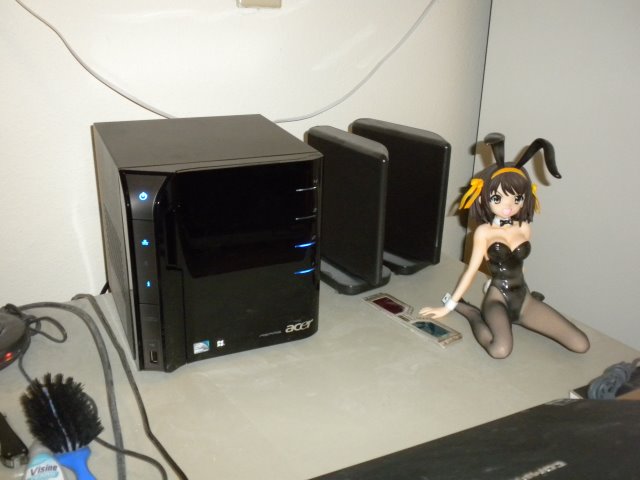
Haruhi sez, "That's how it's supposed to look!"
Next step in the project is to figure out how to set up the drives in RAID 1, but that's for tomorrow.
I suspect the answer is to dismount the second drive. Then it'll be possible to say "Make this a RAID 1 duplicate of the first drive." But I'll need to do some online research first to make sure. And in the mean time it means I can't put anything out on the server.
Posted by: Steven Den Beste in Computers at
06:33 PM
| Comments (8)
| Add Comment
Post contains 162 words, total size 1 kb.
Posted by: Pixy Misa at October 05, 2009 07:25 PM (PiXy!)
I suspect, knowing her nature, that Haruhi will be sad if she doesn't get to sit on top of the new box.
Posted by: Wonderduck at October 05, 2009 08:36 PM (/O6qY)
Posted by: Steven Den Beste at October 05, 2009 09:58 PM (+rSRq)
It's using the Windows Homeserver OS which is a modified version of Server 2003. It's not desirable to do RAID on this machine. Rather, you selectively set it to do file duplication on a folder by folder basis, provided you have two or more hard drives installed. Most maintenance can be done through the connector interface. You can also remote desktop into the machine.
Hard drives are put into and removed from the pool in the "Server Storage" tab of the connector control panel.
Shared folders and duplication are set in the "shared Folders" tab.
Also, if you installed the connector software on your client compuer it is going to automatically back up the entire machine every night, so if you want to not back-up certain drives or folders, you do that in "Computers and Backup"
Posted by: kderosa at October 06, 2009 11:38 AM (kd5Ed)
KDerosa, thanks for the help but I had already figured all that out.
It's possible to disable backups on a per-machine basis, and I've disabled Arcturus. Just as an experiment, however, I'm going to leave backups enabled for Procyon to see how that goes. I deeply fear it's going to end up being a tremendous disk hog, unless they do incremental backups. But it'll be interesting to see.
Posted by: Steven Den Beste at October 06, 2009 11:56 AM (+rSRq)
It does do incremental backups, so it will not become a storage hog. (The following isn't relevant to your set-up, but the back-up scheme is very efficient for multiple computers running similar OSes because the server OS looks for similar blocks of data in the pool of existing backups and only copies blocks that do not already exist in the pool. In this way you can back up, say, five machines in the space of a little more than one.)
The first back-up will take some time. Subsequent back-ups tend to run about ten minutes unless you've made substantial changes or have added lots of data.
And here's a trick for copying large quantities of data, such as video files, from a USB/fireware/SATA hard drive to your shared folders on the server (or vice-versa). Plug the hard drive into the server, but don't add it to the shared pool yet (otherwise you'll lose the data). Then remote desktop into the server and copy the data from the drive (which will show up in explorer) to the unc path of the appropriate shared folder (use the shortcut on the desktop). Copying files over the network is painfully slow even with a GBit connection.
Lastly, check out <a href="http://www.wegotserved.com/">We Got Served</a> for a bunch of useful add-ins for the server and other useful WHS related info. MS also has a useful <a href="http://social.microsoft.com/Forums/en-US/category/WindowsHomeServer/">forum</a>.
If you ever get a large screen monitor and a media connector (such as the PS3) the WHS can also be used to stream all your videos.
Posted by: kderosa at October 06, 2009 05:01 PM (/qyKz)
Well, I'll find out. I finished doing all the copying of my fansubs and it cost 345G * 2. Which leaves about 60% of the disk space on Deneb free. I'm going to leave Procyon on tonight and see how much space it ends up taking.
They don't seem to be objecting to doing a backup of a Vista computer. And they included a boot CD to be used to recover from a backup stored on the server.
Vista doesn't have a full backup program. (What it has backs up user files only.) I wonder if this really is a full backup? I guess the only way I could really discover that is if I ever have a catastrophe here and try to recover, so maybe ignorance is bliss.
It was interesting when I set up the backup that it said it can only back up NTFS partitions. Which may be why it ignored the "H:" storage on Procyon. That's the 32G SDHC which I use as a place to store recent fansubs.
Posted by: Steven Den Beste at October 06, 2009 05:58 PM (+rSRq)
I have succesfully backed up and restored xp, vista, and win7 (essentially vista 1.1) machines. A typical computer will take about an hour to back-up over a Gbit network.
You can test how well your computer will handle the restore process by booting with the restore cd and stepping through the process. You should be able to get all the way to the last step (which would start the actual restore) without issue. If you get that far your restore will likely be successful when disaster does occur. If you don't get that far, you likely have a driver issue which needs to be resolved. Best to resolve that now than when under emergency conditions.
BTW, your restore disk is probably obsolete with all those patches that were installed. You can burn a new one from server/software/Home PC Restore CD.
Also, if you want to preserve your initial backup (to restore to a cleaner state with less windows disease) change the settings from automatic manage to manually manage for just that backup.
Posted by: kderosa at October 07, 2009 04:12 AM (/qyKz)
Enclose all spoilers in spoiler tags:
[spoiler]your spoiler here[/spoiler]
Spoilers which are not properly tagged will be ruthlessly deleted on sight.
Also, I hate unsolicited suggestions and advice. (Even when you think you're being funny.)
At Chizumatic, we take pride in being incomplete, incorrect, inconsistent, and unfair. We do all of them deliberately.
How to put links in your comment
Comments are disabled. Post is locked.20 queries taking 0.0114 seconds, 25 records returned.
Powered by Minx 1.1.6c-pink.