
November 04, 2009
Email:
Well, you closed comments on this thread and I really SHOULD expect that to mean you do NOT want input on the topic. However, there is the slight chance you closed them because of the Star Trek topic drift.
Yeah, that was the reason. The last comment just before I shut it down looked like the first rolling snowball of an avalanche of general ST commentary.
I am NOT going to say "you might want to...."
You have my eternal gratitude.
So I will say this -- I am an embedded software engineer for a company that produces storage arrays. Some RAID code in the industry was written using 32-bits for the LBA values which are used for addressing sectors on the hard drives. This value wraps at 2TB.This is changing of course... but there may still be products which are limited to sub-2TB drives. Good old code will reject larger capacity drives (or not use the full capacity thereof). Bad old code will produce data corruption. I have no idea how or if that applies to the particular array you are using.
What I have is running Windows Home Server. It does redundant storage but it isn't using RAID.
In some ways what it's doing is better, in fact. They're handling redundant storage at the level of the file system instead of at the level of the drive controller. There are good sides and bad sides to that.
One of the good sides is that it means that redundancy is optional. When you set up directory structures, you can designate whether things put inside it are stored redundantly or not. If not, then there will only be one copy amongst the server's drives. If you say they should be, there will be two copies.
But as a user of WHS, the disks don't show up as separate devices in the file system. There's a place in the remote console program where you can see the drives, but that's just so that you can monitor device health and control whether given drives are active or not. At the level of the file system, all the drives merge together, and the entire storage of the WHS looks like a single file system to the client machines.
The decision about where any given file is to be stored is entirely up to the server. If a file is stored redundantly, then the system makes sure that there are two copies of it and that those copies are on different drives. But that process can accumulate garbage when done interactively, so there's a demon that runs once an hour which balances the drives, by moving files around. And there's other housework that needs to be done, some of which runs continuously in the background.
For example, when you first write a lot of files onto the WHS into a directory which is designated to be redundant, it only initially makes a single copy. A background process notices it and takes care of making redundant copies as soon as it can; this doesn't wait for the hourly demon run. But it can still take many minutes to catch up. That's because it runs at reduced priority compared to handling user requests.
I noticed this when I first copied my 300G fansub archive onto the WHS. Afterwards I was looking at the file system control frame, and over the course of ten minutes or so I could see the redundant area growing. (The pie chart shows the duplication as a separate slice.) But the redundant copies didn't start being made until after I finished my copy.
So what has this to do with the question of 2TB drives? Well, if there is a problem then I assume Windows Home Server will handle it just like Windows used to with drives which were too large: it'll format as much of the drive as it can address, and ignore the rest. If indeed the hardware or software cannot address a 2TB drive, then I may only get an increase of 1TB or 1.5TB or whatever it can address. But once that happens, the amount of new storage that it receives should work fine.
UPDATE: One of the interesting positive benefits of this approach is that drives don't have to be added in pairs. I could add a single new 1TB drive today, and after the drive was formatted and mounted, the next balancing run would take a hell of a long time, but thereafter the effective redundant storage available to me would rise by 512G.
Some redundantly-stored files would be duplicated on drives 1 & 2. Some on drives 2 & 3. And some on drives 1 & 3. All of that would be invisible to me, though.
If I add 2TB drives, I will add two. Adding a single one could cause logic problems for the redundancy system, since the two existing drives added together would be as large as the single new 2TB drive, and there are some files on the first 1TB drive that can't be moved.
UPDATE: I do not believe that Intel's SATA controller will have a problem. Their controller is designed to the SATA standard. If someone is selling 2TB SATA drives, then it means SATA can handle drives that large, and that means Intel's SATA controller can, too.
The only concern would be WHS itself, and I'm sure that if there's a software-imposed limitation, Windows Home Server will respond just as Windows always has: use as much as it can, and ignore the rest.
Posted by: Steven Den Beste in Computers at
11:23 AM
| Comments (5)
| Add Comment
Post contains 933 words, total size 6 kb.
I expect that your model will work fine with larger drives, since it's basically a PC.
Posted by: Pixy Misa at November 04, 2009 07:39 PM (PiXy!)
Posted by: Steven Den Beste at November 04, 2009 08:09 PM (+rSRq)
Posted by: Steven Den Beste at November 04, 2009 08:19 PM (+rSRq)
One of the customer reviews at NewEgg says this:
Pros: Small than I thought. Quiet. Expansive. All-in-one. I put 2 x 1.5TB right away and now have sooo much space.
The model came out last Spring (I found a review from last April) and IIRC at the time 1TB drives were the largest available. That may be why NewEgg wrote that it used 1TB drives.
Anyway, if 1.5TB works, likely 2TB will too.
Posted by: Steven Den Beste at November 04, 2009 08:28 PM (+rSRq)
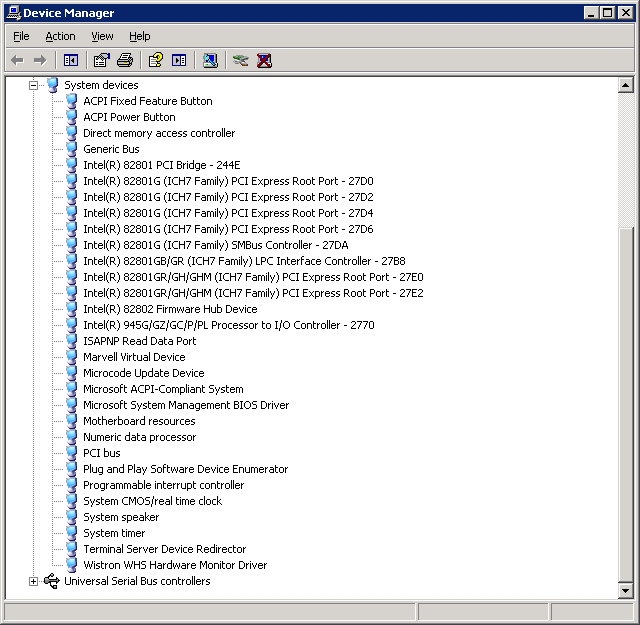
Posted by: Steven Den Beste at November 05, 2009 12:17 AM (+rSRq)
Enclose all spoilers in spoiler tags:
[spoiler]your spoiler here[/spoiler]
Spoilers which are not properly tagged will be ruthlessly deleted on sight.
Also, I hate unsolicited suggestions and advice. (Even when you think you're being funny.)
At Chizumatic, we take pride in being incomplete, incorrect, inconsistent, and unfair. We do all of them deliberately.
How to put links in your comment
Comments are disabled. Post is locked.20 queries taking 0.0237 seconds, 22 records returned.
Powered by Minx 1.1.6c-pink.